68kMLA Classic Interface
This is a version of the 68kMLA forums for viewing on your favorite old mac. Visitors on modern platforms may prefer the main site.
| Click here to select a new forum. | |
| PowerBook 140 issues; no bootup chime, display corruption | |
| Posted by: Dogmander on 2023-04-26 13:14:07 Hello, I recently acquired a PowerBook 140, but it has some issues. Other than having some case damage due to brittle and aged plastics, it shows minimal signs of life. The display partially works, although it is in need of a recap; the image is corrupted. I'm not sure if that due to a logic board issue, or is a result of the capacitors. Additionally, there is no startup chime played. This could be due to a bad ROM, or a multitude of other issues. I've attached some pictures of the display image. Also, there was a little bit of corrision around some of the components, although I was able to clean most of it off. I'm suspecting this is from the battery, as it has suffered a minor leak. I'm not sure if this could have damaged those components, but it's worth mentioning. | |
| Posted by: 3lectr1cPPC on 2023-04-26 13:31:20 The display issue is not the capacitors (although they do need replacement). That pattern is what's meant to display before I assume the PowerBook clears the contents of it's memory and initializes the display properly. Getting stuck in this pattern with no progression means that the PowerBook is sending display signal, but not getting far enough to (I assume), reset the contents in the VRAM and then begin executing code. Normally you wouldn't see that corruption pattern at all, but you do for the first couple seconds on a cold boot when the PRAM battery's gone dead, because then the contents of the PRAM can't be saved when power is lost. As for the cause of this, the area you've shown in your photos shows significant corrosion, especially around the vias. I'd start by checking continuity between the vias and where they appear to be going. If you find any breaks, run bodge wires. May take a bit of work, and you also probably want to remove some larger components in that area in order to clean under them and check for breaks in traces and vias under them. Best of luck! | |
| Posted by: 3lectr1cPPC on 2023-04-26 13:56:42 For reference here’s what the cold boot of a working unit looks like: View attachment trim.A614A910-D9B9-478E-933B-079DA71AF046.MOV | |
| Posted by: Dogmander on 2023-04-26 15:38:01 I see. Additionally, there is some activity with the hard disk if I plug it in, although I think it only goes after I restart the computer once. I'm not sure if it's reading it at all but it's worth mentioning. | |
| Posted by: 3lectr1cPPC on 2023-04-26 16:21:21 What’s the brand of the disk? If it’s a quantum, it’s likely that the rubber bumper has caused the heads to become stuck and it’s failing its seektest. A recording would be nice to judge. Conner drives also have the same issue but they usually just spin up and down instead of trying to seek. | |
| Posted by: Dogmander on 2023-04-26 16:24:48 It's a Conner drive. I can send a recording later. I'm not sure if the drive has failed or not, all I know is that it does spin. | |
| Posted by: Dogmander on 2023-04-27 14:07:55 @3lectr1cPPC I was doing some additional examinations and I think that maybe the Daughterboard could be a source of the issues. Some of the pins of the chips seem a bit dirty and such, so there could be some residue or whatever that needs to be cleaned off. I'll see about trying to get these cleaned with an Ultrasonic cleaner or something of the like. 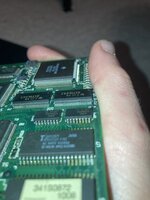 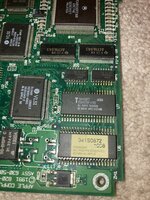 | |
| Posted by: Dogmander on 2023-04-27 14:10:36 http://bitsavers.org/pdf/apple/mac/powerbook/140/050-410_PB140.pdf U6 and U7 are the ROM chips, so that could be why there's no boot chime as it can't read the ROM | |
| Posted by: 3lectr1cPPC on 2023-04-27 16:09:50 Could be. Not sure what that dirtiness could be from. Yellow stuff looks a bit like flux residue but the dark stuff I’m not sure. | |
| Posted by: MacUp72 on 2023-04-28 08:09:46 the daughterboard doesnt look too bad actually.. ultrasonic bath is a good idea http://bitsavers.org/pdf/apple/mac/powerbook/140/050-410_PB140.pdf U6 and U7 are the ROM chips, so that could be why there's no boot chime as it can't read the ROMnice schematics, thanks | |
Posted by: Dogmander on 2023-04-28 08:14:19the daughterboard doesnt look too bad actually.. ultrasonic bath is a good ideaYeah, bitsavers has some nice schematics and pictures of the PB140 on their website Besides from ultrasonic cleaning, any other suggestions on cleaning the daughterboard? Especially between the small pins, as those as hard to clean | |
| Posted by: MacUp72 on 2023-04-28 08:16:52 cleaning it first with a soft toothbrush and isopropanol alcohol doesnt harm..but if there is some dirt/corrosion under the chips ultrasonic cleaning will be a good idea | |
| Posted by: Dogmander on 2023-05-22 13:09:21 I've cleaned it off with some IPA, but no change. I've also checked continuity between a few of the traces of concern, and they all seemed fine from what I checked. I'm not sure what else I could really test without another machine to test parts in. | |
| 1 |