68kMLA Classic Interface
This is a version of the 68kMLA forums for viewing on your favorite old mac. Visitors on modern platforms may prefer the main site.
| Click here to select a new forum. | |
| Power Mac 7500 | |
| Posted by: ExplorerZ on 2023-04-13 13:59:54 This is my first time dealing with a Power Mac. Power supply has issues half of the time. It only turns on when this is unplugged. Tried removing cards. No change. Ordering a compatible monitor to test the display. (No chime) Guessing it needs to be recapped. 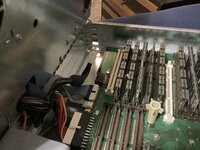 | |
| Posted by: joshc on 2023-04-13 15:14:16 The 7500 has a lot of sockets/slots, so it's important to understand what each is for. The power connector you have disconnected is the 3.3V power for the CPU - you're not going to get far without that connected. Do you have a multimeter? Use it to test the voltages from the power supply with the machine on. It could be the power supply which is at fault. However... In your picture above, the cache is missing - did it come without it or did you remove it? You are also missing VRAM. I don't think there is onboard VRAM so you need that installed as well. You have a lot of memory installed so the memory test will take some time to complete when you power the machine on. 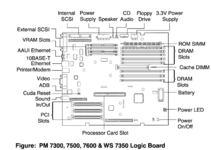 | |
| Posted by: Phipli on 2023-04-13 15:22:43 Can you show us photos of both sides of the CPU card? Including the part numbers. Not having a cache will heavily degrade performance, but not stop the computer working. If you have a G3 or G4 upgrade, you don't need the cache anyway. Not having any VRAM in that board means the onboard video won't work. I think they came with two 1MB sticks as stock. It might work with just one (because the 7200 sort of did... in a way... kind of). | |
| Posted by: Phipli on 2023-04-13 15:24:02 Also, you have a huge amount of RAM in there. I'd remove all but one until you have it chiming and getting to the flashing question mark or the happy mac. | |
Posted by: ExplorerZ on 2023-04-13 16:19:31Can you show us photos of both sides of the CPU card? Including the part numbers.Lots of photos 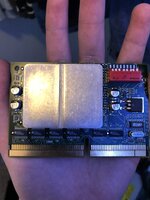 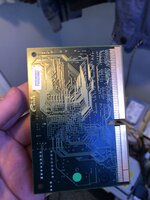 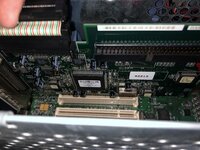 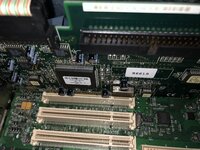 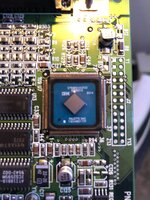 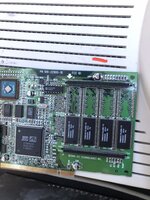 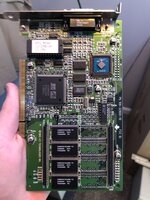 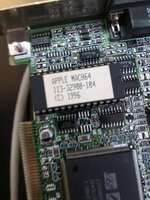 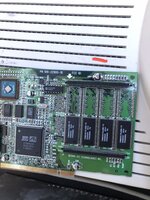 | |
Posted by: ExplorerZ on 2023-04-13 16:22:25Lots of photosView attachment 55217View attachment 55218View attachment 55219View attachment 55220View attachment 55222View attachment 55223View attachment 55224View attachment 55225View attachment 55230 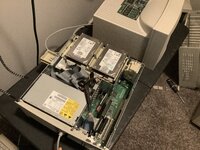 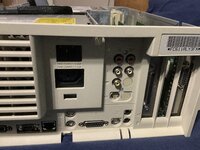 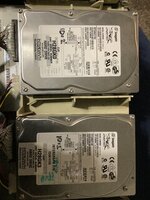 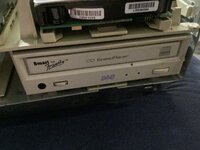 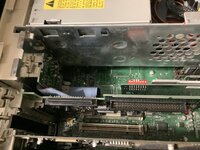 | |
| Posted by: Phipli on 2023-04-13 16:23:46 OK, your 7500 has a G3 upgrade and an ATI Mach64 Graphics card. You don't need a cache. Onboard video won't work, but that card probably will. That is a tricked out machine. Your issue might be that someone has fiddled with the dip switches on the processor. Can you photograph them so I can see how they are set? | |
Posted by: ExplorerZ on 2023-04-13 16:28:14OK, your 7500 has a G3 upgrade and an ATI Mach64 Graphics card. You don't need a cache. Onboard video won't work, but that card probably will. | |
| Posted by: Phipli on 2023-04-13 16:39:01 Change to this, then take a photo to show me if you could please : 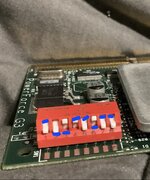 | |
Posted by: ExplorerZ on 2023-04-13 16:42:03Change to this, then take a photo to show me if you could please : | |
| Posted by: ExplorerZ on 2023-04-13 16:44:18 It now powers on with cpu power. No chime. Cannot test display as my Mac to vga adapter has not arrived and it is not compatible with my LC monitor. | |
Posted by: Phipli on 2023-04-13 16:46:40It now powers on with cpu power. No chime. Cannot test display as my Mac to vga adapter has not arrived and it is not compatible with my LC monitor.Plug headphones in and see if it chimes through headphones? | |
Posted by: ExplorerZ on 2023-04-13 16:47:33Plug headphones in and see if it chimes through headphones?Just did. No chime | |
| Posted by: Phipli on 2023-04-13 16:48:23 What you've done is slowed the processor down. We can work out how fast to run it later, but sometimes people knock the switches, or set them too fast. Setting it to a slower speed is a good trouble shooting start. Boot first, speed later 🙂 | |
Posted by: Phipli on 2023-04-13 16:49:20Just did. No chimeIt is 00:48 here atm. I can check if it needs VRAM to chime tomorrow with my 8600. | |
| Posted by: Phipli on 2023-04-13 16:50:09 Have you removed all but one RAM SIMM? | |
Posted by: ExplorerZ on 2023-04-13 16:51:44Have you removed all but one RAM SIMM?No. I am afraid to as it is mainly plastic and I have only removed ram on modern pcs and the iici | |
Posted by: ExplorerZ on 2023-04-13 16:53:13No. I am afraid to as it is mainly plastic and I have only removed ram on modern pcs and the iiciI tried pulling it out but it won’t come out. I don’t know if it’s stubborn or if I’m doing something wrong | |
Posted by: Phipli on 2023-04-13 16:55:03I tried pulling it out but it won’t come out. I don’t know if it’s stubborn or if I’m doing something wrongLeave it for now. Sadly your board doesn't have eject leavers. Mine do. | |
Posted by: ExplorerZ on 2023-04-13 16:55:28I tried pulling it out but it won’t come out. I don’t know if it’s stubborn or if I’m doing something wrong | |
| 1 > |