68kMLA Classic Interface
This is a version of the 68kMLA forums for viewing on your favorite old mac. Visitors on modern platforms may prefer the main site.
| Click here to select a new forum. | ||||||||||||||||||||||||||||||||||
| Help with performa 6300cd | ||||||||||||||||||||||||||||||||||
| Posted by: mloret on 2023-03-26 07:38:32 Hi there! I have a performa 6300 CD, which works well with my multi sync monitor. However, on my workstation, I have a VGA compatible display. Can someone tell me what I would need to get this computer to work with the VGA display? | ||||||||||||||||||||||||||||||||||
Posted by: Phipli on 2023-03-26 07:54:05Hi there!Something like this should be enough : I normally recommend ones with switches, but the 6300 is new enough that one of these should be fine. | ||||||||||||||||||||||||||||||||||
| Posted by: Phipli on 2023-03-26 07:55:06 With switches : 
High Quality Sony MacView LX, Mac Macintosh to VGA adapter W/ DIP switch New NOS 27242495302 | eBayFind many great new & used options and get the best deals for High Quality Sony MacView LX, Mac Macintosh to VGA adapter W/ DIP switch New NOS at the best online prices at eBay! Free shipping for many products!
www.ebay.com
| ||||||||||||||||||||||||||||||||||
| Posted by: François on 2023-03-26 08:08:18 I use a DB-15 to VGA cable with my 6400 connected to a LCD display (LG Flatron 17"), no switches needed, no big assembly protruding from the back of the case. I bought the first cheap cable that I found, worked well right away. | ||||||||||||||||||||||||||||||||||
| Posted by: jessenator on 2023-03-26 08:47:18 I'm not even sure what "era" to call it (or if it even can be categorized like that), but at a certain point, most PowerPC Macs started to have multi-sync on-board video hardware, and will output all VGA+ standards and refresh rates. I want to say all post-x100 PowerMacs, but I can't speak to the lower spec Performas/LCs. Of course, higher tier Apple models (e.g. 9500 et 9600) had PCI video only. The only thing lacking on those cards (e.g. iX Micro TwinTurbo) is a, SVGA-style connector (the clones which were bundled with PCI video cards would have both), but should output the same signals. I personally don't mind having an adapter, but no need to get one of the DIP adapters (yeah, I know there's a switch on this, but it's not a DIP array...) 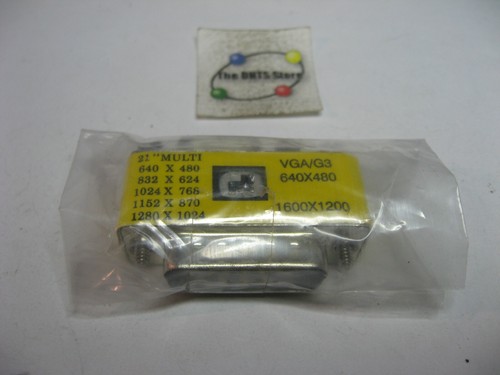
1-785-512-21 MA-002B-2 VGA G3 Computer Monitor Adapter - NOS Qty 1 | eBayFind many great new & used options and get the best deals for 1-785-512-21 MA-002B-2 VGA G3 Computer Monitor Adapter - NOS Qty 1 at the best online prices at eBay! Free shipping for many products!
www.ebay.com
The footprint is small, and it also works a treat with my Quadras. | ||||||||||||||||||||||||||||||||||
Posted by: Phipli on 2023-03-26 08:51:36I'm not even sure what "era" to call it (or if it even can be categorized like that), but at a certain point, most PowerPC Macs started to have multi-sync on-board video hardware, and will output all VGA+ standards and refresh rates. I want to say all post-x100 PowerMacs, but I can't speak to the lower spec Performas/LCs.It was even further back, during the Quadra / Centris era I think. The last of the 68k macs will happily drive most monitors with a minimal adapter. I'm also not certain exactly when the change happened. | ||||||||||||||||||||||||||||||||||
Posted by: mdeverhart on 2023-03-26 10:56:40It was even further back, during the Quadra / Centris era I think.My Centris 650 happily drives a multiscan monitor with one of the minimal, switchless adapters. | ||||||||||||||||||||||||||||||||||
Posted by: Phipli on 2023-03-26 11:02:18My Centris 650 happily drives a multiscan monitor with one of the minimal, switchless adapters.Yeah, they can glitch in System 7.1 though, and get stuck on Sync on Green, which puts a colour cast on the video on some monitors. I think the issue goes away in newer systems. I feel like they were designed to do it, but there is a minor bug. | ||||||||||||||||||||||||||||||||||
| Posted by: mdeverhart on 2023-03-26 12:06:08 Huh, good to know! | ||||||||||||||||||||||||||||||||||
| Posted by: mloret on 2023-03-26 13:05:12 Oh I have this. I should be able to get it to work with my 6300cd? | ||||||||||||||||||||||||||||||||||
Posted by: Phipli on 2023-03-26 13:16:38Oh I have this. I should be able to get it to work with my 6300cd?Yeah, that will work. Try it on the top setting first. | ||||||||||||||||||||||||||||||||||
| Posted by: LaPorta on 2023-03-26 13:25:56 That works. The 6300 will do 800 x 600 at least, and possibly 1024 x 768 if I am remembering correctly. | ||||||||||||||||||||||||||||||||||
Posted by: Phipli on 2023-03-26 13:28:13That works. The 6300 will do 800 x 600 at least, and possibly 1024 x 768 if I am remembering correctly.Yeah, but they should be available on the VGA option, it's mislabelled. The other options are mac monitor modes. | ||||||||||||||||||||||||||||||||||
| Posted by: mloret on 2023-03-26 14:08:47 First option worked! Thank you! | ||||||||||||||||||||||||||||||||||
| Posted by: mloret on 2023-03-26 16:18:09 I decided to take the logic board out and investigate the caps. Don't look bad but the SMD electrolytics need replacing...any recommendations on what to replace them with? Here's a picture and a list.
| ||||||||||||||||||||||||||||||||||
| Posted by: LaPorta on 2023-03-26 17:15:45 Same values, organic polymer. | ||||||||||||||||||||||||||||||||||
| 1 | ||||||||||||||||||||||||||||||||||