68kMLA Classic Interface
This is a version of the 68kMLA forums for viewing on your favorite old mac. Visitors on modern platforms may prefer the main site.
| Click here to select a new forum. | |
| The slow process of coaxing my Lisa (2/10) back to life | |
| Posted by: Berenod on 2023-03-26 01:50:08 As mentioned in my other thread I have acquired a non working Lisa 2/10. First impressions, the machine actually boots as it puts out beeps as woud be expected:
At this moment I am not working on the machine, I have ordered some bits and pieces I came across on Ebay and local 2nd hand sites, being:
Hopefully anything but the actual tube! I do have all the schematics (thanks to lisaem.sunder.net) so would say have a fair chance to find the culprit! Will keep updating once I actually start on Lisa! | |
| Posted by: mactjaap on 2023-03-26 08:06:27 Have a look at this video. Maybe it is also interesting for you. I made the test with Apple IIc monitor for an other thread. This is the result: | |
| Posted by: Berenod on 2023-04-08 07:47:18 And slow it is... First bits and pieces are starting to arrive! A set of 6 potmeters for the video board, and a NOS power button/keyboard plug, with spare light bulb. Didn't really needed the last one, but seller only wanted to sell as a package, and wasn't expensive anyway... 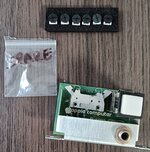 | |
| Posted by: Berenod on 2023-04-11 10:27:49 And the video board just arrived! 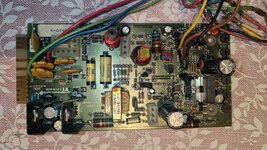 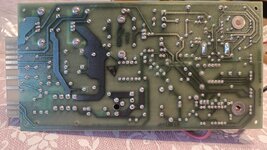 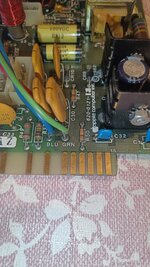 | |
| Posted by: Berenod on 2023-04-11 10:31:15 A bit hard to say, but looks unused. The copper pads where it goes into the connector have absolutely no scratches, normally you always see some small lines... Nor at the two places where the screws go. Also not heat discoloration like you'd expect on older pcb's | |
| Posted by: mactjaap on 2023-04-11 12:26:15 Cool! I hope the best for you! | |
| Posted by: stepleton on 2023-04-11 14:24:29 I note this as a Revision F video board. We don't have schematics for Revision F specifically, but between these schematics for Revision E and these for revision H, with the revision notes at top right: we could derive them if we needed to. I don't know why the revision H notes don't mention a revision G. In any case, best wishes for a working video board! | |
| Posted by: Berenod on 2023-04-15 07:03:21 And Berenod is happy as a pig in sh*t 😍😍 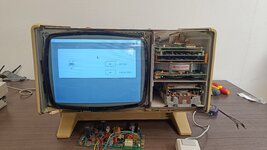 | |
| Posted by: Berenod on 2023-04-15 07:08:01 Next step, carfully coaching the widget back to work. It spins up, but I don't hear the clank of the brake releasing... | |
| Posted by: ScutBoy on 2023-04-15 07:16:58 That's great progress! Screen width/height is a bit out of whack, but that's trivial at this point 🙂 | |
| Posted by: Berenod on 2023-04-15 07:19:58 Sweeet Jeeesus.... I HATE VINTAGE RIFA'S In the morning a Rifa in my Apple //c monitor went up in a puff of stinking smoke, and just when the stink of that one sorta got dissipated, the Rifa in the Lisa power supply decided to do just the same! Scared the living bejeesus out of me, worying something else gave up the ghost! Luckily exploding rifa's are, apart from the attack on our nostrils, electronically wise, rather harmless! | |
Posted by: Berenod on 2023-04-15 07:25:07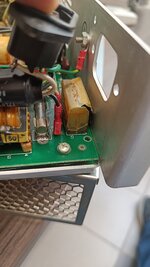 | |
| Posted by: Berenod on 2023-04-20 07:46:22 Ok, rifa replaced! And, step by step I am getting everything back to work! The widget is back alive! Almost 40 years old piece of mechanical equipment, it's simply magical it still works, holds its data... 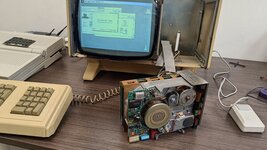 And, so I have a Lisa XL apparently. I am sort of dissapointend in a way, would have loved to play with the original Lisa OS. Gotta research if this can still be done! 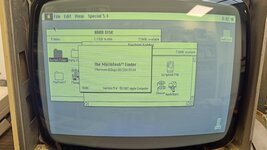 Unfortunately, and as expected, they keyboard does not register any keystrokes at all. The Lisa does detect the keyboard, if it's not plugged in it throws the No keyboard error, if it is plugged in, no error message. But, I am prepared 😛  | |
Posted by: cheesestraws on 2023-04-20 09:25:39Gotta research if this can still be done! It looks like you have the rectangular pixels in MacOS, so you should I think be good to run Lisa software too, unless it's a trick of the camera. But those icons and that text look stretched to me | |
| Posted by: twelvetone12 on 2023-04-20 10:33:22 What version of the Finder is that? Shouldn't 5.4 be with the standard "Larry, John, Steve and Bruce" text? (BTW very cool restoration! well done!) | |
| Posted by: stepleton on 2023-04-20 11:29:12 Looks likely to me that this can run the Office System. If you see "H/88" on the Lisa's "menu bar" during the power-on test, then you know for sure that you can. Congratulations! | |
Posted by: Berenod on 2023-04-20 11:29:51What version of the Finder is that? Shouldn't 5.4 be with the standard "Larry, John, Steve and Bruce" text?That actually is something I am going to try to find out! It seems somebody modified something in the OS, because where the Larry, John,... stuff should be, is what seems to be a company name, followed by a person's name and a Belgian phonenumber which is in the same area code as I am! Kind of interested in finding out the history of the machine. Unfortnately there are no files whatsoever on the widget, so I would guess the company sold the machine and wiped any company data before doing so. | |
Posted by: Berenod on 2023-04-20 11:31:21Looks likely to me that this can run the Office System. If you see "H/88" on the Lisa's "menu bar" during the power-on test, then you know for sure that you can. Congratulations!It does indeed show "something"/88 in the right upper corner during boot, I thought the "something" was an M, but might just as well be an H! | |
| Posted by: Berenod on 2023-04-20 11:35:32 Am really happy with the machine, I guess it's the only still somewhat "affordable" of the Apple Holy Grails, at least for us laymen 🙂 Guess only topped by a working Lisa 1 and the original Apple 1... | |
| Posted by: mg.man on 2023-04-20 11:38:07 Very cool - well done getting your Widget going too! Unfortunately, mine's still AWOL. Re. that version of Mac OS - that too looks pretty special... so "Special" it has a custom menu? 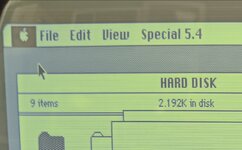 It also looks like the Widget is fully committed to "Mac" mode. Would be cool if you could take a snapshot of it before you wipe it! 😉 | |
| 1 > |