68kMLA Classic Interface
This is a version of the 68kMLA forums for viewing on your favorite old mac. Visitors on modern platforms may prefer the main site.
| Click here to select a new forum. | |
| Apple Macintosh II High Resolution Video Card Memory Upgrade and Recap | |
| Posted by: David Cook on 2023-03-20 10:33:51 I just received a computer with a High Resolution Video Card. This unaccelerated card supports 512x384 and 640x480 modes (and maybe some weird modes with the right monitors and software?). According to Apple, this card had two model numbers: M0322 (630-4222) for 4-bit color, M0324 (630-4230) for 8-bit color. Sadly, my poor card has 8 empty DIP sockets; meaning it is the 4-bit card capable of displaying only 16 colors! 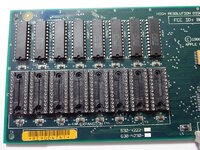 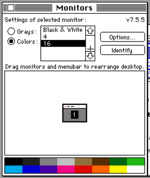 Wow! Wow!Sometimes I buy an old Mac for the computer, sometimes I buy it for the video card. To avoid hurting the video card's feelings, let's just say I love the card and computer equally. The back of the PCB has the number 820-0185-08. The ROM is 341-0660. 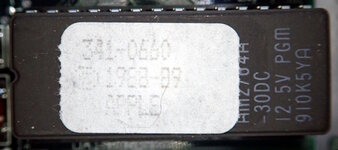 The leaky caps were just starting to damage the card. I replaced the capacitors, tinned bare traces, reheated nearby solder joints and vias. You can see some discoloration and solder mask removal in the image below. Fortunately, no traces needed repairs. If you have one of these cards, please recap it before it is too late. 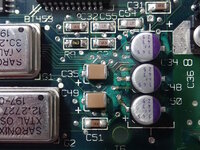 For no good reason, I decided to upgrade the memory on the card. I just couldn't stand to see such wasted potential in the unfulfilled sockets. I ordered new NEC D41264C-12 dual port video DRAM chips from eBay for about $10. 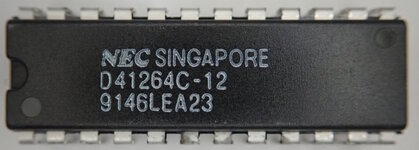 Make sure to install the chips with the notch facing down, not up. 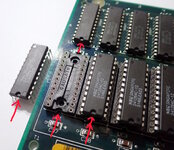 Double rainbow! 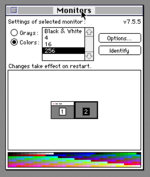 This isn't a particularly speedy card. But, it is period appropriate for a number of old Macs.  - David | |
| Posted by: joshc on 2023-03-20 12:01:42 Nice write-up. I find this period of cards some of the most interesting, rudimentary enough for the layman to understand and still useful for Mac II series machines. Are you also dumping the ROM of your cards in case they fail in future? | |
| Posted by: pezter22 on 2023-08-02 16:53:25 This was a great write up and an inspiration for me to upgrade the memory on my video card. I used the same value, but a higher voltage capacitor for my card. Thx. | |
Posted by: David Cook on 2023-08-02 17:36:41This was a great write up and an inspiration for me to upgrade the memory on my video card. I used the same value, but a higher voltage capacitor for my card. Thx.Your before and after shots are like night and day. Did you replace the screw (T5?) as well? It looks rusted in the first image. | |
Posted by: pezter22 on 2023-08-05 16:26:56Your before and after shots are like night and day. Did you replace the screw (T5?) as well? It looks rusted in the first image.Yup, I replaced the screw that had corroded from the cap goo. Unsure on the size, I have a stash of old Mac parts and screws. I think it's a screw that holds the PDS expansion bracket on the MacSE. I'm glad it worked and glad I found your post on this card. | |
| Posted by: Phipli on 2023-08-05 16:32:15 They're not fast, but 256 colours is plenty 🙂 With a pair of 13" monitors, one of these alongside the built in video makes a nice setup! Keep an eye out for the 8•24, they sometimes go cheap and do higher resolutions or more colours (slowly). | |
| Posted by: Byte Knight on 2024-03-22 17:11:20 Just picked up one of these video cards and it's not working with my Iici. Does it require a driver for System 7.5.5 or is it DOA? | |
| Posted by: David Cook on 2024-03-22 17:14:18 No drivers needed, but it supports only a couple of resolutions. Do you have it hooked to an Apple 13" display or an LCD with a monitor adapter set to 640x480? If not, that may be the problem. | |
Posted by: Phipli on 2024-03-22 17:15:48Just picked up one of these video cards and it's not working with my Iici. Does it require a driver for System 7.5.5 or is it DOA?They don't need a driver. First thing to check is the Nubus connector pins, then carefully look over the back and front for damage (cut traces). The back is usually worse. Edit - oh yeah, after verifying the monitor supports its weird output of course, as @David Cook said | |
Posted by: Byte Knight on 2024-03-22 18:22:13No drivers needed, but it supports only a couple of resolutions. Do you have it hooked to an Apple 13" display or an LCD with a monitor adapter set to 640x480? If not, that may be the problem.I tried it on both the 13" display and VGA monitor with adapter without any luck. I tried reseating the IC's without any change. Nubus pin connectors look good, and no obvious damage to the traces but there is a fair amount of cap leakage where you had it too, so I'll replace those and see what shakes out. Thanks for the help! | |
| Posted by: smrieck511 on 2026-05-20 11:20:32 So you can expand an M0322 (630-4222) to 8bit 256 colors @640x480 by adding memory chips? This is great news. I was not at all familiar with how this card worked. I just bought a IICX with an M0322 and would definitely like to get it to 8bit. | |
| Posted by: misterg33 on 2026-05-20 11:46:48 Can I ask which tool you used to measure the video card performance and grab that screenshot? Appreciate it. | |
Posted by: Phipli on 2026-05-20 12:11:49Can I ask which tool you used to measure the video card performance and grab that screenshot? Appreciate it.It's Norton System Info. You have to turn on the detailed view. Load of different age versions here : Some instructions here : 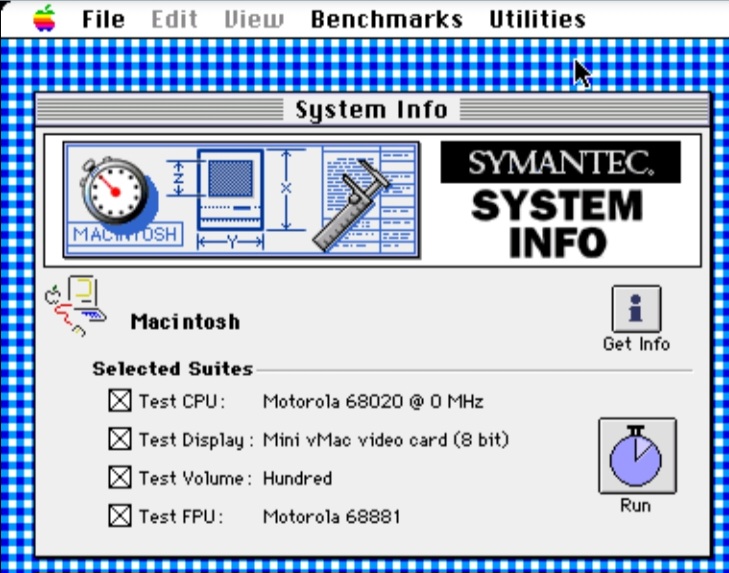
Benchmarking Retro Macs : Norton System InfoBenchmarking Retro Macs : Norton System Info There are a number of classic Mac OS benchmarking tools available. Different ones have various benefits and personal preference is a major factor in cho…
 elephantandchicken.co.uk
| |
| 1 |