68kMLA Classic Interface
This is a version of the 68kMLA forums for viewing on your favorite old mac. Visitors on modern platforms may prefer the main site.
| Click here to select a new forum. | |
| Finally manged to acquire a Lisa 2 | |
| Posted by: Berenod on 2023-03-15 23:48:19 Seems to be in pretty darned good shape physically. 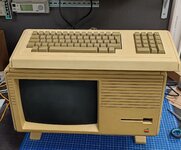 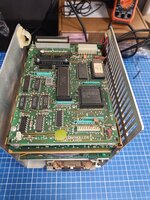 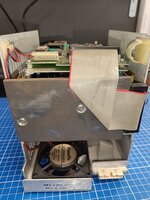 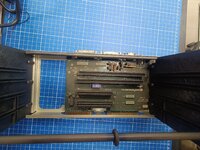 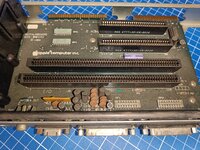 | |
| Posted by: Berenod on 2023-03-15 23:49:54 I/O board 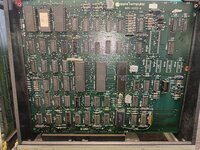 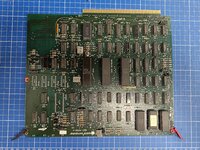 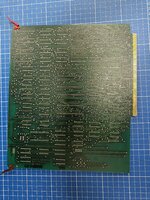 | |
| Posted by: Berenod on 2023-03-15 23:51:08 CPU board and one of the memory boards 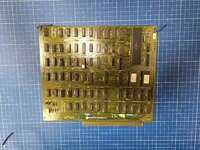 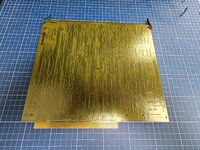 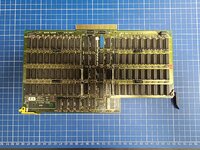 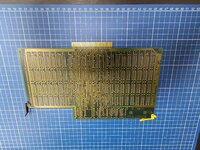 | |
| Posted by: Berenod on 2023-03-15 23:52:44 Guess first job before attempting to power on is checking the PSU on blown rifa's and such. Think somebody here designed some sort of load harrness to check voltages out without the PSU being in the machine? 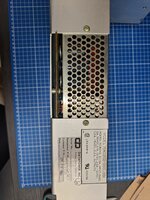 | |
| Posted by: lisa2 on 2023-03-16 10:47:32 If you initially leave the drive cage out, I would not be afraid to try powering it up. The DataPower PS is pretty robust and if a RIFFA cap did blow it does not damage anything. | |
| Posted by: cheesestraws on 2023-03-16 12:44:48 Woo, nice one. 🙂 | |
| Posted by: mactjaap on 2023-03-16 13:42:24 Super! Very happy a 68kmla member bought this one. It was also seen on the dutch thrift web site Marktplaats. Thanks for sharing this. I hope it works. Including the widget! We have been talking a lot on this web site about the widget drive. My favorite hard drive. | |
Posted by: stepleton on 2023-03-16 14:57:17Think somebody here designed some sort of load harrness to check voltages out without the PSU being in the machine? Yes, that's my Lisa 0. It's really just cobbled together; I don't have schematics for it. 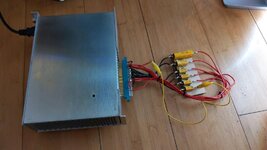 Here's a clearer photo that lets you see the resistor values better: https://photos.app.goo.gl/vDfeNUc8rLhM5PMA9 Get a pinout of the Lisa PSU connector and go to town! (Check on Bitsavers or http://lisa.sunder.net/books.html). Get ready for those power resistors to get HOT: make sure they can take the watts. You'll need to clip the power-up pin to +5V standby for the PSU to turn on, and the first time you try it out, you WILL forget to defeat the panel interlock microswitch on the front (back?) of the power supply and you'll think for a moment that the PSU is dead. Good luck! | |
| Posted by: Berenod on 2023-03-16 22:28:23 Well, after Lisa2's reassurances on the Datapower PSU, I have reassembled and powered up the Lisa. Good news, there is life in it! I get beeps 🙂 The bad news, trouble with the monitor part, totally does not come to life. Just stays pitch black, no lines, small dot, nothing. I'm still pretty optimistic, as long as the actual tube is not dead we still stand a chance. Computerwise I do think it looks rather good, with the drivecage installed the the widget drive spins up (noisy bugger that is), stil get the beeps (three beeps, well, actually rather loud, one second, beeps, evenly intervalled). I don't hear the brake release, but that's problems for later... So, any tips on how to attack the monitor part? I assume there is an analog board in there, pretty much like the compacts, it's the only part I have not yet seen as it seems to be pretty well hidden in there. Totally dead tube to me usually meens bad/cracked soldering on the analg board, totally dead flyback transformer or possibly PSU issues. | |
| Posted by: Berenod on 2023-03-16 22:33:01 So, below stuff is to be checked out (pictures from https://www.freney.net/web/?Apple-LISA-parts-references-276 ) 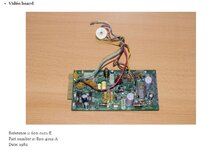 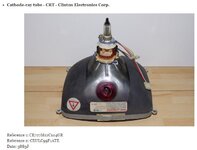 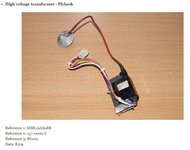 | |
| Posted by: Berenod on 2023-03-16 22:42:39 Just found the technical manual, will be mighty helpfull! And what a masterpiece that book is, when was the last time anyone saw a hand drawn "exploded view"? 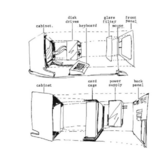 | |
| Posted by: Berenod on 2023-03-16 22:47:14 Oh, shoot, I'm going to need staff 🙂  | |
Posted by: Berenod on 2023-03-16 22:51:14Get a pinout of the Lisa PSU connector and go to town! (Check on Bitsavers or http://lisa.sunder.net/books.html). Get ready for those power resistors to get HOT: make sure they can take the watts. You'll need to clip the power-up pin to +5V standby for the PSU to turn on, and the first time you try it out, you WILL forget to defeat the panel interlock microswitch on the front (back?) of the power supply and you'll think for a moment that the PSU is dead. Good luck!No I did not 🤣🤣 I do read up a bit before starting out on such project, so I knew of the two microswitches, the one in the back is actually rather well hidden, the front is in plain sight! And also on a positive note, both soft start and soft stop works, so there is at least a part of the logics operational. | |
| Posted by: Berenod on 2023-03-17 06:14:49 So, definitely something up with either the video board, the flyback or both. Using my proximity voltage detector I get nothing at all on the Lisa's anode. Just to doublecheck, I used the proximity tester on the anode of the CRT of an SE, and it definitely detects that. View attachment VID20230317135116.mp4 | |
| Posted by: Berenod on 2023-03-17 06:40:35 To compare, this is what it does on the CRT of one of my SE's: View attachment Untitled.mp4 | |
| Posted by: Berenod on 2023-03-17 08:26:28 FYI, the start-up beeps are exactly as to be expected:
| |
| Posted by: Berenod on 2023-03-17 08:27:19 Anybody knows what signal comes out of the video plug in the back? Is it composite or some such? Manual doesn't say much! | |
Posted by: lisa2 on 2023-03-17 08:43:23Anybody knows what signal comes out of the video plug in the back? Is it composite or some such?It’s a composite video signal but it’s not standard NTSC it runs at a higher frequency (22 kHz ??). Anyway you’re not most likely to have anything laying around that would work with it. Have you tried tweaking the parts on the back of the power supply for the brightness and the focus? Also at the bottom of the analog board is a voltage regulator (7824 I think) I’ve had issues with those that usually burns out a resistor up at the top of the board. | |
Posted by: stepleton on 2023-03-17 11:25:19Oh, shoot, I'm going to need staff 🙂 This is ridiculous! IBM's repair manuals at least extended the basic courtesy of giving you instructions for how to save your co-worker's life: 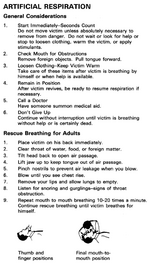 "Continue without interruption until victim is breathing without help or is certainly dead." --- not a phrase you expect to find in documentation for a small computer. (From the IBM 5100 Maintenance Information Manual.) | |
| Posted by: mactjaap on 2023-03-17 11:50:11 I though It’s a composite video signal but it’s not standard NTSC it runs at a higher frequency (22 kHz ??). Anyway you’re not most likely to have anything laying around that would work with it.im not sure but I thought I used an Apple IIc monitor for this. Then you have some output. Anyone who can confirm this. It is many years ago. | |
| 1 > |