68kMLA Classic Interface
This is a version of the 68kMLA forums for viewing on your favorite old mac. Visitors on modern platforms may prefer the main site.
| Click here to select a new forum. | |
| IIsi freezes when sound is activated | |
| Posted by: chrisrueckert on 2023-02-19 12:44:34 Whenever the IIsi wants to play sound, it freezes, sometimes immediately or after two or three attempts (like changing the alert sound in the Sound Control Panel works 2-3 times, then the si freezes). The Mac was recapped before I received. It appears the pads are gone for C33 & C35, including the SMB of C33. It's hard to tell what the person recapping the board had in mind, but I have a feeling that something is missing there... 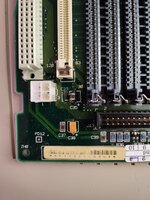 The SMB on C35 has contact with both ends to other traces of the board (continuity tested). However, I can't read what the SMB's capacity (or the part's type for that matter) is. Could the missing SMB for C33 be the reason for the Mac crashing when sound would be played? | |
| Posted by: Snial on 2023-02-19 14:37:57 I would suspect that the reason for the crash is some kind of brown-out a current over-load. This implies there's something like a short-circuit or at least a very low resistance somewhere related to the audio hardware. A missing capacitor wouldn't do that - it's an open circuit. It does, however, look like that area of the board has been very badly treated as it looks like the solder pads are burned out. | |
| Posted by: imactheknife on 2023-02-19 15:23:45 C35 is supposed to be a 47uf 16v cap. The little resister that’s supposed to be beside it has traces to both negative and positive pads of c35 so should check for continuity. Cant say for certain that this area is sound related. What is the rest of board like? Upload some good clean pictures | |
| Posted by: imactheknife on 2023-02-19 15:27:39 One of my iisi boards | |
Posted by: chrisrueckert on 2023-02-19 23:23:11C35 is supposed to be a 47uf 16v cap. The little resister that’s supposed to be beside it has traces to both negative and positive pads of c35 so should check for continuity. Cant say for certain that this area is sound related. What is the rest of board like? Upload some good clean picturesHere's a shot of the entire board. 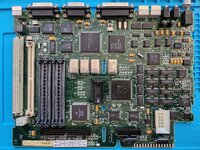 | |
| Posted by: imactheknife on 2023-02-20 10:33:11 if you have a solder iron would take some flux and touch reheat the three caps near sound chip by power possibly, Maybe check traces first and see if any broken traces. Also, check for solder balls between legs on Chips close by. | |
Posted by: David Cook on 2023-02-20 17:52:16Here's a shot of the entire board. Near fan: 75175s look questionable. Dark areas, etc. Below there, move the crystal away from Q5. Worried the transistor leg may contact the canister. Below there, check the upper left pins of UE5. It is common for the capacitor juice to pool there and eat the solder between the pad and the pin. Take a dental pick or toothpick and test each pin to see if it wiggles. Near CPU: Is that dust or stray solder on C32? My best guess is that there are pins that are barely resting on their pads (like UE5) because of capacitor damage. The sound from the speaker vibrates the board enough to break contact. To rule this out, remove the speaker and use alligator clips to electrically connect the speaker to the board. Then play some sounds to see if it still crashes. Then try plugging in headphones to eliminate vibration and some of the amplifier circuit from being the cause. | |
Posted by: chrisrueckert on 2023-02-21 13:20:52Near fan: 75175s look questionable. Dark areas, etc.Thanks for the hints. I desoldered UE5 and noticed a broken trace between pin 6 and 7. Pin 7 didn't appear to be connected to the pad either. I'll try to repair it over the weekend and see if that fixed the issue. 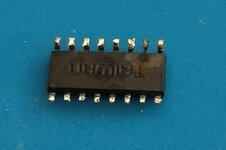 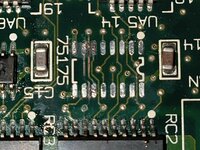 | |
| Posted by: David Cook on 2023-02-21 14:08:50 Hope you are able to fix the faults. Best of luck! | |
Posted by: imactheknife on 2023-02-21 18:12:59Thanks for the hints. I desoldered UE5 and noticed a broken trace between pin 6 and 7. Pin 7 didn't appear to be connected to the pad either. I'll try to repair it over the weekend and see if that fixed the issue.View attachment 52714View attachment 52713that trace doesn't connect to those pads just goes between them, unless you meant the little round via? | |
| Posted by: chrisrueckert on 2023-02-26 04:41:15 So I fixed the broken trace I saw last week, re-soldered the UA5 and checked the capacitors C10, C11, and C12. Sure enough, the negative pad of capacitor C10 had a broken trace too. Now the Mac starts-up with a noise at least (see attached video). I'll check the area around the sound chips for more broken traces now. 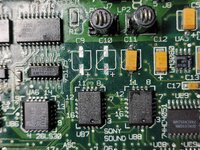 | |
| 1 |