68kMLA Classic Interface
This is a version of the 68kMLA forums for viewing on your favorite old mac. Visitors on modern platforms may prefer the main site.
| Click here to select a new forum. | |
| Strange alarm clock icon/alert | |
| Posted by: croissantking on 2023-02-09 13:01:02 What’s this charming little alarm clock icon that’s flashing in my menu bar? I don’t recognise what it’s from. I don’t think I installed any kind of alarm clock either (System 7.5.5). 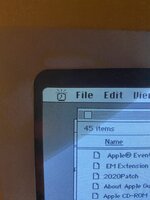 | |
| Posted by: Phipli on 2023-02-09 13:03:51 The standard clock in the Apple menu from System 7.1 did that didn't it? | |
Posted by: Phipli on 2023-02-09 13:09:40What’s this charming little alarm clock icon that’s flashing in my menu bar? I don’t recognise what it’s from. I don’t think I installed any kind of alarm clock either (System 7.5.5). | |
| Posted by: croissantking on 2023-02-09 13:12:08 That’s interesting. But I don’t have an alarm clock under 7.5.5. Must be some residual code somewhere in the OS being triggered. | |
| Posted by: CC_333 on 2023-02-10 11:56:20 I think in 7.5.x, the alarm clock functionality was included in the Date & Time control panel, wasn't it? c | |
Posted by: Phipli on 2023-02-10 12:16:48I think in 7.5.x, the alarm clock functionality was included in the Date & Time control panel, wasn't it?Can't see it and can't think where it would be : | |
| Posted by: AndyO on 2023-02-10 12:17:21 Not sure I'm seeing that. This is a screenshot of the 7.5.3 Date & Time clock options pane from my M1 iMac... and I don't see it there. 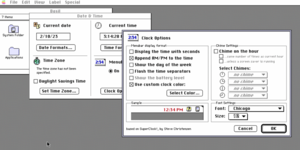 | |
| Posted by: CC_333 on 2023-02-10 12:18:52 Huh, interesting! This is quite mysterious, isn't it? c | |
| Posted by: croissantking on 2023-02-12 05:15:43 It gets triggered when I run Snooper. It just happened again during either the CPU or ADB test. | |
| Posted by: croissantking on 2023-02-12 06:55:40 My take is thus: I think the alarm clock alert is built into the system in 7.5.x and it’s able to be triggered even without the desk accessory. It’s residual code from System 7.1 that has been left even though the DA is no longer included. I’ve manually installed the Alarm Clock DA just so I’m able to turn the damn alert off! | |
| 1 |