68kMLA Classic Interface
This is a version of the 68kMLA forums for viewing on your favorite old mac. Visitors on modern platforms may prefer the main site.
| Click here to select a new forum. | |
| How do I safely remove heatsink on a Apple nVidia GeForce4 TI4600 128MB card? | |
| Posted by: JohnnyPhantom on 2023-02-06 08:37:57 Hi everyone, I just picked up a Apple Power Mac G4 (FW 800) with a dead PSU for parts for $50 on facebook, came with a 23" Apple Cinema HD display as well, was worth the drive I think. I grabbed it for parts for my G4 Mirror Drive Door 2003. It had the Apple nVidia GeForce4 TI4600 128MB video card as well as a dual 1.42GHz Processor that I'm going to put in my MDD 2003 to make a nice (and possibly the fastest G4) OS 9 bootable machine with original Apple Parts. I'd like to remove the heat sink off the nVidia card to remove and reapply fresh thermal paste since its about 20 years old now. The heatsink is attached to the card with 2 plastic clips. What's the best way to remove these clips without breaking them so I can remove the heatsink and then reattach the heatsink? | |
| Posted by: 3lectr1cPPC on 2023-02-06 08:50:48 Can you post pictures of them? | |
| Posted by: Paralel on 2023-02-06 09:01:27 Very carefully... (Sorry, I couldn't resist) | |
Posted by: JohnnyPhantom on 2023-02-06 09:18:22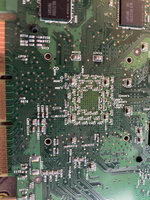  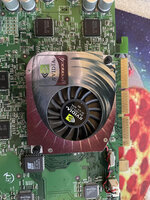 | |
| Posted by: JohnnyPhantom on 2023-02-06 09:19:30 It's just plastic pegs. I probably could squeeze with some needle noise pliers and push them out, but I'm curious if there's a safer way. I'd hate to crush the pegs and not be able to reuse them and have no pressure of the heatsink against the GPU | |
| Posted by: JohnnyPhantom on 2023-02-06 09:25:11 | |
| Posted by: CircuitBored on 2023-02-06 09:27:39 The heatsink on this specific model of card is glued on. Be very careful. You will struggle to put the heatsink back on properly once you have removed it due to the use-once clips and the thick resin/glue used as thermal compound. Even if you get the heatsink off without wrecking the GPU die you will struggle to get the compound off the heatsink. I got the heatsink off my 4600 Ti by dripping isopropyl alcohol onto it for about two hours. That said, perhaps your heatsink will magically just pop off. Brittle thermal compounds are always a fun surprise after twenty years... My advice is to forget about the original heatsink altogether because it is terrible and noisy. There are plenty of third-party aftermarket coolers for this model floating around. I recommend you grab one and enjoy a quieter card with better performance. | |
Posted by: JohnnyPhantom on 2023-02-06 09:37:46The heatsink on this specific model of card is glued on. Be very careful. You will struggle to put the heatsink back on properly once you have removed it due to the use-once clips and the thick resin/glue used as thermal compound. Even if you get the heatsink off without wrecking the GPU die you will struggle to get the compound off the heatsink. I got the heatsink off my 4600 Ti by dripping isopropyl alcohol onto it for about two hours.I chickened out with the pliers and removing those plastic clips. Wonder how good the original thermal paste still is at cooling. Could you send me a example of the 3rd party coolers? I'm not sure what I should be searching for. Thanks! | |
| Posted by: Paralel on 2023-02-06 09:56:41 It's almost a guarantee that any thermal paste that acts like a glue is going to be borderline at best at its intended purpose. | |
| Posted by: macuserman on 2023-03-03 14:50:56 I’ve had pretty good luck just replacing the fan with a new one and leaving the heatsink as is on these. Although I’m sure maximal future proofing would involve an upgraded heatsink I’m not sure that’s really necessary. | |
Posted by: Phipli on 2023-03-03 14:59:54I’ve had pretty good luck just replacing the fan with a new one and leaving the heatsink as is on these. Although I’m sure maximal future proofing would involve an upgraded heatsink I’m not sure that’s really necessary.What did you replace the fan with? | |
Posted by: macuserman on 2023-03-03 15:37:25What did you replace the fan with?I had a line on stock replacement fans for awhile I may still have some or be able to get them. | |
| 1 |