68kMLA Classic Interface
This is a version of the 68kMLA forums for viewing on your favorite old mac. Visitors on modern platforms may prefer the main site.
| Click here to select a new forum. | |
| Trashy issues | |
| Posted by: croissantking on 2023-02-05 01:54:23 Quick question, I have an issue on one of my machines running OS 8.1 where items cannot be stored in the trash, instead I get a dialog saying that the files moved there must be deleted immediately. Also, Trash folders that should be invisible seem to show up on some of my partitions… Any easy fix? | |
Posted by: cheesestraws on 2023-02-05 02:11:55Quick question, I have an issue on one of my machines running OS 8.1 where items cannot be stored in the trash, instead I get a dialog saying that the files moved there must be deleted immediately. What kind of volume is this on? Some kinds of file share don't support multi-user wastebaskets and only support deleting immediately (right up to the present, actually: you can still get that message on modern OS X with network shares!) | |
| Posted by: croissantking on 2023-02-05 05:15:22 It’s just a regular volume. | |
Posted by: Phipli on 2023-02-05 05:18:26It’s just a regular volume.How full is it? I have seen this issue before on a corrupted disk, I can't remember what was wrong. If you are more than 90% full or so, make more room. | |
| Posted by: croissantking on 2023-02-05 05:22:53 I erased the disk and have put a clean install of OS 8 on it (there’s loads of free space) and it’s still doing this, so weird! All I can say is that it’s a bog standard PowerBook 540c with BlueSCSI, if that matters. | |
Posted by: Phipli on 2023-02-05 05:56:50I erased the disk and have put a clean install of OS 8 on it (there’s loads of free space) and it’s still doing this, so weird!Did you erase from the Special menu, or Format and install a new driver? Try using Apple HD SC Setup to reinstall the driver (you can try without wiping the disk). That sometimes sorts dodgy behaviour. Is it an "Apple" disk? Click update here, if it is available : 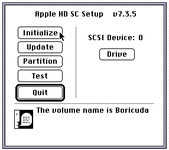 | |
Posted by: croissantking on 2023-02-05 17:15:50Try using Apple HD SC Setup to reinstall the driverI followed your instructions but it still has this odd behaviour. The drive is an SD card on BlueSCSI so maybe that has something to do with it, although I can’t quite see how. | |
| Posted by: cheesestraws on 2023-02-06 01:59:41 That's incredibly odd. Well done. Never heard of this failure mode before. Gotta catch 'em all! | |
| Posted by: croissantking on 2024-09-07 15:15:25 The solution has been found here - with thanks to @Mk.558. Basically, a flat PRAM battery in my PowerBook and an invalid date and time setting were the problem. It is a documented issue with OS 8.0/8.1 that did not manifest when I was booted into my 7.5.5 partition on the same machine. I am very pleased to have this resolved as it was quite annoying. | |
| 1 |