68kMLA Classic Interface
This is a version of the 68kMLA forums for viewing on your favorite old mac. Visitors on modern platforms may prefer the main site.
| Click here to select a new forum. | |
| IIci Cache Card | |
| Posted by: Phipli on 2023-01-05 04:42:46 Good afternoon folks. I have a dead Apple branded 32k cache card that I'm trying to revive. I've replaced the actual Cache SRAM, the 74F32, recapped it and checked all the ceramic caps for shorts. Basically that leaves the main custom silicon and the TAG RAM... I can't get either it seems, plus if I keep buying parts... well, I already spent the value of the card in cache chips :s Does anyone have a dead IIci Cache board, in the UK if possible, that they'd be willing to donate to the cause of bringing another back to life? This is the card I mean, and its the P4C116-20JC chips that are eluding me. The MT5C1608DJ-20 and IDT6116SA20Y are probably an equivalent parts. 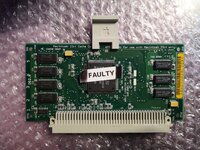 | |
| Posted by: rikerjoe on 2023-01-05 14:40:04 I also started troubleshooting a Iici cache card with no luck so far. My non-working card has CY7C185 28-pin CACHE SRAM chips and MT5C1608 24-pin TAG SRAM chips. (I have a working card with P4C164 28-pin CACHE SRAM chips and P4C116 24-pin TAG SRAM chips.) I wondered about the MT-branded chips since they have a bad rep in the 8-bit computing world. To date I replaced the 24-pin TAG SRAM MT-branded chips with Renesas 6116SA20SOG from Mouser. It's not an ideal match because the packages are different, but the data sheets for the original MT5C1608 versus Renesas show the exact same pin configurations. I was able to bend the pins on the new chips to align with the pads and confirmed good continuity after soldering. Unfortunately, the new chips did not resolve my problem, and I set the cache card aside to work on a separate restoration project. Here is the before shot, showing the MT-branded 24-pin TAG SRAM chips: 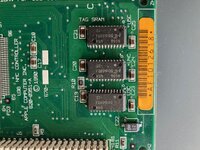 Here is the after shot, showing the replaced chips: 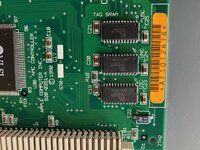 I know this isn't of any help to you (plus I'm in the US) except to say that I'm a kindred spirit attempting to solve the same problem. | |
Posted by: Phipli on 2023-01-05 14:55:51I also started troubleshooting a Iici cache card with no luck so far. My non-working card has CY7C185 28-pin CACHE SRAM chips and MT5C1608 24-pin TAG SRAM chips. (I have a working card with P4C164 28-pin CACHE SRAM chips and P4C116 24-pin TAG SRAM chips.) I wondered about the MT-branded chips since they have a bad rep in the 8-bit computing world.Interesting, most of the cards I've seen have the same P4C116 TAG RAM. I was finding equivalent parts by searching for 2kx8 20ns SRAM! I'm worried the issue is the custom silicon. Edit : I meant to ask, what symptoms does your card show? | |
| Posted by: rikerjoe on 2023-01-05 15:20:33 Symptom is with the bad cache card my IIci chimes, then after about 20 seconds I hear the speaker pop faintly, but it remains with a black screen with no desktop or happy Mac appearing, and I see no disk activity on my internal BlueSCSI. With a good cache card, no cache card, or my Interware Booster 40-33 the desktop appears immediately after the faint speaker pop, and boot proceeds normally. | |
Posted by: Phipli on 2023-01-05 15:25:16Symptom is with the bad cache card my IIci chimes, then after about 20 seconds I hear the speaker pop faintly, but it remains with a black screen with no desktop or happy Mac appearing, and I see no disk activity on my internal BlueSCSI. With a good cache card, no cache card, or my Interware Booster 40-33 the desktop appears immediately after the faint speaker pop.Yeah, same here - after the memory test the monitor powers on, but no signal comes through and the disk activity light comes on briefly... but nothing else happens. Possibly means it is the custom chip if I've replaced the Cache and you've replaced the TAG! | |
| Posted by: Bolle on 2023-01-09 15:08:57 Interesting, the TAG SRAMs are not actual cache tag chips but just basic SRAM… so the address comparison happens in the custom silicon. Never paid attention to that, always was under the impression they used tag chips. | |
| Posted by: paulbruneau on 2024-03-31 16:52:55 I have two IIci cache cards that I have recapped and both of them are showing that exact same black screen failure in a working IIci. Kind of a bummer! | |
| Posted by: ironborn65 on 2026-01-23 11:19:34 I'm adding another sad story here. I got 4 cache cards, that have been gently cleaned, recapped and cleaned and checked and cleaned ... One of them makes the chime of death, while the other three exhibit the same symptom as @Phipli. Yes, the central one has the VLSI with a couple of pins bent, but they are not short or cut. Why are those cards so brittle? 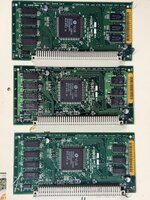 | |
| Posted by: Boctor on 2026-01-23 14:57:19 I've got one where I can fully boot, but not long after, I get a bad F-line instruction bomb dialog. It's similarly washed and recapped. I use an accelerator anyway, but it would feel lousy if I ever had to resell or trade my IIci and couldn't include a working 32k cache to make it authentic for the next tinkerer. I do wonder if these things have some kind of low-level design flaw unrelated to caps. | |
| Posted by: cgp on 2026-01-23 15:33:59 FWIW, back in 2023, I got replacement CY7C128A-20VC TAG SRAM chips from UTSource to fix mine. | |
| Posted by: ironborn65 on 2026-01-23 16:36:02 UTSource Digikey Mouser Conrad have none, are there any compatible non obsolete chips? | |
| Posted by: ironborn65 on 2026-01-23 16:40:46 linking a thread about the same topic | |
Posted by: cgp on 2026-01-23 16:42:57UTSourceThe UTsource app is telling me they have used parts available. | |
| Posted by: ironborn65 on 2026-01-23 16:46:57 thanks, can u pls provide the URL? I got this CY7C128A-20VC Search Results | UtsourceSearch CY7C128A-20VC in Utsource, view stock, price, datasheets and sourcing options for electronic components.
 www.utsource.net
Replacement ModelsIf the CY7C128A-20VC is unavailable or obsolete, consider the following alternative models: | |
Posted by: cgp on 2026-01-23 17:03:06thanks, can u pls provide the URL?If you look at the bottom of that page you'll see the used parts. | |
| Posted by: dschnur on 2026-01-23 17:04:35 A little while I spent way too much time beating on a few of those boards. I played musical ram, pulled and tested all the caps, etc., but never got a single one to work. Finally, I moved the ASIC to a known-good board and it failed. The one from the good board fixed the bad one. I gave up on the other boards after that. If you can find a cache card with physical damage, you could possible salvage parts from it, but the ASIC seems to have a glass jaw after all these years. | |
| 1 |