68kMLA Classic Interface
This is a version of the 68kMLA forums for viewing on your favorite old mac. Visitors on modern platforms may prefer the main site.
| Click here to select a new forum. | |
| SCSI Hard Disk ICON hack | |
| Posted by: slomacuser on 2014-09-02 09:46:59 With the Mac Plus I got external Microtech HD enclouser with Maxtor drive, I deleted the partion and reinstalled the drive with modified HD SC Setup 7.3.5 so it has original Apple drivers loaded. Anyway I lost the HD's original icon wich I want to use again as I copied it on backup drive. The question is how can I access the hidden parttion with driver to change that icon? Note that prior the System 7 you can not just copy the icon on HD's drive.   | |
| Posted by: olePigeon on 2014-09-02 11:04:05 A custom firmware icon is usually applied by a 3rd party SCSI utility. Micronet or FWB can do custom icons. I don't know if there's specifically a tool for modifying the icon, though. That'd be pretty cool without having to reformat a drive. You could also Get Info and copy/paste the icon, though I know that's not the same. | |
Posted by: slomacuser on 2014-09-02 11:45:36You could also Get Info and copy/paste the icon, though I know that's not the same.You can't copy/paste custom icon on system below 7.0 | |
| Posted by: olePigeon on 2014-09-02 12:59:10 Oh really? I didn't know that. You can try using ResEdit and modify the icon file. | |
| Posted by: Elfen on 2014-09-02 16:29:19 If you deleted the partition and formatted the drive, consider the icon gone. But you can use ResEdit to create an icon, as it does have an icon editor. Thing is where - the Finder, System or Desktop files? | |
| Posted by: slomacuser on 2014-09-08 03:09:48 I found control panel for system software below 7 which can change your HD drive icon, it is called IconMaster. Check the link below. I also included icons for System 7 which can be just copy/pasted on HD icon or folder. 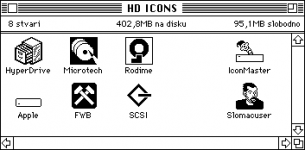 HDICONS.img.zip | |
| 1 |