68kMLA Classic Interface
This is a version of the 68kMLA forums for viewing on your favorite old mac. Visitors on modern platforms may prefer the main site.
| Click here to select a new forum. | |
| White Whale: MicroQue LC aka Chonky LC aka WTF is this thing | |
| Posted by: zackl on 2022-12-03 16:18:34 I've been looking for one of these "turn the pizza box into a PRO workstation" for years So behold - a magnificent abomination of engineering - the MicroQue Macintosh LC! I am somewhat baffled by what I have here - I can't find a single reference image or article about this other than another thread that identifies the adapter - detectives? 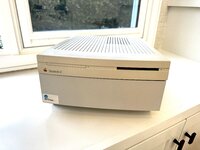 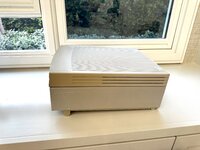 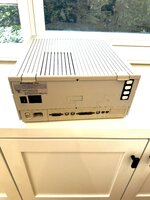 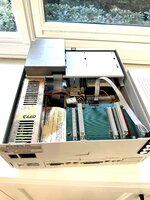 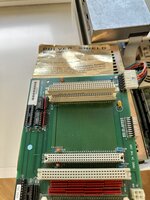 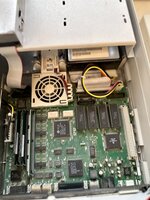 | |
| Posted by: olePigeon on 2022-12-03 18:05:53 It's a product similar to the MicroMac Power Workstation, DGR LC Max, or DGR MultiMax. Seems to me the adapter was licensed from DGR, then each company made their own expander chassis. As mentioned in the other thread, I have 3/4 of one. Missing the front bezel and power supply. I think we determined my adapter was identical to yours. Can I ask where you found yours? Edit: Your connector on the back answers questions I had on those pins near the front! Looks like toggle switches so you can turn on/off each of the PDS slots. | |
Posted by: olePigeon on 2022-12-03 18:11:28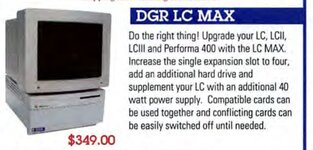 | |
Posted by: zackl on 2022-12-03 19:15:08It's a product similar to the MicroMac Power Workstation, DGR LC Max, or DGR MultiMax. Seems to me the adapter was licensed from DGR, then each company made their own expander chassis. Re where I found it I honestly don’t remember! It has been in storage for years at this point and I thought it was just the case / shell. Was shocked to see all the innards. LMK if you need pics of anything | |
| Posted by: bibilit on 2022-12-04 11:34:16 Is there two power supplies ? | |
| Posted by: joshc on 2022-12-04 20:52:31 Yeah, with these you get an additional power supply as well as a riser to take more expansion cards. This one looks a bit odd in that there's no bezels for a CD drive or floppy drive on the front though? | |
Posted by: CC_333 on 2022-12-05 21:10:43This one looks a bit odd in that there's no bezels for a CD drive or floppy drive on the front though?That would be nice, but I think a CD drive bezel was necessarily omitted because there's no room for one, and the lid and bezels of the donor LC are retained and used for the floppy drive(s). I could see a customized LC lid with a widened cutout for a slot loading CD drive, though, as I think there would be slightly more room to cram it into the second floppy space than there would be in a stock LC (it would block the cooling fan and speaker, and possibly interfere with the logic board). c | |
| Posted by: olePigeon on 2022-12-06 09:11:59 @CC_333 @joshc Both DGR and MicroMac made a version with a IIvx style bezel, the MultiMax and PowerWorkstation respectively. It had a couple 5.25" drive bays for whatever you wanted. MicroMac Power WorkStation - Did anyone ever buy one?So MicroMac is sort of weird. I'm certain the company went out of business 15 years ago, but their website is still up and running. One of the products they apparently sold was the MicroMac Power WorkStation. This has to be one of the coolest LC upgrades to have ever existed. Anyone here...
 68kmla.org
And a picture that Trash80 scanned showing the DGR Max ... sort of inbetween the the LC Max and MultiMax. | |
| Posted by: olePigeon on 2022-12-06 09:13:59 @zackl I wouldn't mind a picture of the other side of the flippy switches so I can see how it's wired. Then I could wire up my own. | |
| Posted by: olePigeon on 2022-12-06 09:21:05 I just realized with the DGR Max did. It converted the original floppy drive area into the second power supply, then added LED activity indicator bezel that slotted into the original floppy drive opening. | |
| Posted by: joshc on 2022-12-06 10:19:55 The MicroMac one is the one I was thinking of. What is the purpose of the flippy switches on the MicroQue? | |
| Posted by: olePigeon on 2022-12-06 10:45:27 @joshc Computers only ever shipped with a single LC PDS slot, and so cards were never designed with the idea of having more than one card on the BUS. There were likely hardware conflicts that came up all the time, so the designers gave you a simple switch with which to enable / disable each slot individually. That way you can swap between cards. | |
| Posted by: joshc on 2022-12-06 10:55:25 Cool! Thanks for the info, didn't know they had that feature. | |
| Posted by: Gorgonops on 2022-12-06 14:11:57 I would bet really entertaining things could happen if you flicked those switches while the machine was running. | |
Posted by: CC_333 on 2022-12-06 18:57:04I would bet really entertaining things could happen if you flicked those switches while the machine was running.Given how uncommon this thing is, I wouldn't want to find out.... Hopefully the worst that would happen is a big software crash. Those aren't fun, but at least they're easy enough to recover from. Fried hardware, not so much. c | |
| 1 |