68kMLA Classic Interface
This is a version of the 68kMLA forums for viewing on your favorite old mac. Visitors on modern platforms may prefer the main site.
| Click here to select a new forum. | |
| Macintosh Plus burnt analog board. | |
| Posted by: dragonpunchu on 2022-11-28 01:36:44 I've recapped (240v analog board) a Macintosh Plus a year ago and everything was fine. Recently when I tried to boot it it blew its fuse. On further inspection I can see burned off pcb in C33. I've attached photos of the carnage. Can I recover this? or is this analog board now dead? 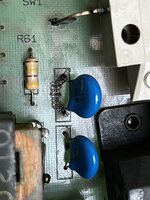 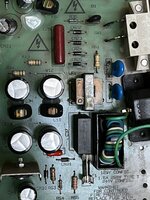 | |
| Posted by: bibilit on 2022-11-28 02:14:05 Can you have a look at the bridge rectifier set (CR22 to CR25) for any shorted diode ? can see anything else that can blow the fuse and burn that capacitor on the neighborhood. | |
Posted by: dragonpunchu on 2022-11-28 02:20:16Can you have a look at the bridge rectifier set (CR22 to CR25) for any shorted diode ? can see anything else that can blow the fuse and burn that capacitor on the neighborhood.CR24 is shorted, the other ones are fine. Good call! What diode do I need to replace this one? Kind hard to read them. | |
| Posted by: bibilit on 2022-11-28 02:34:26 AFAIK probably a standard unit 1N4001 or 1N4007, but the best way is to remove the bad one a have a look at the reference. | |
Posted by: dragonpunchu on 2022-11-28 05:30:37AFAIK probably a standard unit 1N4001 or 1N4007, but the best way is to remove the bad one a have a look at the reference.I've removed it and it is a 1N4007, ordered some and will be replacing and checking if that fixes it. Thanks | |
Posted by: techknight on 2022-12-01 07:03:04I've recapped (240v analog board) a Macintosh Plus a year ago and everything was fine. Recently when I tried to boot it it blew its fuse. On further inspection I can see burned off pcb in C33.You should grab a dremel tool and clean out that carbon tracking below the capacitor. This will always remain conductive to some degree and start causing you problems. | |
Posted by: dragonpunchu on 2022-12-02 04:31:13You should grab a dremel tool and clean out that carbon tracking below the capacitor. This will always remain conductive to some degree and start causing you problems.Well spotted! | |
| Posted by: dragonpunchu on 2022-12-02 04:45:10 I've replaced the CR24 and the mac cameback to life with no problems! Thanks for the tips | |
| Posted by: marcelv on 2022-12-02 10:57:29 You could possibly also replace CR22,CR23 and CR25 as they are the same age and wear. | |
Posted by: dragonpunchu on 2022-12-02 10:59:41You could possibly also replace CR22,CR23 and CR25 as they are the same age and wear.It's on my todo list! 👍 | |
| 1 |