68kMLA Classic Interface
This is a version of the 68kMLA forums for viewing on your favorite old mac. Visitors on modern platforms may prefer the main site.
| Click here to select a new forum. | |
| Macintosh Portable is suddenly flaky / unstable, not sure what's up | |
| Posted by: Huxley on 2022-11-27 11:10:02 So I was hoping to enter the "Portables Week" contest over on Reddit with my beautiful backlit Macintosh Portable. I ran over to my storage locker and grabbed the Portable this morning and fired it up with my SCSI2SD connected to the external SCSI port. I should note that this Portable has a re-celled battery and recapped motherboard obtained from @haplain 7-8 years ago, and also has a fresh 9-volt battery installed, and as recently as 1-2 years ago it was running well. Pretty quickly I noticed some weird stuff going on today:
Any idea what's going on? As best I am aware, the power supply itself was never recapped - would that cause any / all of this behavior? For whatever it's worth, I gently opened the machine and re-seated all the internal cards, but that didn't seem to make much difference. Thanks for any ideas! Huxley | |
| Posted by: Huxley on 2022-11-27 11:23:27 Quick update: I just broke out my trusty voltmeter and tested the output from the Macintosh Portable power brick, and it seems to be holding steady right at 7.5 volts, which I think is good for this model, right? | |
| Posted by: Huxley on 2022-11-27 11:33:59 Quick Update II: I just pulled out the main battery and stuck the voltmeter on the contacts, and it seems to only be putting out ~1.05 volts - that seems kinda low, right? I'm going to leave it plugged into the charger for a couple hours and test it again, but I'm definitely suspicious that maybe the battery has died (again) | |
| Posted by: Berenod on 2022-11-27 11:39:36 Re-celled battery 7 years ago? Lead acid cells (as they should be in a portable) die on you in the blink of an eye when left to deep discharge. One of the things with those portables, they're never really "off", more like in an always "stand-by" state, so always keep discharging the battery at a trickle. I cherrish my portable, it's barely hanging in there with a degraded hybrid due to cap leakage from before the recap, and one of the things I do is at least once a month fully let the battery run empty followed by a complete recharge (and enjoy some shufflepuck café or tetris while doing it). I know the backlit doesn't have the hybrid board, but unstable voltages does wreak havoc on proper running of those machines! | |
| Posted by: LaPorta on 2022-11-27 12:11:54 PSU would not cause this. Is this a real backlit, or an upgraded non-backlit? | |
| Posted by: LaPorta on 2022-11-27 12:12:42 I just saw the 7-8 years thing as well...this battery was not on a trickle charger/maintainer while not being used? | |
| Posted by: 3lectr1cPPC on 2022-11-27 12:18:30 Bad battery would be my guess as well, next would be a bad hybrid module but if there logic board is a backlit revision board than it won’t have one. All your issues (especially the backlit instability) can be explained by a low voltage/current issue, I’ve had similar instability when my PowerBook 5300’s ac adapter started to go bad. I’ve heard stories of compacts having similar power cycling issues when using the floppy drive due to a flakey PSU as well. Due to the portable power weirdness in general, a bad battery could cause this as well I’d think. | |
| Posted by: Huxley on 2022-11-27 12:37:55 Hey guys, thanks for the useful info - I hate to admit it, but it's starting to feel more and more like my Portable battery died due to neglect 😕 I am intrigued by this eBay listing for a replacement battery - there's not much info to go on, and the pics seem to show a 3D-printed case with unknown bits inside. Have any of you bought one of these? Any review / info / feedback would be appreciated! | |
| Posted by: LaPorta on 2022-11-27 12:42:30 THis is a drop-in, exact replacement, if you don't mind that it is not in an original style case. You just need to make the proper terminal contact. | |
Posted by: 3lectr1cPPC on 2022-11-27 13:28:00I am intrigued by this eBay listing for a replacement battery - there's not much info to go on, and the pics seem to show a 3D-printed case with unknown bits inside. Have any of you bought one of these? Any review / info / feedback would be appreciated!That would be the one made by our very own @360alaska! I obviously don’t have one as I don’t own a portable, but I trust their engineering for sure. They’ve also made a custom board to allow the PowerBook 100 to use lithium cells, which they also sell. | |
| Posted by: 4seasonphoto on 2022-11-27 14:33:08 Most likely what's happening is that as the system loads extensions and more hardware bits are activated, current draw becomes too much for the weak battery, and the system crashes. Existing battery can be rebuilt using 3x 2 volt Hawker Cyclon lead acid cells, some soldering required. But the last time I had to deal with it, I found an even easier solution which is 100% reversible: Remove the gold plated battery contacts from the bottom of the battery box, then create a couple of battery extension cables (Faston F2 connectors IIRC). Find off-the-shelf 6 volt sealed lead acid battery which is the best fit for the battery box, plug in the Faston connectors, and you are done. Really makes battery replacements a breeze. Only possible danger is that unlike the stock battery arrangement, there's nothing to prevent you from connecting the battery backwards. If you are accident-prone, I suppose you could incorporate a diode to protect your computer against that sort of goof. | |
Posted by: LaPorta on 2022-11-27 14:34:51Most likely what's happening is that as the system loads extensions and more hardware bits are activated, current draw becomes too much for the weak battery, and the system crashes. Existing battery can be rebuilt using 3x 2 volt Hawker Cyclon lead acid cells, some soldering required.Exactly w hat I did with the battery I posted. | |
| Posted by: haplain on 2022-11-29 20:21:43 Definitely sounds like the battery to me. These machines are so finicky without a very stable battery. I've had all sorts of issues that I couldn't solve only to figure out they were nearly all battery related. The backlit model also seem to be a lot more temperamental, assuming because of the extra draw from the backlight. On an aside. I picked up one of these hybrid chips, just because, but hopefully the seller will have more in stock. | |
| Posted by: Huxley on 2022-12-05 13:32:12 Wanted to post a good news / bad news update: The Good News: the battery purchased via eBay from @360alaska arrived today and appears to be working great! I dropped it into the Portable and it fired right up, and now doing things like inserting floppies or running programs isn't bombing the machine. Hooray! The Bad News: when I pulled the Portable from its padded case, I think I partially lifted it by placing one hand under the middle-bottom of the machine... and it cracked. There's now a long crack running along the underside of the Portable from the left-rear corner towards the right-front corner 😢 Soooo @maceffects ... any chance of a transparent replacement Mac Portable case anytime, or should I just continue quietly weeping to myself? Huxley | |
| Posted by: 3lectr1cPPC on 2022-12-05 14:45:54 Guess the portable is new enough to be brittle… that really sucks, sorry about that. I figured it wasn’t as bad in that regard as the slightly later PowerBooks since the portable hinges generally don’t have issues, the plastic doesn’t have the BFRs in it that make them go yellow, and plastic started going to crap in the early 90s. Guess I’m wrong! | |
Posted by: Huxley on 2022-12-06 07:58:33Guess the portable is new enough to be brittle… that really sucks, sorry about that. I figured it wasn’t as bad in that regard as the slightly later PowerBooks since the portable hinges generally don’t have issues, the plastic doesn’t have the BFRs in it that make them go yellow, and plastic started going to crap in the early 90s. Guess I’m wrong!Quick update on the case damage: I took a closer look at the underside (see pic below) and now have a better sense of what happened. My Portable was already missing a small chunk of plastic from the left-rear corner - the original owner who sold it to me back in ~2007 when I lived in Albuquerque had dropped it at some point, knocking the corner off. Looking at the new crack, it's pretty clear that the damage to the corner compromised the overall strength of the bottom case. Now I'm wondering if I can find anyone parting out a Portable which I could get a new bottom case from. Does anyone have a suggestion on how I can keep this crack from spreading further? I'm worried that it's going to keep creeping along like a cracked windshield, eventually splitting the entire bottom case in two... 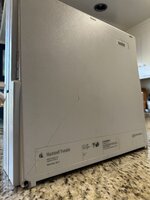 | |
| Posted by: maceffects on 2022-12-06 16:29:25 @Huxley you have no idea how bad I want to do a clear Mac Portable... These are such awesome, if temperamental, machines <3 | |
Posted by: SuperSVGA on 2022-12-06 17:18:30Does anyone have a suggestion on how I can keep this crack from spreading further?It's not a great solution, but if you drill a hole at the end of the crack it will stop spreading. I've tried super glue, but it didn't hold and discolored the inner surface where the signatures are. | |
| Posted by: lobust on 2022-12-07 02:21:02 I don't have a portable, but I assume the case is typical ABS? Use a fine pointed brush to run some Plastruct Plastic Weld* into the crack and squeeze it together as well as you are able for as long as you are able. * eg: https://www.gaugemasterretail.com/magento/plastruct-plsweld.html (Ideally, if you can source some, otherwise plain acetone works reasonably well) | |
| Posted by: ironborn65 on 2023-05-13 10:34:22 Mm, you can consider to lay some metallic/aluminum tape inside along the entire diagonal, covering the crack and more to give it more strength. Glueing a thin sheet of metal or plastic can also help, still I can not recall how much space you have. The pros is that it's invisible and it preserves the original case | |
| 1 |