68kMLA Classic Interface
This is a version of the 68kMLA forums for viewing on your favorite old mac. Visitors on modern platforms may prefer the main site.
| Click here to select a new forum. | |
| Oh no, my RaSCSI suddenly stopped working | |
| Posted by: rollmastr on 2022-11-11 23:36:12 Hello together, unfortunately my favorite vintage mac gadget stopped working yesterday. The Pi seems fine as I can access it with the web browser, ftp or ssh, but three different Macs no longer regognize the attached SCSI devices through RaSCSI while other devices (I tried a BlueSCSI and a Zip drive) work. Termination is not the issue. This is what I see in SCSIProbe: 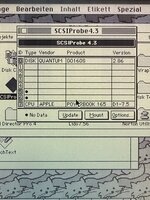 This is what LIDO shows: 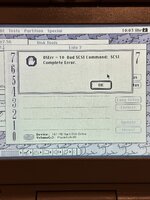 ID 5 is a disk image ID 6 is the DaynaPort adapter. I tried to reinstall RaSCSI without any change so I assume that I have a hardware problem. What makes the thing even worse is that currently the RaSCSI kits are out of stock. Should I order a set of new bus transceiver chips from Mouser and replace them or do you think my Pi could be the problem? | |
| Posted by: rollmastr on 2022-11-12 07:19:33 So... I carefully resoldered the bus transceivers and nothing changed. I also tried to disable termination on the RaSCSI and daisy-chained it with an external HDD to yet another Mac. It booted and SCSIProbe showed "no data" for the RaSCSI while the internal and the external drive worked fine. Very annoying, here I am tinkering with 30+ year old garbage and the only modern component fails. | |
| Posted by: pfuentes69 on 2022-11-14 07:35:21 Maybe you could check the loopback testing... https://github.com/akuker/RASCSI/wiki/Troubleshooting#Loopback_Testing | |
| Posted by: rollmastr on 2022-11-14 08:06:45 Thanks, will do. I ordered a set of jumper leads which should arrive some time this week. | |
| Posted by: rollmastr on 2022-11-16 10:27:33 Jumper leads arrived and I assembled a loopback cable as described in the troubleshooting guide: 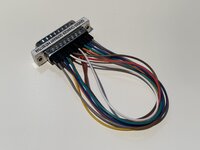 The result of the loopback test is: pi@RaSCSI:~/RASCSI/python/loopback_test $ python3 test.py Error: GPIO D0 should drive ACK low, but did not Error: GPIO D1 should drive SEL low, but did not Error: GPIO D2 should drive ATN low, but did not Error: GPIO D3 should drive RST low, but did not Error: GPIO D4 should drive CD low, but did not Error: GPIO D5 should drive IO low, but did not Error: GPIO D6 should drive MSG low, but did not Error: GPIO D7 should drive REQ low, but did not Error: GPIO DP should drive BSY low, but did not !!!!!!!! Test FAILED !!!!!!!! Total errors: 9 Without the loopback cable I receive more errors: pi@RaSCSI:~/RASCSI/python/loopback_test $ python3 test.py Error: GPIO D0 should drive ACK low, but did not Error: GPIO D1 should drive SEL low, but did not Error: GPIO D2 should drive ATN low, but did not Error: GPIO D3 should drive RST low, but did not Error: GPIO D4 should drive CD low, but did not Error: GPIO D5 should drive IO low, but did not Error: GPIO D6 should drive MSG low, but did not Error: GPIO D7 should drive REQ low, but did not Error: GPIO DP should drive BSY low, but did not Error: GPIO ATN should drive D2 low, but did not Error: GPIO RST should drive D3 low, but did not Error: GPIO ACK should drive D0 low, but did not Error: GPIO REQ should drive D7 low, but did not Error: GPIO MSG should drive D6 low, but did not Error: GPIO CD should drive D4 low, but did not Error: GPIO IO should drive D5 low, but did not Error: GPIO BSY should drive DP low, but did not Error: GPIO SEL should drive D1 low, but did not !!!!!!!! Test FAILED !!!!!!!! Total errors: 18 So it appears I have a problem with the D signal, correct? | |
Posted by: pfuentes69 on 2022-11-16 10:36:10Jumper leads arrived and I assembled a loopback cable as described in the troubleshooting guide:Yeah, something must be wrong. I’d recommend seeking for support in the discord channel. Or post in thinker different, as I can’t find here @akuker. | |
| Posted by: rikerjoe on 2022-11-27 19:38:59 I have a similar problem where my RaSCSI suddenly stopped working. I am able to use the web interface, and I can connect to the AFP server running on it from a modern Mac. Connecting a classic Mac via the SCSI cable - no dice: no AFP, no disk images, no Ethernet. All used to work just fine. This tells me the raspberry pi is fine and something is wrong with the RaSCSI board. The bus transceivers on top of the RaSCSI are running very hot, which I don’t think is normal. I may try a replacement of those chips to see if this resolves the problem I’m having. | |
| Posted by: techknight on 2022-12-08 05:50:44 yeah I bet the bus transceiver failed | |
| Posted by: rikerjoe on 2022-12-16 15:15:55 I replaced the four bus transceivers on top of the RaSCSI, and all is back to normal. I am able to connect via SCSI cable and see images, AFP server, and connect Ethernet from my classic Macs. | |
| Posted by: rollmastr on 2022-12-17 00:56:16 Great to hear you could fix your RaSCSI. I did a lot of measuring according to the troubleshooting guide and found out that the SCSI data lines do not drive low, they always stay high, everything else seemed OK. Due to shipping cost at Mouser I just ordered a new RaSCSI kit, assembled it and it works. Might order just the transceivers later. | |
| 1 |