68kMLA Classic Interface
This is a version of the 68kMLA forums for viewing on your favorite old mac. Visitors on modern platforms may prefer the main site.
| Click here to select a new forum. | |
| How to install system 6.0.8 AZERTY/french version on Mac Plus with ZuluSCSI | |
| Posted by: MattBranth on 2022-11-04 00:59:10 Hi! I have a Mac Plus booting on system 6.0.8 using a mini ZuluSCSI card. I'm currently using RaSCSI-Boot-6.0.8.hda disk image containing the system 6.0.8 found here The problem is that this system use QWERTY keyboard, and there is no way to change it to AZERTY in system configuration. I'm looking for a french and/or AZERTY 6.0.8 system or an utility software doing this. I found here some international OS 6 version but I can't boot on this images. How to boot on a custom .img file? I rename them FD0.img and load them on the ZuluSCSI SD card, then power up the mac, but unfortunatly I have the question mark disk picture on the screen... | |
| Posted by: bibilit on 2022-11-04 01:13:54 simply renaming the UK/US System and folder to "old" and moving away to another file and replacing both with the french one at the same place should work. I should have a copy anyway if that is not suitable. | |
| Posted by: MattBranth on 2022-11-04 01:19:35 Thks! If you have a bootable french version of the system 6.0.8 , I am greatly interested! | |
| Posted by: bibilit on 2022-11-04 02:38:54 send me PM, at home probably. | |
| Posted by: Wawavoun on 2022-11-04 04:37:52 Hi, Read this for keyboard layout installation : Mac Plus 6.0.8 change keyboard layoutHello there ! I have a Mac Plus with a french layout keyboard. I have made my own boot floppy disk with Minimal Mac Plus 6.0.8 system (no network, no printer etc...). Now what should I add to this boot disk so I can change the keyboard layout from us to french ? I have the Macpack disk image...
 68kmla.org
Regards. Philippe | |
Posted by: MattBranth on 2022-11-04 13:24:17Hi,Hi Philippe, Thank your for this information! It is possible to drag and drop a keyboard layout onto a non working system FILE. After that in the control panel this layout is selectable. Where should I put this file in the System 6.0.8 folder ? | |
| Posted by: MattBranth on 2022-11-04 13:33:26 Here is the folder structure : 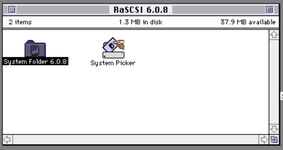 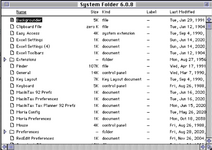 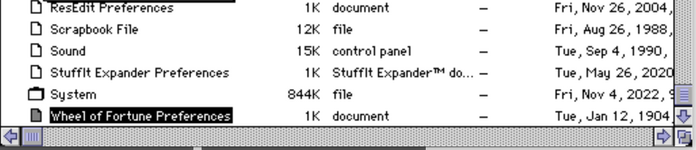 | |
| Posted by: Wawavoun on 2022-11-04 15:27:22 You must boot from another system that the one where you want add azerty layout (use a copy or something like that). Then drag and drop the layout file to this non working system FILE, not the system folder. This file is inside the system folder. Philippe | |
| Posted by: MattBranth on 2022-11-05 00:51:53 So I just have to drag and drop the "France" keyboard file at the root of the "System Folder 6.0.8" (booting from another volume) ? 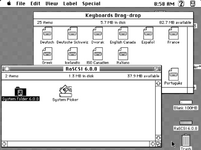 | |
| Posted by: Wawavoun on 2022-11-05 02:34:38 No. Open your system folder, then you will see a FILE named "System", not a folder, a FILE. It is visible on your previous post just over the "Wheel of Fortunes Preferences" file. Then drag and drop the keyboard layout file on this FILE named "System". You have not to drag and drop in a folder. Then after reboot with this system, in the control panel, you can choose azerty keyboard. | |
| Posted by: MattBranth on 2022-11-05 03:21:04 It works! Thanks a lot! | |
| Posted by: Wawavoun on 2022-11-05 04:36:49 You are welcome. | |
Posted by: mattia1071 on 2025-12-06 15:59:16No.I'm tryingg to do the same on my mac SE with 6.0.8, but it's impossible to drag something onto the system (suitcase) file/folder. Strange because (if i well remember) I already did it in my portable and i could set another keyboard layout that way, in the mac SE I cannot. weird. | |
| Posted by: finkmac on 2025-12-07 07:05:44 don’t you you have to use font/da mover on system 6? | |
| Posted by: adespoton on 2025-12-10 15:47:44 Yup. Or use a suitcase manager like Suitcase. | |
| 1 |