68kMLA Classic Interface
This is a version of the 68kMLA forums for viewing on your favorite old mac. Visitors on modern platforms may prefer the main site.
| Click here to select a new forum. | |
| How to create a blank HD for file saving and transfering with ZuluSCSI for Macintosh plus | |
| Posted by: MattBranth on 2022-10-27 23:56:06 Hi! I just refurbished a Macintosh Plus (with the help of joshc, cheesestraws and bibilit who I thank). I ordered a ZuluSCSI mini so I can boot and use software in a stable way. Indeed, the "natural" boot from my system disk isn't reliable... Then my question is: How do I create an empty HD volume that allows me to save files (pictures, texts, etc.) from the Mac plus. Or the other way, to drop files created on a modern windows computer that would be usable on the mac (pictures,texts, etc.).? For information, I have already installed Basilisk II on my PC, but I don't really see how to proceed... I've also heard about Disk Jockey, but it doesn't seem to work on windows... Thanks for your help! | |
| Posted by: 68kPlus on 2022-10-28 01:22:46 I used Dummy File Creator, made an empty 2GB file, and then used Basilisk II to mount it and then format it as HFS. I can walk you through the process if you need me to. | |
| Posted by: MattBranth on 2022-10-28 13:27:58 Thanks for your help. For the moment, I only manage to installed Basilisk II and system 7.5.3 using this tutorial: https://www.emaculation.com/doku.php/basilisk_ii_setup It seems possible to create empty volumes with the "Create" button of the Volumes tab. But how to export an image of this HD drive before copying it to the zuluSCSI SD card ? | |
| Posted by: MattBranth on 2022-10-28 15:40:20 I have another problem. I'm trying to install Graphic Converter on my emulated 7.5.5 system mac on Basilisk II. - I download the first link on this page : https://macintoshgarden.org/apps/graphicconverter-4x - I unpack the gc4usppc.sit file with Stuffit Expander on my windows PC - I copy the expanded "GraphicConverter 4.0US PPC.smi" file from "This PC" folder to my "System753" system drive on the emulated Mac on Basilisk II. - When I double click on this file I have the following message: 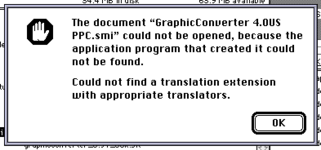 Whats the problem here? | |
| Posted by: MattBranth on 2022-10-28 15:56:25 I also try to unpack the gc4usppc.sit file into the mac environment using Stuffit Expander 5.5 which is installed on this emulated environment. The result is the same 🤔 | |
| Posted by: MrFahrenheit on 2022-10-28 16:07:55 Macintosh files contain two forks, a resource fork and a data fork. The Mac file system keeps them sorted. The file systems used by Windows do not. So when you download a file on Windows and extract it using a tool in windows, you corrupt the file. | |
| Posted by: Crutch on 2022-10-28 18:35:42 Yes, to be explicit, you need to transfer the .sit file to your emulated Mac and run StuffIt Expander there. | |
Posted by: MattBranth on 2022-10-28 22:36:32Yes, to be explicit, you need to transfer the .sit file to your emulated Mac and run StuffIt Expander there.Hi! As I said, I already test this procedure, and the result is the same 🤔 | |
| Posted by: MattBranth on 2022-10-28 22:37:04 Maybe it's link to my ROM which is a performa one ? | |
| Posted by: MattBranth on 2022-10-29 01:11:18 In fact, I have the impression that whatever the .sit file is, the problem is the same: 1) I transfer the .sit file from a directory on the host computer (a_mac_disk) to an HD in the mac (mystore) 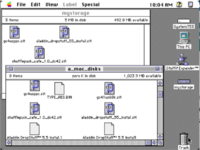 2) I double click on the .sit file on the mac, which launches the decompression by StuffIt Expander 5.5 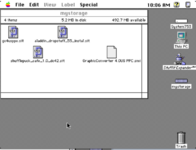 3) When I click on the .smi, I get the error : 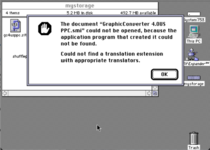 Any ideas? | |
| Posted by: MattBranth on 2022-10-29 03:09:20 In fact, its works when the compressed file is an image, I mean the disk mount correctly. But I have the error message on installers file | |
Posted by: MrFahrenheit on 2022-10-29 05:27:26In fact, its works when the compressed file is an image, I mean the disk mount correctly. But I have the error message on installers fileI’m going to download the file link for you and try it myself and I’ll report back. Just allow me to have two coffees first. | |
| Posted by: bakkus on 2022-10-29 05:40:14 Am I missing something obvious, or is it merely the fact that something called *_PPC_.smi will fail to execute on Basilisk which is strictly 68k? You'll need the "gc41us68k.sit" file available from the same page. | |
Posted by: MrFahrenheit on 2022-10-29 05:48:31Am I missing something obvious, or is it merely the fact that something called *_PPC_.smi will fail to execute on Basilisk which is strictly 68k?Good point! I missed that. @MattBranth You need to download the 68k version maybe? | |
| Posted by: MrFahrenheit on 2022-10-29 06:00:37 Using SheepShaver and Mac OS 9 on my Windows 10 PC, I downloaded the file you mentioned using Chrome on Windows 10 to my shared folder with SheepShaver. I copied the .sit file over to my Macintosh volume inside SheepShaver and expanded with StuffitExpander 5.5, and received a .smi file with its proper icon. I double clicked and it launched and opened. 1. Because Basilisk is a 68k emulator and not PowedPc, first try the 68k file on Macintosh Garden. 2. If that doesn’t work, there’s something possible wrong with the way you’re expanding / copying / moving the files. | |
| Posted by: MattBranth on 2022-10-29 08:04:41 When I get the smi file from a mouted disk image, it works: 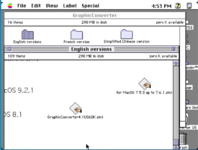 But when the smi file is from a decompression done in the simulated environnement, it doesn't work (it seems the file isn't reconized): 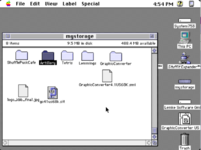 | |
| Posted by: MrFahrenheit on 2022-10-29 08:09:32 There is something happening with file corruption. I’m not sure what, but there’s something that’s happening here that is corrupting your files. Specifically, because the .smi that you’re extracting has a generic icon, seems to indicate the resource fork is being stripped out. | |
| Posted by: MattBranth on 2022-10-30 00:51:07 Thanks for your help! So far I'm getting by with disk images to get software. Now my questions are more related to ZuluSCSI: - How do I get my Mac Plus to boot with the 6.0.8 system? Is it enough to copy the MacOS_6.0.8_System_Startup.img image from https://macintoshgarden.org/apps/rascsi-reloaded to the FAT 32 SD Card and then rename it to HD0.img? - How do I load my HD containing software and files used in Basilisk II into my zuluSCSI ? Just put my my_storage.dsk file in the SD card and rename it HD1.hda? | |
| Posted by: MrFahrenheit on 2022-10-30 04:59:09 I don’t use these SCSI emulation disk doodads (yet) so I can’t help you there. But I should point you to a good collection of tools and utilities for System 6 that has been created and uploaded by 68kmla user @joshc on his site: Mac Hut - System 6.0.8 Recovery ToolkitThe tools on this image are really useful and you may want to have them on your device for setting up or for use later. | |
| 1 |