68kMLA Classic Interface
This is a version of the 68kMLA forums for viewing on your favorite old mac. Visitors on modern platforms may prefer the main site.
| Click here to select a new forum. | |
| Does anyone need the Apple Network Server 500/700 Diagnostic Information, Utilities, and Documentation I have? | |
| Posted by: jajan547 on 2022-10-16 17:40:21 I have the following:
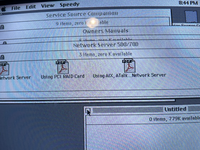 | |
| Posted by: joshc on 2022-10-16 18:07:55 I don't 'need' them but I know we do have a few ANS owners on the forum so I'm sure they'd appreciate these. Probably worth uploading to archive.org if they're not on there already. | |
| Posted by: joshc on 2022-10-16 18:08:26 Which Service Source Companion disc did you find them on, is that disc archived? | |
| Posted by: jajan547 on 2022-10-16 18:08:41 That's the thing I don't know if they were uploaded already | |
| Posted by: jajan547 on 2022-10-16 18:12:14 All of my discs are not archived I have the following:
| |
| Posted by: joshc on 2022-10-17 02:39:04 Oh yeah, it would be nice to see what's on those if you can archive them 🙂 | |
Posted by: jajan547 on 2022-10-17 04:59:30Oh yeah, it would be nice to see what's on those if you can archive them 🙂I would just don’t have a Mac I can upload them with, would an iBook work? | |
| Posted by: joshc on 2022-10-17 05:42:35 What machines have you got? ‘dd’ to an iso should do the trick to make a perfect copy including the file system/partition map on the discs. | |
| Posted by: jajan547 on 2022-10-17 07:08:50 Well I have a 2017 iMac, and basically everything 1980-1996 that’s about it. If I got the USB disc thingy that Apple sells would it work? If not would a better solution be a cheap iBook? | |
| Posted by: joshc on 2022-10-17 07:14:28 Yeah I'd get a USB CD drive for the 2017 iMac and do it that way. | |
| Posted by: jajan547 on 2022-10-17 10:02:55 Alrighty I guess I’ll get a super drive | |
Posted by: MrFahrenheit on 2023-04-16 20:10:54Well I have a 2017 iMac, and basically everything 1980-1996 that’s about it. If I got the USB disc thingy that Apple sells would it work? If not would a better solution be a cheap iBook? Do your 1990's Macs have a CD-ROM drive? You could easily download Astarte CD-Copy 2.x from Macintosh Garden, launch it, insert a CD, and save the image out as an ISO. Then just upload that ISO to Macintosh Garden. I'd love to see what's on these CDs. | |
Posted by: jajan547 on 2023-04-17 04:43:15Do your 1990's Macs have a CD-ROM drive? You could easily download Astarte CD-Copy 2.x from Macintosh Garden, launch it, insert a CD, and save the image out as an ISO. Then just upload that ISO to Macintosh Garden.I suppose I could do this on my TAM or 6360. I also have a SuperDrive but it doesn’t like to read these older disc images. | |
Posted by: MrFahrenheit on 2023-04-17 06:37:06I suppose I could do this on my TAM or 6360. I also have a SuperDrive but it doesn’t like to read these older disc images. The 6360 might work. If you’re willing to try it would create a good exact copy ISO that way. Try version 2.0.3 here: https://macintoshgarden.org/apps/astarte-cd-copy | |
Posted by: jajan547 on 2023-04-17 08:21:32The 6360 might work. If you’re willing to try it would create a good exact copy ISO that way.Will give this a try tonight | |
| Posted by: ScutBoy on 2023-04-17 14:51:31 I have a couple of these docs, but wouldn't mind collecting the whole set. Will wait patiently 🙂 | |
| Posted by: jajan547 on 2023-04-18 00:41:24 These are what I have and wow looks like Apple dropped CD-ROM support in Ventura. I will have to make a new IDE2SD image for my 6360 albeit it's the prototype so not sure how picky it'll be with other OS's but I think it'll be okay on Mac OS 8. Anyways I can't do much until I make a new bootable image but like I said here's some of what I have lying around. 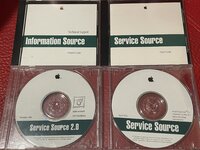 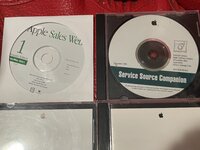 | |
Posted by: joshc on 2023-04-18 01:48:02and wow looks like Apple dropped CD-ROM support in VenturaWhat makes you think this? CD support is still there in Ventura. Apple still sells their USB SuperDrive and Ventura still recognises other brands of USB CD drives. What have you tried to get it working? Those CD-ROMs will have HFS partitions so modern macOS can't mount them. But using hfsutils or fusehfs would work. Otherwise, just insert the CD, and then use dd to copy the image contents to a file and distribute that. That will preserve the data and partition map of those discs so it would be the best way to archive them. | |
| Posted by: Realitystorm on 2023-04-18 04:16:30 I will have to check, I think I got some of these in the bin of disks with the NewLife haul. I just used imgburn on my Windows PC to make a .bin file. I find I can't make working copies of bootable Apple HFS CDs using the ISO standard. Haven't gotten around to investigating | |
| Posted by: CTB on 2023-06-30 16:09:42 Did these ever get imaged and uploaded somewhere? | |
| 1 > |