68kMLA Classic Interface
This is a version of the 68kMLA forums for viewing on your favorite old mac. Visitors on modern platforms may prefer the main site.
| Click here to select a new forum. | |
| How to repair a Powerbook series 100 keyboard | |
| Posted by: gregoireg on 2022-10-10 15:20:59 I have a working Powerbook 145b and the keyboard has 2 defect keys: Z and X. It doesn't seem to be a connection problem. Mechanically, the 2 keys seem fine. Has anyone successfully repaired a Powerbook keyboard? Can a key be lift off without breaking the plastic key? | |
| Posted by: 3lectr1cPPC on 2022-10-10 16:42:34 Removing the key caps is pretty easy. I believe that you can disassemble the keyboard if all the keys have been removed (that’s how they’re held together I believe) but I don’t know if you’d find anything obviously wrong. My only attempt to troubleshoot a keyboard membrane ended in disaster, so good luck. Keep track of all of the layers and what order they go in. | |
Posted by: gregoireg on 2022-10-10 16:52:07Removing the key caps is pretty easy. I believe that you can disassemble the keyboard if all the keys have been removed (that’s how they’re held together I believe) but I don’t know if you’d find anything obviously wrong.Thank you. This is useful information and a little bit what I'm afraid of. Is there a better angle of attack to remove a plastic key? | |
| Posted by: 3lectr1cPPC on 2022-10-10 17:25:30 Unless you have a key puller then just use a spudger, or your fingers. Don’t yank at them, use common sense but I haven’t ever broken one. | |
| Posted by: 3lectr1cPPC on 2022-10-10 17:27:17 Here’s what the clips look like 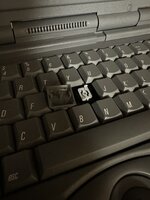 | |
| Posted by: gregoireg on 2022-10-10 18:46:35 Thank you. Fixed! I have removed indeed the keys, which are in two parts: the white plastic part and the key. Indeed, don't force but raise up the key. Then, some compressed air fixed the problem. | |
| Posted by: 3lectr1cPPC on 2022-10-11 04:31:50 Awesome! Glad you got it fixed. | |
| 1 |