68kMLA Classic Interface
This is a version of the 68kMLA forums for viewing on your favorite old mac. Visitors on modern platforms may prefer the main site.
| Click here to select a new forum. | |
| Bit of a long shot but ... | |
| Posted by: ChrisW381 on 2022-09-14 07:48:58 Hi guys so a bit of a long shot but here goes ... I have a 2011 (I think) MacBook Pro. It died as a result of a catastrophic failure of the logic board! So replaced it with what was said to be a 2009 one. So all fitted well. Here is my problem it has no system at all and a formatted 250 Gig internal drive and I believe is a DVD multi drive. So tried to download the Lion software on the machine in Disk utility mod, it connected to the internet with any problems without success as it says its looking for apple validation?? tried the various key hacks on start up and nothing. Purchased a so called bootable DVD with Mountain Lion OSX and it seems to read the disk and .... nothing just the flashing folder and ? So I have been told that it may need Snow Leopard but for the life of me I cannot seem to make a bootable flash drive or DVD with it on. Any step by step advice would be much appreciated as the MacBook is very close to the skip! Thanks in advance Chris | |
| Posted by: LaPorta on 2022-09-14 07:56:34 Lion was out by that time (I had it on my 2010 iMac). A guide for bootable drives from that era are easily found on Macworld: 
Your quick guide to creating a macOS Bootable USB InstallerMake a macOS installer with createinstallmedia and install Monterey or another macOS on multiple Macs, do a clean install, or access a faulty Mac.
 www.macworld.com
| |
| Posted by: ChrisW381 on 2022-09-14 08:32:51 Many thanks for the swift response I have downloaded the Lion and snow Leopard downloads on my iMac but after 3 attempts of setting this up on a flash drive with out success clearly I am missing something. The internal drive shows as being correctly formatted, available but nothing on it. The MacBook will run disk utilities if forced to do so and allows formatting of the internal hard disk. I have followed those instruction carefully with out success. I have read that sometimes they will not install as the logic board internal clock may have defaulted to a very early date? clearly without a OS on the machine I cannot see how you could reset that. By the way I have done numerous PRAM resets which do complete but then back to the flashing folder picture and a ? | |
| Posted by: LaPorta on 2022-09-14 10:22:37 Is there possibly a hardware incompatibility with this being a 2009 LB in a 2011? | |
| Posted by: ChrisW381 on 2022-09-14 11:06:52 Just wanted to add that my only other Mac is a iMac i7 that is running the latest OS so i do not have anything with Lion or Leopard on. Also noticed that I cannot see what’s on the so called Lion installation dvd with my iMac as it seems to hang it? very close to the skip lol! 😡 | |
| Posted by: mg.man on 2022-09-14 12:09:24 I have a bootable USB stick with Lion and Mountain Lion installers. I also seem to recall something about setting the Date to before a certain date to get the install to work. You mention you're able to run the Disk tools and also format the HD, so your Recovery Partition must be intact. Try running Terminal and setting the Date to 2011 something, then try installing. Also worth checking "About" when you've booted the Recovery environment. Where abouts in the UK are you? | |
| Posted by: ChrisW381 on 2022-09-14 12:11:31 Thanks again… how do you run terminal with no system? I am in Co Antrim N. Ireland 🇮🇪 | |
| Posted by: LaPorta on 2022-09-14 12:14:05 You may be correct: I think Lion was the first to have this restriction. I don’t personally know, but is there a way to manually set the date with OF, and then not connect to the internet so it doesn’t update? | |
| Posted by: mg.man on 2022-09-14 12:14:56 Ah, so not that close - shame. how do you run terminal with no system?If you can boot in Recovery, "Terminal" should be an option in the menu... | |
| Posted by: ChrisW381 on 2022-09-14 12:18:56 In recovery the only options are format, install from the internet which fails as it says looking for Apple eligibility code and fails… or quit | |
| Posted by: LaPorta on 2022-09-14 12:27:26 As I was saying, perhaps go through Open Firmware to set the time? Anyone know if that can be done? | |
Posted by: mg.man on 2022-09-14 12:49:14In recovery the only options are format, install from the internetHmm... so that sounds like your Recovery partition is from a much later (than Lion / Mountain Lion) version. According to EveryMac, some of the MBPs from 2011 supported up to OSX 10.13! Do you know the Apple Model - should be on the bottom (in very small text). | |
| Posted by: ChrisW381 on 2022-09-14 12:56:30 The original Mac Book Pro was a 2012 then the board was a 2011 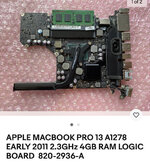 | |
| Posted by: ChrisW381 on 2022-09-14 13:08:17 The other side of the logic board for info thanks guys 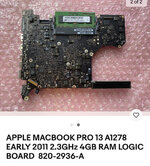 | |
| Posted by: mg.man on 2022-09-14 13:08:48 So, you went from a 2012 down to a 2011? You mentioned 2009 initially. Anyway, have you tried this - Create a bootable installer for macOS – Apple Support (UK)You can use a USB flash drive or other secondary volume as a startup disk from which to install the Mac operating system. These steps are primarily for system administrators and other experienced users.
If not, I'd try with El Capitan or Sierra - you probably won't be able to create (and possibly not boot) Lion or Mtn Lion. | |
| Posted by: ChrisW381 on 2022-09-14 13:10:08 Apologies the initial year was a typo! | |
| Posted by: ChrisW381 on 2022-09-17 01:52:26 OK firstly thanks for all the advice ... good news is that I finally figured out how to make a bootable memory stick with High Sierra on and it booted! so all ok and I am using the machine here 🙂 So the next issue is how to get it to upgrade as it refuses to allow installation of any other version of the OS like Catarlina or El Capitan etc. Apple store says the machine cannot run them.. seems odd as my old Mac Mine 2010 is running them? Anyway here is the detail of this MBP now for info ... what I am really trying to get at is being able to run at least office which will also not install! Thanks again! 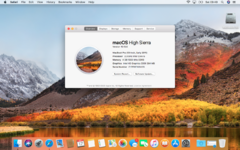 | |
| 1 |