68kMLA Classic Interface
This is a version of the 68kMLA forums for viewing on your favorite old mac. Visitors on modern platforms may prefer the main site.
| Click here to select a new forum. | |
| Best cable for discharging Mac Plus CRT | |
| Posted by: 68kPlus on 2022-08-29 23:42:25 Hi guys, Just wondering if this cable from element14 (AUS) is suitable for a CRT discharge tool. EDIT: this cable is suitable for 10A, which is what other people have used (Bruce from Branchus Creations said 15A is good, but some people have used 10A from extension cables and it works) Thanks! | |
| Posted by: Iesca on 2022-08-29 23:48:40 I've never had a problem just using a regular runofthemill alligator clip with my screwdriver. Larry Pina suggests splicing in a large resistor, but even that's not really necessary. | |
| Posted by: 68kPlus on 2022-08-30 00:19:19 Okay cool. I'm not going to add a resistor as the "pop" or spark sound is preferred (I've never done this before and I want to make sure I do it right). Thank you for your help! | |
Posted by: joshc on 2022-08-30 00:19:39I've never had a problem just using a regular runofthemill alligator clip with my screwdriver. Larry Pina suggests splicing in a large resistor, but even that's not really necessary.Same here, I've always just used normal alligator clips with a thick/large screwdriver. | |
| Posted by: 68kPlus on 2022-08-30 00:20:03 Also may I ask about your Macintosh Plus with the fan mod? I was looking into that in the past. I too have a platinum 4MB, from 1990. | |
| Posted by: pfuentes69 on 2022-08-30 00:41:20 Well... It seems there's no consensus about this. I always used a plain cable without resistor, but it seems that this can (not so rarely) cause damages. So I'm making myself a new cable with several 1 MOhm 2W resistor... still investigating how many I should put in series | |
| Posted by: 68kPlus on 2022-08-30 00:44:54 Do you think it would be better if I waited a while until I discharged it to reduce the discharge amount? | |
| Posted by: joshc on 2022-08-30 00:48:03 Are you discharging because you're going to work on the analog board? If you only need to access the floppy drive or logicboard, it's not necessary to discharge. Leaving it for a day or two will result in some discharge, yes. | |
| Posted by: 68kPlus on 2022-08-30 00:50:47 I'm going to replace the RIFAs before they blow. Is it possible for it to completely discharge over time? How long would it take (estimate)? Thank you for the help! | |
Posted by: pfuentes69 on 2022-08-30 00:54:02I'm going to replace the RIFAs before they blow. Is it possible for it to completely discharge over time? How long would it take (estimate)?Most models include bleeder resistors that will progressively discharge the CRT. Which one is yours? A Plus? In all the times I discharged a CRT I only had once a loud (and scary) Pop! when doing it to a Mac that was just turned off | |
Posted by: Iesca on 2022-08-30 00:54:35Also may I ask about your Macintosh Plus with the fan mod? I was looking into that in the past. I too have a platinum 4MB, from 1990.Sure what would you like to know? I didn't perform the mod myself, it came to me that way. Also you should be safe leaving it unplugged for 24 hours before opening. | |
Posted by: 68kPlus on 2022-08-30 00:55:19Sure what would you like to know? I didn't perform the mod myself, it came to me that way.Just what size the fan is, where it's placed and how loud it is. Thanks! | |
Posted by: 68kPlus on 2022-08-30 00:56:31Most models include bleeder resistors that will progressively discharge the CRT. Which one is yours? A Plus?Mines a Plus, an international one. I guess leaving it for a few days is enough to avoid damage to the analogue board? I have no experience in CRTs or analogue boards so I just want to do it simple and then replace the RIFA caps and leave it alone after that. | |
Posted by: pfuentes69 on 2022-08-30 01:03:52Mines a Plus, an international one. I guess leaving it for a few days is enough to avoid damage to the analogue board? I have no experience in CRTs or analogue boards so I just want to do it simple and then replace the RIFA caps and leave it alone after that.According to this page (points 3 and 4), the Plus doesn't have the bleeder resistor. It mentions damage to the logic board, but I heard reports of people damaging the analog board too... Many people does it with a plain cable, but now I'm not confortable doing it again... | |
| Posted by: 68kPlus on 2022-08-30 01:08:38 It does say that it should go to the ground lug and not the chassis, so maybe it would be okay? I am not able to make a special cable (I have no idea how). Perhaps leaving it for a week and then trying to discharge it? | |
| Posted by: 68kPlus on 2022-08-30 01:12:04 Also another point to mention, Branchus creations uses a hand made discharge tool and he doesn't mention a resistor, yet uses it for his repairs on clients computers. Never seems to have had an issue with it. Could just be luck | |
Posted by: pfuentes69 on 2022-08-30 01:15:14It does say that it should go to the ground lug and not the chassis, so maybe it would be okay? I am not able to make a special cable (I have no idea how). Perhaps leaving it for a week and then trying to discharge it?The technique is always to attach the discharge cable to the metal frame of the CRT. I don't think a week is necessary, but if you aren't in a hurry, 24/48 hours should be enough and then discharge. For the cable I'm making I ordered these clips and these 1M resistors, then I'll solder using some cable I have around. About Branchus... yeah, most people does this and myself I did it like that lots of times... and I just learn about few cases of damage, but... | |
| Posted by: 68kPlus on 2022-08-30 01:23:11 Interesting. My Plus has been off since yesterday and I don't have any parts yet, so I'll wait until the parts arrive to do it (which should be a week with Australia's shipping at the moment). I think I'll probably just wait until it's fully discharged and then do it the normal way. I might take the logic board out though... | |
Posted by: 68kPlus on 2022-08-30 01:25:55The technique is always to attach the discharge cable to the metal frame of the CRT.Not the grounding screw? I've only heard people saying the ground screw and not the chassis... Perhaps thats how the guy broke his 128K? | |
Posted by: pfuentes69 on 2022-08-30 01:29:32Not the grounding screw? I've only heard people saying the ground screw and not the chassis... Perhaps thats how the guy broke his 128K?All that should be connected... You'll see that the ground cable of the board goes always to the top-left corner of the CRT, that's where people clips the discharge cable. 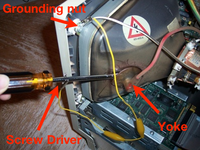 (Found this random image... the "Yoke" is not that, but ok...) | |
| 1 > |