68kMLA Classic Interface
This is a version of the 68kMLA forums for viewing on your favorite old mac. Visitors on modern platforms may prefer the main site.
| Click here to select a new forum. | |
| How were the floppies included with the Plus? | |
| Posted by: pfuentes69 on 2022-08-17 01:11:30 Hey, recently I made these replicas of the floppies coming with a 128K or 512K, to complete my 512K. 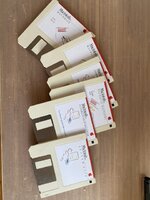 I used as reference this page to a Museum. I'd like to do the same for the Plus, but I don't find a clear reference of which disk came with the Plus. I only found this one, but I guess some other would be included with the computer, such as the "Guided Tour". Does someone know which floppies were supplied and (bonus) where to find the IMG or DSK files? Thanks! | |
| Posted by: LaPorta on 2022-08-17 02:22:34 The Plus was produced for so many years, that they no doubt changed over time. I have System 5 floppies that came with the one my dad purchased in 1987: | |
| Posted by: LaPorta on 2022-08-17 02:23:12 PS I have images as well. | |
| Posted by: Iesca on 2022-08-17 02:28:39 As for images of the disks, you should be able to find them on the Macintosh Garden. As to what was included, you would have gotten a cardboard box, similar in size to the original plastic accessories box of the Mac 128k, that would have contained the disks, the how-to cassettes, and the programmer's switch, as well the power cord. It would have also contained the Quick Reference card I believe? Don't quote me. Here is an ebay listing with the box (sadly missing the actual disks), but you can get an idea of it, especially the second picture: 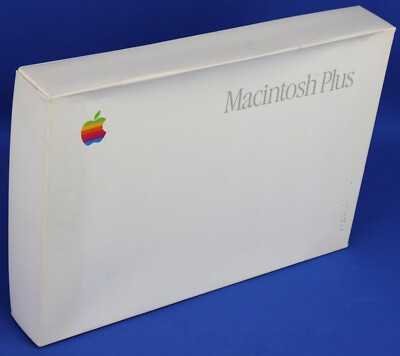
Macintosh Plus Accessory Box with Manuals and Reset Switch No Software | eBayContains the following manuals Macintosh Quick Reference Card, Apple part number 030-3180-A. Macintosh Utilities User's Guide,Apple part number 303-3173-A. We will use the identified carrier and service.
www.ebay.com
| |
Posted by: pfuentes69 on 2022-08-17 03:04:03The Plus was produced for so many years, that they no doubt changed over time. I have System 5 floppies that came with the one my dad purchased in 1987:Cool, this helps. I think I'd like to do something like the set that came with the first production run (see next post), but making the replicas of System 5 is also a nice bonus. | |
Posted by: pfuentes69 on 2022-08-17 03:08:19As for images of the disks, you should be able to find them on the Macintosh Garden.Indeed I saw this listing... and I also found this video. This makes me thing that the disk set was something like this that I just found here:  It says it was System 3.2/Finder 5.3... I'll check in the garden. | |
| Posted by: LaPorta on 2022-08-17 03:39:01 Some of those I may have as well (another box, I have to check). It is the box mentioned above. | |
Posted by: joshc on 2022-08-17 03:42:31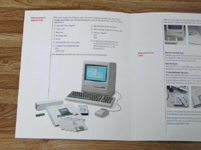 | |
Posted by: pfuentes69 on 2022-08-17 03:47:36View attachment 45264Thanks... I see a fourth disk there... The list mentions "Backup Disk" | |
Posted by: cheesestraws on 2022-08-17 03:53:28This makes me thing that the disk set was something like this that I just found here: Those three discs are what I got with one of mine, but that was obviously second hand and I don't know whether I'm missing any. | |
| Posted by: LaPorta on 2022-08-17 17:59:13 I don't have the System Tools backup disk, but I have the regular one. Here is my Plus box: 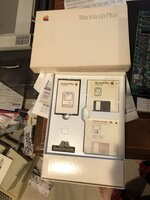 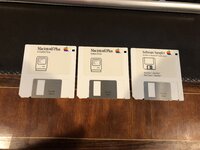 I cam make images for you, if desired. | |
Posted by: pfuentes69 on 2022-08-17 22:41:44I don't have the System Tools backup disk, but I have the regular one. Here is my Plus box:Fantastic, this helps! I think I managed to find all images except the mysterious “backup”, but thanks a lot for the offer. | |
| Posted by: pfuentes69 on 2022-08-20 14:24:00 So I made these... 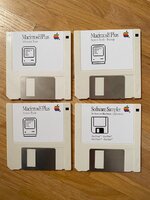 I don't have now white disks, so I had to use these in light beige... But I'm quite happy with the labels. | |
| Posted by: Iesca on 2022-08-20 21:14:31 One imagines that the "Backup" is probably just a duplicate of the regular System Tools diskette? | |
Posted by: pfuentes69 on 2022-08-20 22:36:26One imagines that the "Backup" is probably just a duplicate of the regular System Tools diskette?That’s what I did… as so far there’s no more info about it. | |
| Posted by: jcnva on 2022-08-24 06:32:13 Here is my Mac Plus box - the backup system tools disk just looks like a copy... | |
Posted by: pfuentes69 on 2022-08-24 06:37:52Here is my Mac Plus box - the backup system tools disk just looks like a copy...Perfect! That unveils the mystery. I made up the label adding “Backup” but now it’s clear it’s just a duplicate of the System Tools disk | |
| Posted by: olePigeon on 2022-08-26 08:36:53 @pfuentes69 Beautiful. This is also a hobby of mine. If you're looking for labels, I'd suggest buying some from www.sheetlabels.com. I bought 4 packs from them in 2 styles and 2 sizes. One set in matte finish, a second set in glossy finish; then in two sizes, 2.688x2 for the "square" front-only label, and then the 2.75x2.75 for the wrap-around label like the one you used. I like them a lot better than the Avery labels because they have spaces between the labels for bleed printing. That way you don't have to worry as much on getting it just right, and graphics will always go to the very edge. Apple almost exclusively used the glossy 2.75x2.75 wrap-around labels. Then I bought some floppy jewel cases and made some inserts. However, most recently I bought some new-old-stock glossy photo paper for laser printers and remade some of my inserts as well as tested out my glossy labels. I think they came out just perfect. Laser printer + glossy medium makes it look like it's screen printed. | |
| Posted by: pfuentes69 on 2022-08-26 11:21:51 That's a great work! The jewel cases with the glossy labels are gorgeous! It's good to know about those labels with spaces between the labels, because now I need to arrange in a way that the backgrounds don't interfere. I just enjoy making the labels, although the work is not so delicate. Today I made some more... 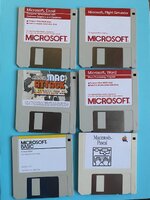 | |
Posted by: olePigeon on 2022-08-26 13:33:26I just enjoy making the labels, although the work is not so delicate. Today I made some more... Ditto. 😀 A byproduct of making disk labels is recreating vintage company logos. I also journeyed into posters and box art. | |
| 1 > |