68kMLA Classic Interface
This is a version of the 68kMLA forums for viewing on your favorite old mac. Visitors on modern platforms may prefer the main site.
| Click here to select a new forum. | |
| Mini vMac for iPad … interrupt switch? | |
| Posted by: Crutch on 2022-08-13 07:36:55 I recently started running Mini vMac on my iPad after doing thru the mechanics of a local build with XCode, and it is awesome. But …. Does anyone now how to simulate an interrupt switch press to the emulation? On the desktop version this is ^C ^I or something like that. I can’t figure out how to do it on the iPad version. | |
Posted by: Phipli on 2022-08-13 08:26:34I recently started running Mini vMac on my iPad after doing thru the mechanics of a local build with XCode, and it is awesome.In the android version, tapping in the black void off the emulated screen shows extra things including a button for a menu. Interrupt and Reset are in that menu. | |
| Posted by: Crutch on 2022-08-13 08:31:11 Ah thanks! I failed to interpret those old icons … answering my own question for the record: swipe left with two fingers to get the “Insert Disk” window. Then tap the interrupt symbol: 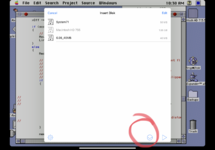 | |
| Posted by: jdlanza on 2022-08-13 18:57:48 Curious — is there a tutorial or a “how to” to help someone build Mini vMac using XCode? | |
Posted by: davidg5678 on 2022-08-14 06:41:46Curious — is there a tutorial or a “how to” to help someone build Mini vMac using XCode?This website has articles about the process involved: https://blog.gingerbeardman.com/2021/04/17/turning-an-ipad-pro-into-the-ultimate-classic-macintosh/ | |
Posted by: jdlanza on 2022-08-14 19:41:43This website has articles about the process involved: https://blog.gingerbeardman.com/2021/04/17/turning-an-ipad-pro-into-the-ultimate-classic-macintosh/Thx! | |
Posted by: smrieck511 on 2023-03-06 12:43:38Ah thanks! I failed to interpret those old icons … answering my own question for the record: swipe left with two fingers to get the “Insert Disk” window. Then tap the interrupt symbol:Are you doing the Minivmac color MacII emulation on the iPad? I knew there was one for the regular Mac Plus | |
| Posted by: Crutch on 2023-03-06 12:48:07 Yeah it’s just a setting to switch machine types. Swipe right with two fingers and scroll down to change machine type. | |
| Posted by: beachycove on 2023-03-06 13:04:36 Is there any reason to prefer the minivmac route over the basilisk? I didn’t know this was possible, but did years ago have a minivmac installation on an iPod Touch v1. That was actually pretty epic, so managing to heave it onto an iPad ought to be awesome indeed. — No jailbreaking needed? | |
| Posted by: Crutch on 2023-03-06 13:37:29 No jail breaking needed but you need to build it yourself in XCode. Yes, MiniVMac emulates the whole machine and enables running debuggers like Macsbug which is critical when doing dev work. Basilisk doesn’t, to my knowledge, allow that. | |
| Posted by: beachycove on 2023-03-07 11:19:35 Okay, so inspired by this, I did a little digging, and…. Am I right in thinking that I would need a (paid) developer account to install either of the locally built emulators on an iPad for anything longer than 7 days? I’ve got Xcode, and therefore have a developer account associated with an AppleID, but have a sentimental attachment to the $99 a year required for full admission to the club. I also don’t want to have to re-install everything once a week, as it is much easier just to haul out the Pismo, which requires no such gymnastics. If there’s a workaround, mind, I’m definitely going to give this a go. | |
Posted by: 3lectr1cPPC on 2023-03-07 11:30:17Okay, so inspired by this, I did a little digging, and…. Am I right in thinking that I would need a (paid) developer account to install either of the locally built emulators on an iPad for anything longer than 7 days?Yes, until the EU legislation forces apple to allow full sideloading next year. This is a big pain point for us jailbreak enthusiasts. Shouldn’t be too long until the 7 day limit is gone. | |
Posted by: Iesca on 2023-03-07 12:00:20Is there any reason to prefer the minivmac route over the basilisk?In addition to what Crutch said, I will add that Mini vMac also specifically emulates a 68000 processor, which is quite different in many respects to the later 68k processors in terms of functionality (and as such compatibility). | |
| 1 |