68kMLA Classic Interface
This is a version of the 68kMLA forums for viewing on your favorite old mac. Visitors on modern platforms may prefer the main site.
| Click here to select a new forum. | |
| SE/30 - some rows on the CRT are offset a little bit | |
| Posted by: racingmars on 2022-08-06 11:20:01 Hello, I have a Macintosh SE/30 on which I've just completed re-capping the logic and analog boards. The machine is running great, but the video is slightly wonky. It's most noticeable on vertical lines: it looks like certain rows of pixels are offset slightly to the right. This is a relatively "stable" condition; the whole time that "Extracting" dialog was open, for example, the image was steady, it just had those certain rows offset. What's on the screen does affect it, though. When that "Extracting" dialog closed, the rows that were offset changed. Any thoughts on what causes this? Thanks! 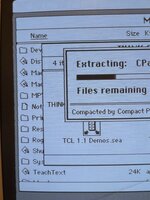 | |
| Posted by: Bolle on 2022-08-06 11:34:28 Do you have any other logicboard to try with that CRT/analogboard combo? This could be caused by either the analog board not processing the video signal correctly or the logicboard generating slightly offset sync/video signals. My bet is on the analogboard/CRT neck though. | |
Posted by: racingmars on 2022-08-06 11:47:18Do you have any other logicboard to try with that CRT/analogboard combo? Nope, this is my only one. Don't have any other parts to swap around. | |
| Posted by: racingmars on 2022-08-06 12:17:33 Oh... well this is suspicious! One of my new replacement capacitors on the analog board blew itself up! 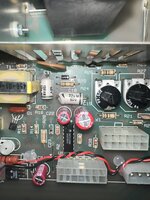 | |
| Posted by: racingmars on 2022-08-06 14:55:00 Okay, I even looked at the datasheet for those white Vishay capacitors when I put them in to try to figure out which side was positive, but it was not at all clear. I went with my gut thinking the black line may indicate the "crimped" side, and like the tantalum caps where that stripe would indicate positive... but no. I put them in backwards. My fault! Will have replacements for those two on Wednesday to try again... hopefully that magically takes care of the slight video wonkiness. Will report back in a few days. | |
| Posted by: Chopsticks on 2022-08-06 17:50:12 just for your own future reference, the black line/stripe etc on capacitors is always the negative terminal. unfortunately tantalum capacitors for whatever reason are marked the opposite to every other capacitor. a good tip/trick that I often use to help is to take a couple photos of the board before I remove any capacitors, just in case there are incorrect silkscreen marking or in same cases when those marking are incorrect | |
Posted by: racingmars on 2022-08-06 19:09:29just for your own future reference, the black line/stripe etc on capacitors is always the negative terminal. unfortunately tantalum capacitors for whatever reason are marked the opposite to every other capacitor.Thank you -- where were you yesterday? 🙂 But yeah... the silly thing is I *know* this, but hadn't worked with this particular type of package before, and was just over-thinking it. I thought maybe they were going for simulating the "crimped" end with the black strip, although I see now the beveled edge could be meant to show that. Sigh. Live and learn! | |
| Posted by: Chopsticks on 2022-08-06 19:31:24 I totally understand, hopefully the recap solves you screen issues. I have a real soft spot for the SE/30 myself | |
Posted by: Phipli on 2022-08-07 01:18:54just for your own future reference, the black line/stripe etc on capacitors is always the negative terminal. unfortunately tantalum capacitors for whatever reason are marked the opposite to every other capacitor.I had an e-machines card that had a cap in backwards from the factory. I found photos of another two similar cards online and one also had the cap backwards, the other was correct. The cause? The cards used all tantalum capacitors except for one electrolytic. The e-machines factory seems to have been commonly putting the electrolytic in with the band towards +ve. The cap is next to the nubus slot. | |
| Posted by: Phipli on 2022-08-07 01:20:54 Heh, see (random internet picture) : | |
| Posted by: Chopsticks on 2022-08-08 00:51:09 yeah its also common for people restoring vintage machines to use tantalum's in place of electrolytic so it pays to double check. I guess the good thing is they don't fail with a short these days (well less common anyways), they also don't leak! personally I prefer not to use tantalum caps. when I need to replace an electrolytic I tend to use solid polymer caps, they look like electrolytic caps in shape and size but they don't leak or dry out really. those they cost much more the a standard capacitor... food for thought there really | |
| Posted by: racingmars on 2022-08-13 23:03:11 Followup on this to close the loop -- replaced those two caps that were in backward with new ones, and now the wonky video problem is solved! | |
| 1 |