68kMLA Classic Interface
This is a version of the 68kMLA forums for viewing on your favorite old mac. Visitors on modern platforms may prefer the main site.
| Click here to select a new forum. | |
| Top half of PowerBook 160 LCD dark | |
| Posted by: mrw on 2022-08-01 15:52:51 I recapped my PowerBook 160 with Mac84's parts list. The screen works much better than before the, but the top half is much darker and has much more ghosting than the bottom: 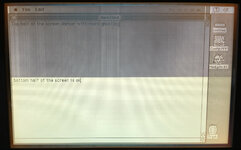 This thread seems to describe a worse but similar situation: PB160 screen recap failure. Any suggestions?So quite a while back I recapped a powerbook 160's screen and the results weren't so great. I've done many successful recap jobs (including powerbook screen recaps) in the past so I felt pretty good about the work. Just recently I decided to get it off the self and check my work under the...
 68kmla.org
The text in my screen is more readable, though the problem in the thread could be a result of how the picture was taken or stored. As was suggested in that thread, I tried reseating the display cable both at the LCD and on the display interface board also cleaned a lot of electrolytic capacitor contents off the reverse side of the LCD. The picture above was taken after doing both, so no improvement. Did I mess up the recapping? I tried checking capacitance but couldn't figure out how to do it with my multimeter. Is there a specific set of capacitors I should check? Thanks! | |
| Posted by: desertrout on 2022-08-02 20:34:59 It's unlikely (not impossible, but unlikely) the new capacitors themselves are an issue, I'd suggest you focus more on cleaning. Yep, do it again with IPA and a brush, blot often, on both sides of the controller board - avoid any of the transparent bits as the IPA can dissolve the adhesives and cause new issues - you can clean the white flex connectors and their pads and everything on the controller board, the IC's too. Of course clean around the caps on the one driver board, and if you see anything remotely suspicious nearby try to gently clean it off. I've even had to remove newly-installed capacitors and reclean to resolve display issues because I hadn't cleaned well enough the first time, and this is after doing what I thought was a good job... so that might be an option: just baseline it and start over after a super clean. If it's still an issue after that, then at least you know cap juice isn't a factor. | |
| Posted by: Byrd on 2022-08-02 21:07:01 I was going to say check the CFL backlighting while on, but the 50% OK/50% dark regions wouldn't be so demarcated. Still, worth a look while open to see if the CFL tube at the top lights up just a bright as the bottom while testing. | |
| Posted by: techknight on 2022-08-23 13:14:32 those displays are dual-scan which this fault is of no surprise, you are probably missing a signal to the upper scan. look for rotten/broken traces/vias where the caps were. | |
Posted by: Durosity on 2022-08-24 03:19:17those displays are dual-scan which this fault is of no surprise, you are probably missing a signal to the upper scan. look for rotten/broken traces/vias where the caps were.I thought the dual-scans only came in with the PowerBook 520? | |
| 1 |