68kMLA Classic Interface
This is a version of the 68kMLA forums for viewing on your favorite old mac. Visitors on modern platforms may prefer the main site.
| Click here to select a new forum. | |
| Floppy Emu HD mode not working, SE w/ Radius '020 accelerator | |
| Posted by: JC8080 on 2022-07-31 08:51:27 Has anyone ever had experience using a Floppy Emu with a SE with a Radius '020 accelerator? I have an SE with the 25mhz version of the accelerator, the machine boots fine off its internal HD, and will boot off the Floppy Emu in floppy mode, but when I try to boot using the HD mode it freezes up. The activity LED on the Floppy Emu goes from blinking like it normally does when being accessed, to solid green, and a small message shows up on the screen that I think said "wait state changed to 4", but unfortunately I didn't take a photo of the message. | |
| Posted by: mg.man on 2022-07-31 09:09:43 I don't have, so haven't tried with a Radius accelerator, but I *can* tell you I've had the exact same issue when my Total Systems Mercury '030 is enabled. If I boot with extensions off (so the Mercury is not (at least fully) "enabled"), I can successful boot from the FloppyEMU in HD20 mode. If the Radius needs an extension to enable it, it might be worth trying with that disabled? 🤔 | |
Posted by: JC8080 on 2022-07-31 10:32:07I don't have, so haven't tried with a Radius accelerator, but I *can* tell you I've had the exact same issue when my Total Systems Mercury '030 is enabled. If I boot with extensions off (so the Mercury is not (at least fully) "enabled"), I can successful boot from the FloppyEMU in HD20 mode. If the Radius needs an extension to enable it, it might be worth trying with that disabled? 🤔 Good to know, thanks. I was looking through the control panel of this machine (I just picked it up) and I don't see any Radius control panel for the accelerator. I didn't look in the system folder, so it's possible there's an extension in there to enable the accelerator. I'll try booting with extensions disabled. It actually won't boot off the HD at the moment, the anti-virus software is saying there's an infection, even though it was booting fine before that, and I didn't do anything other than boot to the Floppy Emu from the pre-installed (on the Floppy Emu) 6.0.8 boot disk. Booting with extensions disabled would likely skip the anti-virus boot scan as well. | |
| Posted by: Phipli on 2022-07-31 12:12:55 Was going to say but @mg.man beat me too it. Sounds like timing issues likely from missing driver. I have the driver somewhere... | |
| Posted by: Phipli on 2022-07-31 12:30:55 The first two files are specifically for the SE, They came with RadiusWare 2.0, but I don't seem to have that on my phone... unless it is in "radius_drivers". Otherwise, the version 3.2.5 might work with the SE driver 🙂 Edit : The "radius_drivers" is likely the third in the set of files. Seems to match whats here : It recommends installing from radius_drivers to enable all functions. | |
| Posted by: kuifduif on 2022-07-31 13:57:57 Try to switch the SE on while holding down the mouse button; my Radius accelerator shows the following screen (from its ROM) where you can disable the accelerator or it’s caches: | |
| Posted by: JC8080 on 2022-08-04 12:26:40 In my other thread, it sounds like the Floppy Emu is known to be incompatible with accelerators. I installed the driver's @Phipli recommended, the issue remained. I was able to disable the accelerator per @kuifduif instructions, Floppy Emu works fine with the accelerator turned off. Not the ideal solution, but it does let me copy files to my accelerated machine, which ultimately is the goal. Disable Radius SE '020 accelerator?Does anyone know of there is some of programmer switch procedure to disable a Mac SE Radius '020 accelerator on boot? My Floppy Emu doesn't work in HD mode with the accelerator, it would be nice to be able to disable the accelerator so I can copy from my Floppy Emu in HD mode to the SE internal...
 68kmla.org
| |
| Posted by: cheesestraws on 2022-08-04 12:39:54 Given that I think a real HD20 doesn't work either, it doesn't seem entirely fair to frame this as a floppy emu issue... | |
| Posted by: lisa2 on 2022-08-04 13:19:33 Is this SE a "SE FDHD" model? Most SE's don't support HD floppies.. | |
Posted by: JC8080 on 2022-08-04 13:31:00Given that I think a real HD20 doesn't work either, it doesn't seem entirely fair to frame this as a floppy emu issue...Yes, I didn't mean to call this out as a Floppy Emu issue, it's an issue with accelerators and HD20 compatibility in general. The Floppy Emu is an amazing product, I can't imagine trying to work with these old machines without one. | |
| Posted by: mg.man on 2022-08-04 13:52:29 In an attempt to end any speculation... I put my SE'030 (Total Systems Mercury 030) back together (I'd been using the case/PSU/etc. for some other projects recently) and hooked up a real HD20. When booted without the GEMstart extension loaded (and later confirmed with Extensions disabled by holding down "shift"), the HD20 works fine. However, when I start with everything "on", after quite a bit of trying (flashing LED on the HD20), I end up with the following: 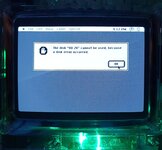 ...and to give another data point, I also tried a @tashtari TashTwenty, with similar result: 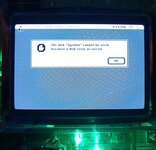 So, I think we have definitive proof that accelerators (certainly the Total Systems types and variants) don't mix well with "HD20" devices... | |
Posted by: JC8080 on 2022-08-04 15:16:25So, I think we have definitive proof that accelerators (certainly the Total Systems types and variants) don't mix well with "HD20" devices...Thanks for checking, that's good info to have documented. | |
Posted by: Tashtari on 2022-08-04 16:54:34"wait state changed to 4"I'm just guessing, but this could be an error saying the phase lines were changed to state 4, which indicates that the host is trying to force the drive to reset, which is never an indication of anything good in the DCD/HD20 interface. Maybe something with the accelerator is causing the IWM to clock too fast and they've compensated for it on the floppy interface but not the HD20 interface? | |
Posted by: Phipli on 2022-08-04 18:54:11In an attempt to end any speculation...Just one thing - booting without the extension doesn't stop the accelerator usually. If you check tattletech you might find it still reports an 030 (but at perhaps half the speed). On mine you disable the accelerator by powering on while depressing the interrupt button. You may have accidentally indicated that the accelerators /do work/, at low speed. | |
Posted by: mg.man on 2022-08-04 23:35:13the host is trying to force the drive to reset -- or -- the accelerator is causing the IWM to clock too fastI believe I mentioned... the HD20 does make a valiant attempt to come online - you can hear the mechanism re-/trying to load, and the LED does flicker as if there is activity before the SE throws the error. There is a similar "pause" using the TashTwenty, but with no LED, it's hard to know what's going on. I can't recall, is there a "debug" (logging) mode on the TT? 🤔 booting without the extension doesn't stop the accelerator usually.I'll check later, but from memory, I *think* it reports as a 68020, not '030. | |
Posted by: Tashtari on 2022-08-05 06:57:18is there a "debug" (logging) mode on the TT? 🤔Nope, afraid not. If you have a PIC programmer and a spare PIC16F1825, I can hook you up with my cobbled-together DCD protocol analyzer, though. Also, forgot this before, but the fact that it knows what the volume name is means some communication must be taking place. Maybe the clock isn't totally wrong but is sufficiently disrupted that the checksum fails sometimes - that will cause the Mac to go into phase 4 in an attempt to set things right. I don't know what phase 4 looks like on a real HD20 but it wouldn't surprise me to learn that it goes through its powerup cycle again and thusly unload/reload the heads. | |
Posted by: mg.man on 2022-08-05 08:00:36If you have a PIC programmer and a spare PIC16F1825I do... (still haven't gotten 'round to moving my TTs over to '1704s - maybe this is a good excuse to pull one of the 1825s 🤔 ) I don't know what phase 4 looks like on a real HD20 but it wouldn't surprise me to learn that it goes through its powerup cycle again and thusly unload/reload the heads.That does sound like the behaviour I was seeing... the HD20 was definitely straining to do "something"... | |
Posted by: mg.man on 2022-08-05 08:06:43I'll check later, but from memory, I *think* it reports as a 68020, not '030. The below is booted with System 7.1 / Extensions Off ("shift" held down) -- how's this for "odd"? 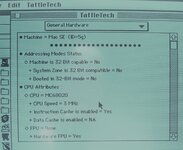 | |
| Posted by: mg.man on 2022-08-05 08:07:22 Oh, and yes, I can access the TT (and HD20) in this "mode"... | |
| Posted by: Skate323k137 on 2022-08-05 09:11:32 Odd is right! My MicroMac accelerator will allow HD20 access when booted with extensions off, but it does the READ STATE CHANGE 4 or such error if the accelerator is enabled. I could check TattleTech if someone is curious what it reports as with extensions disabled. | |
| 1 |