68kMLA Classic Interface
This is a version of the 68kMLA forums for viewing on your favorite old mac. Visitors on modern platforms may prefer the main site.
| Click here to select a new forum. | |
| [C Programming] Cursed INIT making | |
| Posted by: Mu0n on 2022-07-29 07:41:35 I'm reading this extensive mactech article: MacTech | The journal of Apple technology.in the hopes of doing a cursed booting INIT. This time, I'm targeting ease of use and focusing on System 6 only, maybe add System 7 later. But my idea would be slightly funnier in System 6. I want to play a properly formatted snd resource that mimicks either the Win95 or Win98se startup sound. Seems like there's some resource wrangling that has to occur to make sure your INIT type code doesn't get shoved around by other things and I'm not sure if the proper strategy is to play it right away (while the icon would appear at the 'Welcome to Macintosh' sequence) or wait a bit later when the desktop graphics is loaded up using some timer callback routine. Bonus points: display a full screen mockup screenshot of windows 95/98 that can be dismissed with a click. The Cursed System 6 boot. I got the idea from 'Macintosh Programming Secrets 1988' with this passage: 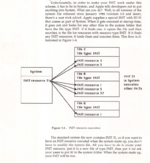 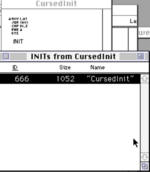 | |
| Posted by: cheesestraws on 2022-07-29 08:05:08 Just pop it in an INIT file and stick it in the right place. Don't worry about resource wrangling, if you try to do anything too clever it'll break, because under System 7, INITs aren't loaded by INIT 31 but by boot 3 anyway. So just do what Disinfectant does, and if you want your INIT to load early, give it an early-alphabetical name. Under System 7, 'scri' files are loaded before INIT files, but I don't know if that works under System 6, never tried it. | |
| Posted by: Crutch on 2022-07-29 09:48:18 If you want it to just happen at boot time, yeah do what @cheesestraws says (always good advice). If you want it to happen later, it’s still really easy because playing an arbitrary sound is one thing the Notification Manager can do out of the box. Write an INIT to load and detach your ’snd ‘ resource (_DetachResource) then use NMInstall() to install an NMRec including your sound handle in the nmSound field. You’re done. If you want to put up a splash screen, you can also install an nmResp callback and have it put up a window and wait for a click. (You will need to set up an A5 world to do this.) | |
| Posted by: cheesestraws on 2022-07-29 10:00:22 Agreed: Notification Manager is a really handy thing to get your head around. A very flexible bit of the OS. | |
| Posted by: Mu0n on 2022-07-29 13:26:27 After a bit of scrounging for old source files, I successfully: 1) ran code that uses the Sound Driver to play a .snd resource (piano sample from Studio Session) that I pack in a regular application. hear it fine in System 6 in mini-vMac when I launch the app. 2) prepared my other INIT project and pack it with the same .snd resource in the .rsrc file 3) plant a SysBeep(few seconds), compile the INIT into a bootable volume's sys folder and ran it and heard it in mini-vMac. safeguarding A4 (or not) before and restoring it later has no consequence, of course. I couldn't: 1) play a short 12000 byte snd (piano sample from Studio Session) in the boot sequence of the init. I can hear the sound driver attempt something with a very short pop, but no full sound 2) play the larger sound (windows 95 start chime) I really want that's about 60,000 bytes (is that too much? Must I break it down?). Should I keep the file outside of the INIT? Both of the snd resources play in ResEdit, in SimplePlayer and various places. My methodology to get the windows 95 chime was to save the wav from the net, open it up in Audacity, convert to 11kHz, 8-bit PCM and exporting to Apple AIFF. When I downgraded from 22 kHz to 11kHz, the sound was 2x too slow so I sped it up in Audacity before saving as. I imported it in my virtual volume in Basilisk II from a mounted host machine C drive right in the mac environment. I used an obscure utility to transform the data-fork only AIFF file I produced to a mac snd file, which could be heard just fine by double clicking on it afterwards. | |
| Posted by: cheesestraws on 2022-07-29 13:30:23 These kinds of questions are almost impossible to answer without the source code that isn't working 🙂. | |
Posted by: Mu0n on 2022-07-29 13:35:12#define kSound 129 The buffer padding anti-pop trickery was swiped somewhere a long time ago. I can't find the source of that trick for now... edit - I know that SysBeep is there and StartSound is commented out, I just forgot to change it back. It doesn't work either when it's properly changed back. | |
| Posted by: Crutch on 2022-07-29 13:40:04 You aren't checking to ensure GetResource actually got the resource. Check for a NULL value in sndH and check ResError. I don't think System 6 will let you get 66k of RAM at INIT time. Your resource is probably failing to load, so StartSound plays an empty handle, you get pops then nothing. (Tip: always always check that what GetResource returns isn't NULL.) There is a way to get a bigger memory allocation at INIT time. I think you need to put something in a special resource ... or is that only under System 7 ... hmmmm try digging around in the tech notes. It's there somewhere. | |
| Posted by: Mu0n on 2022-07-29 13:40:37 I have to force a delay, don't I? I thought I was playing the sound synchronously... edit - yeah, the piano sound works now! just had to add: while(!SoundDone()); StopSound(); | |
| Posted by: Mu0n on 2022-07-29 13:44:45 and the w95 sound works! but it's 2x too fast......I should have trusted Audacity. | |
Posted by: Mu0n on 2022-07-29 13:48:28You aren't checking to ensure GetResource actually got the resource. Check for a NULL value in sndH and check ResError.Living dangerously when prototyping! But yeah, don't worry, I checked that something was loaded in the debugger, that was my first reflex. | |
| Posted by: Crutch on 2022-07-29 14:04:32 Ooops I thought of that but misread your call to StartSound! Just change your “nil” to -1L and it will play synchronously. No need to wait for SoundDone. | |
| Posted by: Mu0n on 2022-07-29 18:56:41 New roadblock. I've taken ALL the precautions to make sure my PICT is exactly 512x342. My INIT will scale it up weirdly and show it thus: 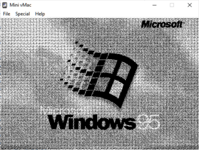 and when I'm all booted up seconds later, I've run another normal app that opens and draws the exact same PICT resource (I just duplicated it across .rsrc files between the two projects) and it shows as it should: 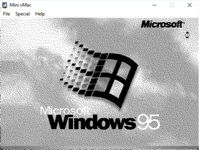 Almost as if the same drawing operations were slightly cramped during INIT. That makes no sense to me. Here's the revised INIT source code: #define kSound 130
#define kClick 740
#define kSndOffset 36
#include <Sound.h>
#include <SetUpA4.h>
#include <OSUtils.h>
Handle myINITHandle;
void main(void)
{
Ptr myInitPtr, myPtr;
FFSynthPtr sndPtr;
Rect r;
PicHandle bootupPicture, desktopPicture;
Handle tempH,sndH;
long bufferSize,addSize;
WindowPtr blockTheScreen;
SetRect(&r,0,0,512,342);
// First cursed image during bootup
FillRect(&r, white);
bootupPicture = (PicHandle)GetResource('PICT',128);
if(bootupPicture != NULL)
{
HLock((Handle)bootupPicture);
DrawPicture(bootupPicture, &(**bootupPicture).picFrame);
HUnlock((Handle)bootupPicture);
ReleaseResource((Handle)bootupPicture);
}
Delay(240,nil); //wait 4 seconds
desktopPicture = (PicHandle)GetResource('PICT',129);
if(desktopPicture != NULL)
{
HLock((Handle)desktopPicture);
FillRect(&r, white);
DrawPicture(desktopPicture, &(**desktopPicture).picFrame);
HUnlock((Handle)desktopPicture);
ReleaseResource((Handle)desktopPicture);
}
sndH = GetResource('snd ', kSound);
if(sndH != NULL)
{
bufferSize = GetHandleSize(sndH) - kSndOffset;
if(bufferSize % kClick)
addSize = (bufferSize/kClick + 1) * kClick -bufferSize;
bufferSize += addSize;
tempH = NewHandleClear(addSize);
HandAndHand(tempH,sndH);
HLock((Handle)sndH);
myPtr = *sndH + kSndOffset/4;
sndPtr = (FFSynthPtr)myPtr;
sndPtr->mode = ffMode;
sndPtr->count = FixRatio(1,2);
StartSound(sndPtr, bufferSize, nil);
HUnlock(sndH);
}
while(!SoundDone());
StopSound();
// Expect a click to end
while(!Button());
}and here's the simple load-a-PICT-then-draw-it code: #include <Quickdraw.h>
void main(void)
{
Rect r;
PicHandle myPicHandle;
InitGraf(&qd.thePort);
InitWindows();
HideMyMenuBar();
WholeScreen(white,false);
SetRect(&r,0,0,512,342);
FillRect(&r, white);
myPicHandle = (PicHandle)GetResource('PICT',128);
if(myPicHandle != NULL)
{
HLock((Handle)myPicHandle);
DrawPicture(myPicHandle, &(**myPicHandle).picFrame);
HUnlock((Handle)myPicHandle);
}
DisposeHandle((Handle)myPicHandle);
while(!Button());
ShowMyMenuBar();
}WholeScreen() is a function I made some time ago: WindowPtr WholeScreen(Pattern thePat, Boolean wantMenus)
{
WindowPtr window;
Rect r;
r=qd.screenBits.bounds;
r.top=kMenuBarHeight;
if(wantMenus) window=NewWindow(nil,&r,nil,true,plainDBox,kMoveToFront,false,0);
else window=NewWindow(nil,&(qd.screenBits.bounds),nil,true,plainDBox,kMoveToFront,false,0);
SetPort(window);
FillRect(&(window->portRect), thePat);
return window;
}and HideMyMenuBar is a classic: void HideMyMenuBar(void)
{
Rect rcMBar;
short *setMBarHeight;
setMBarHeight=(short *)0x0BAA;
if ( gs_hrgnMBar == 0L) {
gs_dyMBar = GetMBarHeight();
*setMBarHeight=0;
rcMBar = qd.screenBits.bounds;
rcMBar.bottom = rcMBar.top + gs_dyMBar;
gs_hrgnMBar = NewRgn();
RectRgn( gs_hrgnMBar, &rcMBar );
UnionRgn( GetGrayRgn(), gs_hrgnMBar, GetGrayRgn() );
PaintOne(nil,gs_hrgnMBar);
}
} | |
| Posted by: Mu0n on 2022-07-29 18:59:22 One of the things I explored is: should I initialize a window before drawing to it in the INIT? But I get messages like these (coprocessor not installed... ??) 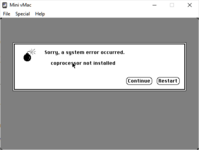 | |
| Posted by: Mu0n on 2022-07-29 19:02:08 On a hunch, I decided to comment out all the DrawPicture calls and kept only the white pattern FillRect and I got this: 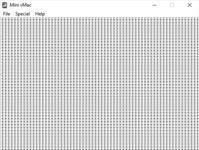 HMMMM | |
| Posted by: Crutch on 2022-07-29 19:09:45 QuickDraw isn’t initialized for your INIT. Did you try calling InitGraf? Similarly, opening a window will crash because you didn’t call InitWindows. (You can call InitWindows at INIT time, it will however wipe out any previously displayed INIT icons.) | |
| Posted by: Mu0n on 2022-07-29 19:15:05 Yes, I tried the trio of InitGraf, InitWindows and doing a NewWindow, got the coprocessor error. I just tried blanking out the screen 1 char at a time and I'm going sideways now: 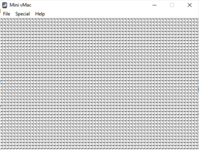 | |
| Posted by: Mu0n on 2022-07-29 19:18:31 InitGraf alone: 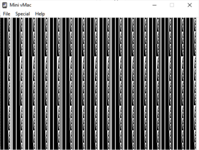 | |
| Posted by: Crutch on 2022-07-29 19:49:30 Yeah but don’t forget you need to set up your A5 world first. I think you mentioned you read this, which explains how: http://preserve.mactech.com/articles/mactech/Vol.05/05.10/INITinC/index.html Just do this before doing anything else: asm { move.L CurrentA5,A5 } Come to think of it I think you then actually don’t need to call InitGraf (but it probably doesn’t hurt, as long as you’ve set your A5). Sorry it’s been a while … | |
| Posted by: Crutch on 2022-07-29 19:50:17 You might also enjoy this TN: https://512pixels.net/wp-content/uploads/S3/Technical Note PT35 - Stand-Alone Code, ad nauseam.pdf | |
| 1 > |