68kMLA Classic Interface
This is a version of the 68kMLA forums for viewing on your favorite old mac. Visitors on modern platforms may prefer the main site.
| Click here to select a new forum. | |
| Appletalk wiring | |
| Posted by: Wawavoun on 2022-07-14 10:47:55 Hello, I have a Mac Plus and a Powerbook 100 and hope to connect them via Apple network. I got a lot of cables from my uncle and see two possibilities : - try to use a Phonenet system with two small boxes and a phone cable but I miss the terminators so between what pins of the rj11 should I connect the 120 ohms resistor ? - I have also found a 3 pins minidin 4 meters cable and I am wondering if I can simply put this cable into the minidin printer connectors of both computers and get the network working ? Thanks for help on that topics. Philippe | |
| Posted by: LaPorta on 2022-07-14 10:57:50 If you use PhoneNet, make sure you have an RJ-11 cable with all four wires, not just two. The terminators are really not needed; you will be fine without them. | |
| Posted by: cheesestraws on 2022-07-14 11:01:07 Yeah, over short distances I wouldn't worry about the terminators at all. It's not like SCSI where it's vital. You can't just wedge the 3-pin din between two machines in the serial port - it won't fit. But you can use a standard Apple printer cable, the 8-pin one, between two computers and that'll work too (so long as it's actually a mac printer cable and not an identical-looking cable which isn't, thankyou strange Internet vendors of cables...) | |
| Posted by: Wawavoun on 2022-07-14 14:10:27 Thanks. Phonenet with terminators and a 2 m lenght cable works well ! | |
| Posted by: Wawavoun on 2022-07-15 12:53:15 I would say WITHOUT terminators ! | |
| Posted by: cheesestraws on 2022-07-15 12:56:36 Glad to hear it 🙂 | |
| Posted by: theirongiant on 2024-03-19 16:57:13 Just what exactly IS an Apple printer cable, and how does the wiring differ from most random eight pin mini DIN cables sold today? I bought one of those from CablesToGo to connect two old Macs together locally, and it did not work. | |
| Posted by: NJRoadfan on 2024-03-19 18:02:26 Apple printer cable has a mini-DIN 8-pin on both ends. Pins 1-2, 3-5, and 6-8 are flipped. Your random cable has all pins wired straight through. So pin 1 one end is wired to pin 1 on the other end | |
Posted by: theirongiant on 2024-03-19 18:11:14Apple printer cable has a mini-DIN 8-pin on both ends. Pins 1-2, 3-5, and 6-8 are flipped. Thanks! I have a Mac SE and the MacTest SE application. It is asking me to connect a serial loopback cable. How does the wiring of a serial loop back cable different from a printer cable? | |
| Posted by: NJRoadfan on 2024-03-19 18:38:22 A loopback "cable" really isn't a cable. Its a pigtail connector that "loops back" the above pairs in the connector for testing. The Apple printer cable is technically a crossover cable. | |
| Posted by: Mk.558 on 2024-03-19 18:51:51 An Apple "printer cable" is shown at the bottom of this image. 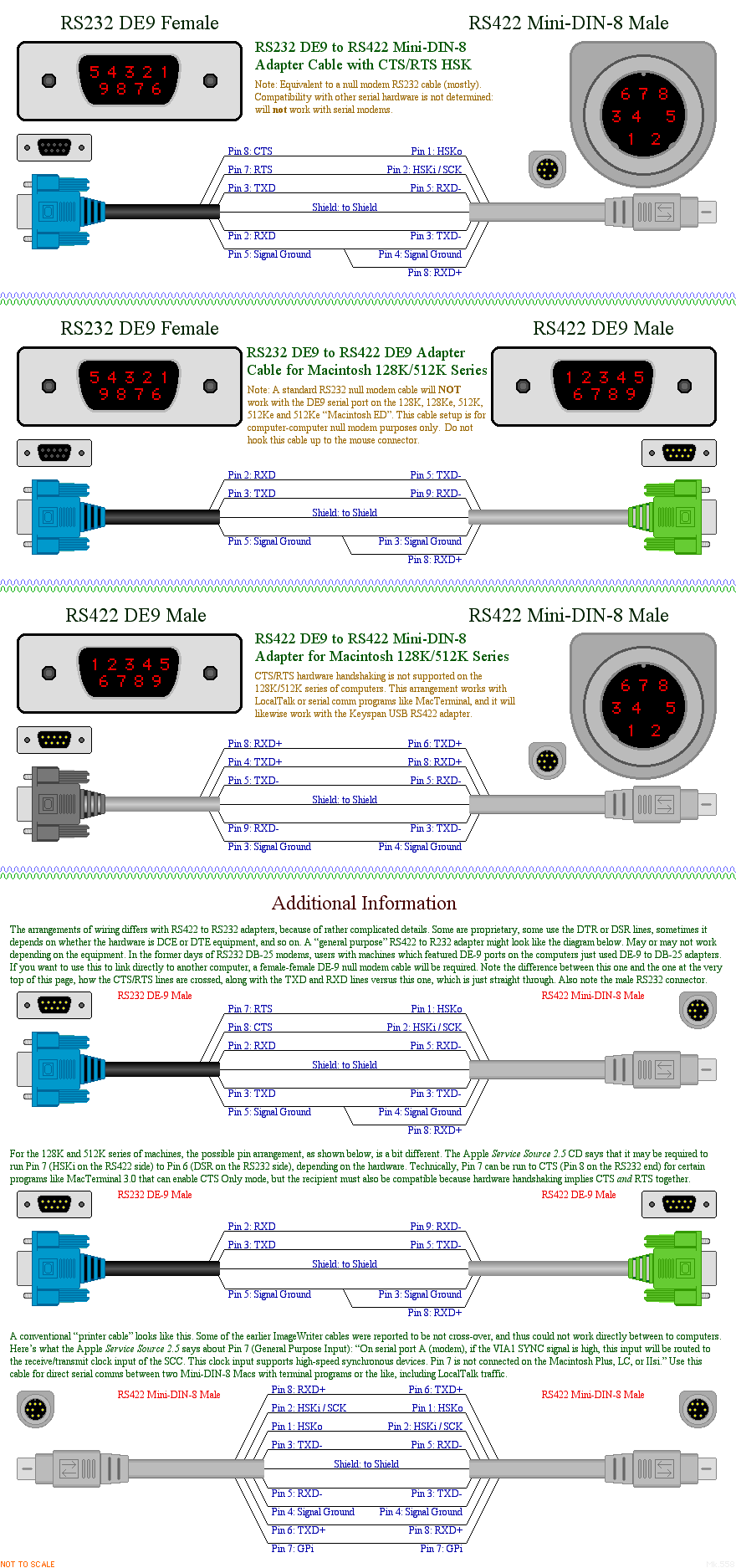 | |
| 1 |