68kMLA Classic Interface
This is a version of the 68kMLA forums for viewing on your favorite old mac. Visitors on modern platforms may prefer the main site.
| Click here to select a new forum. | |
| TAM no display | |
| Posted by: bibilit on 2016-05-08 23:38:03 A friend bring me his TAM yesterday to have a look at it. He paid huge money for it, being complete including all items, cardboards and accessories. Unfortunately, the display is solid grey with nothing else. The chime is present, the hard disk seems to be working, and i can even ear what's look like and error message at the end of the process. So far i have removed the Ram and cache for a test, pressed down the Cuda reset switch but still the same. I am thinking that the problem is related with the screen, the solid grey being only the proof that the backlight is working. Any idea ? The next step will be to test an external display using the PCI slot, what do you think ? | |
| Posted by: galgot on 2016-05-09 03:30:53 By the title, though you had bought a TAM mate ... 🙂 Or maybe could be the inverter ? Think these screens are the same as the 3400c/Kangas ones. | |
| Posted by: Byrd on 2016-05-09 03:48:54 Hi, is the display a single grey shade or pixellated grey as what you get before the "Happy Mac" icon displays at startup? A single grey screen would suggest failure of the LCD panel/loose connection - rectified potentially by a new panel (yes same from a 3400 or Kanga). Another possible failure is the analogue to digital breakout board - this basically converts the TAM/6500 board anlogue video out to LVDS signal to drive an LCD. My TAM had the same issue, but was met with artefacts first then a plain grey screen. To start with though, I'd disconnect power + PRAM battery and leave it along for 48 hours. Once started up, reset the PRAM. External video out may or may not work with the internal LCD connected. JB | |
| Posted by: bibilit on 2016-05-09 04:22:20 Hi, @ Gael, no not mine, but happy to have it for a while at home, yes same screen as Kanga/G3 (and keyboard is the same as Pwb 5300) @ Byrd, screen is plain grey 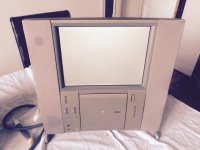 Can also be a problem with the small orange ribbon ? | |
| Posted by: Byrd on 2016-05-09 16:32:09 So it sounds like the TAM operates and functions as it should, but with a faulty display ... see if you can elicit any video by reseating those cables you have access to, but I'd suspect it's take apart time (which isn't that bad a job, the scariest part being to pry/gently bend the top perforated plastic piece off the top). Reseat video cables, I'd also clean them with electrical contact cleaning spray. | |
| Posted by: Macdrone on 2016-05-09 17:05:52 there are a bunch of cap cans on all those boards if cable reseating does not work. | |
| Posted by: Byrd on 2016-05-09 22:22:59 For a 1997 Mac (and a model which hasn't had bad caps documented) I wouldn't be replacing caps - once instance where cap repair should be done as a last resort. It's an LCD issue. | |
| Posted by: bibilit on 2016-05-09 23:12:34 Some more tests yesterday evening. using a PCI riser (one from a 6400) was able to hook a PCI video card, but out of the two LCD i have, one says resolution is out of range while the other says something about analog not supported... so no dice here. Looking closely at the TAM screen, before the display turns to plain grey, i can see some artefacts (thin lines) for a very quick moment. | |
| Posted by: bibilit on 2016-05-13 14:09:04 Well, happy ending for the TAM, many thanks to Galgot who supplied a tested screen from his spares fleet, the Tam is working again: 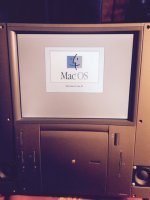 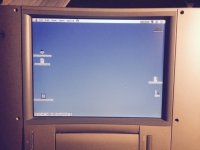 a bit nerve wrecking to remove then put all back together... | |
| Posted by: Macdrone on 2016-05-13 14:12:19 So the screen went. Had not seen that yet. I hate my TAM as its brittle so things just feel like they are going to break. | |
| Posted by: galgot on 2016-05-14 01:17:48 Nice ! Good to see one dead 3400c could be of some help 🙂 | |
| Posted by: techknight on 2016-05-14 17:26:46 its the little fuse on the LCD panel itself that causes the white screen. | |
| Posted by: maceffects on 2016-05-22 17:40:21 Have you checked the PRAM battery voltage? Video issues are the number one symptom on the TAM for battery issues. | |
| Posted by: Macdrone on 2016-05-22 23:52:56 The new screen fixed the issue for him so I am sure its not the pram battery. | |
| Posted by: bibilit on 2016-05-23 02:40:01 Yes, the new screen solved the issue, battery was flat anyway, and didn't replaced it. | |
| Posted by: aplmak on 2016-05-23 07:48:24 I hesitate on taking TAM's apart... The plastic on many of them just crumbles... even by using no force... It's such a delicate machine... As far as caps go.. it's easier to replace them before they leak and cause trace problems and reek havoc on other ic's... I am sure Techknight would agree... if I remember correct many of them are 47uf 16v for the most part.. on the logic board. I don't trust those little cans... they cause so much damage.. Granted these caps may be better quality then the ones before they still don't last forever... and by this time their lifeline is getting thinner... If you've got it apart already why not do it? | |
Posted by: bibilit on 2016-05-23 10:40:51If you've got it apart already why not do it?If it was mine, probably...i agree with you, plastic is weak, two of the locking tabs holding back and front casings just broke down (and i didn't used much force) Again, wasn't mine and was a bit nervous about such a rare computer (In France only 600 units were sold...) and it was the very first time i can have a look at one for real. But IIRC capacitors can be replaced without removing the Logic Board, the back is large enough. | |
| Posted by: aplmak on 2016-05-23 11:13:05 Your right!! I was in fact going to do some on mine just with the back cover off... You can get to them pretty much! And because they haven't leaked you don't really have to clean the board up from electrolytic fluid all over the place... so it's the ideal time to do it... and throw some ceramic or tantalums in there... | |
| 1 |