68kMLA Classic Interface
This is a version of the 68kMLA forums for viewing on your favorite old mac. Visitors on modern platforms may prefer the main site.
| Click here to select a new forum. | |
| Classic II Logic board issue | |
| Posted by: MegaImg on 2022-06-20 09:54:22 I have in my hand 2 logic board of Classic II with the blue wire on them, I alredy recap both of them and clean them....but when I try to test them on my working unit, black screen, no bomb but costan energizing of the speaker. Example Some Kind of sound........silent.....sound.... Any ideas of what is the issue with this logic boards....maybe someone had the same behavior before..... Thanks | |
| Posted by: joshc on 2022-06-20 15:20:10 Has the DFAC/ASC (Apple sound chip) been cleaned and traces checked? Can you post some photos of the boards? | |
Posted by: MegaImg on 2022-06-20 17:51:26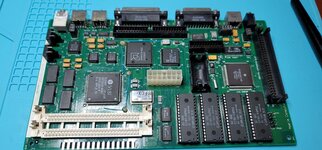 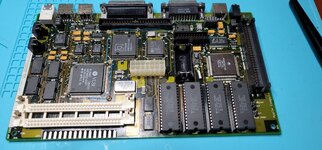 | |
Posted by: MegaImg on 2022-06-20 17:54:11Has the DFAC/ASC (Apple sound chip) been cleaned and traces checked?Added the photos... no damage traces that I can tell.... Customer don’t know if the boards work neither....so trying to figure it out was wrong with them. | |
| Posted by: jajan547 on 2022-06-20 22:23:49 Two things the RAM and Sound Chip areas can be greatly affected by leaking caps even on a clean board a trace can be bad. You say both boards have the same black screen issue? Also you're positive this 100% works with a good board but only experience this with these two boards? | |
Posted by: MegaImg on 2022-06-20 22:47:08Two things the RAM and Sound Chip areas can be greatly affected by leaking caps even on a clean board a trace can be bad. You say both boards have the same black screen issue? Also you're positive this 100% works with a good board but only experience this with these two boards?The tested the memory of my working board in both logic board. So again, my board with memory work great...this 2 logicboard, same behavior.... | |
| Posted by: jajan547 on 2022-06-20 22:49:11 I mean the on board ram and the video chip not ram simms | |
| Posted by: joshc on 2022-06-20 23:26:08 Those boards do indeed look very clean. Let's not make assumptions about what might or might not be good or bad, you'll need to do some actual diagnosis using the schematics. The only obvious thing I noticed on the second pic, two legs of the 68030 could be touching - check that isn't the case. 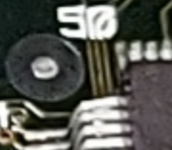 What happens if you press the reset button with these logic boards? Does it interrupt the sound from the speaker? Also, what hapens if you plug in headphones, can you hear anything different from that? Classic II schematics attached. Page 8 has the pinout for the DFAC (Apple sound chip) - things there have to check out because the DFAC is part of the startup circuit. Check if the RESET line is stuck low, if it is, you won't get any video at all. The other important part to check is U10 (Egret) - a Motorola microcontroller with Apple code that is responsible for some housekeeping startup/shutdown routines on these machines. It is shown on page 1 of the schematics. The issue has been covered before, see here: Macintosh Classic II blank screen after recapI just acquired a mint condition Classic II. It was described that it shows only checkerboard pattern. When I got it, it powered on and it showed checkerboard without chime. The HD also starts. Then I recapped it, but now the screen remains blank, also without chime. The logic board was in...
 68kmla.org
They had to pull and resolder the Egret before the RESET line would come unstuck. I've had to do this before on Classic II boards as well. The other thing I'd suggest, using the schematics, is lots and lots of checking of traces and vias - if any are bad, it could lead to the problem. | |
| Posted by: imactheknife on 2022-06-21 05:18:33 If you have any luck, please let me know. I have same board. I have lines on screen which are better after recap, static in speakers. Dim screen though.. | |
| Posted by: bibilit on 2022-06-21 05:42:00 Classic II boards... often the Egret is contaminated (i agree with joshc) and won't work without a thorough removal and cleaning. | |
Posted by: jajan547 on 2022-06-21 05:50:35Those boards do indeed look very clean. Let's not make assumptions about what might or might not be good or bad, you'll need to do some actual diagnosis using the schematics.I agree with this I didn’t mean the on board RAM or DFAC were necessarily bad but more so that cap goo could’ve gotten under them as they are closest to that cluster. Absolutely agree that the EGRET can cause issues I had a similar situation in an LC520 board, the computer would give similar results so even after recap I removed the EGRET, removed old solder with some wick, applied new solder and the EGRET. I’ve had no issues since. | |
| Posted by: MegaImg on 2022-06-21 08:53:19 Check the CPU pin, none are touching, maybe artifac of the photo....One of the board Re-Solder the EGRET because it was contamidated but I test continuity before and for me it was working....but just in case. Remove the reset and interrupt push siwtches and deoxit them, one of them look like it was stock in close mode....so will test soon, will let you know! | |
Posted by: imactheknife on 2022-06-21 09:26:53Check the CPU pin, none are touching, maybe artifac of the photo....One of the board Re-Solder the EGRET because it was contamidated but I test continuity before and for me it was working....but just in case. Remove the reset and interrupt push siwtches and deoxit them, one of them look like it was stock in close mode....so will test soon, will let you know!How do you check continuity of egret etc. I have multimeter, just dont know the process of that and check capacitors continuity.. thanks in advance, mark | |
Posted by: MegaImg on 2022-06-21 09:35:48How do you check continuity of egret etc. I have multimeter, just dont know the process of that and check capacitors continuity.. thanks in advance, markCheck from the IC pins to the PCB BIAS or end point in the schematics.... | |
| Posted by: MegaImg on 2022-07-03 19:44:35 Ok no go yet, I want to check if the ROMS are working or maybe burn new ones....First, any place that I can find the ROMS for this logicboard and second do you guys know what EPROM is compatible (27C010 ?) with it...Thanks in advance! Trying to read the ROMS with my TL866II-Plus without luck...Any advice... | |
| Posted by: dochilli on 2022-07-05 02:45:33 ROM download: https://www.macintoshrepository.org/7038-all-macintosh-roms-68k-ppc- Sometimes must be splitted up into 2 or 4 Files. The 2 ROM version of Classic II can use 2 27c400 EPROMs (100ns or faster; 150ns won't work). The 4 ROM version can use 4 27c010's (AFAIK). | |
| 1 |