68kMLA Classic Interface
This is a version of the 68kMLA forums for viewing on your favorite old mac. Visitors on modern platforms may prefer the main site.
| Click here to select a new forum. | |
| Reviving a PowerBook 165c | |
| Posted by: cplater on 2022-06-06 11:22:13 I recently purchased a PowerBook 165c that did not include a power adapter. I had a PB100 series charger in my stockpile, so I took a chance. Unfortunately, the computer would not boot w/ the charger I had on hand. I went to eBay and purchased a new power adapter, but it didn't work either. I opened up the PowerBook 165c, and I don't see anything of concern (corrosion, battery leakage, etc). I'm looking for suggestions on where to start troubleshooting this computer to bring it back to life. | |
| Posted by: desertrout on 2022-06-06 13:34:43 Congrats on the acquisition! Which adapter did you get, and did you test voltages (sometimes their capacitors fail and they fail or go way overspec)? Is the machine doing anything at all when you try to boot? If the adapter is good (should read ~7.8V... needs to be at least 3.0A, original was 24W) and it's still not showing any signs of life you could try the following things: - try booting without the battery installed - doing a power manager reset (with the battery removed and the adapter unplugged, use a paper clip (or two) to press *and hold* the interrupt and reset buttons on the back of the case for 10 seconds, then plug it back in and try to boot - if these don't work, there's a chance the 5A fuse inside has blown, but it's an easy replacement That's a start, keep us posted! | |
| Posted by: croissantking on 2022-06-07 06:32:06 I recently revived a dead PowerBook 145. The problem turned out to be the SMD fuse near the battery terminals. Once I replaced that, it booted right up. | |
| Posted by: cplater on 2022-06-07 07:00:22 I tried: 1) Booting without the battery -- no luck 🙁 2) PMU reset - held interrupt and reset for 25 seconds (w/o power), waited 10 minutes. Plugged in power, and no luck🙁 I did test the power adapters. My Apple adapter (the gray power brick) shows 0V, but the replacement I purchased from eBay does show ~7.8V I looked at the board, but could not determine where the fuse might be located. | |
| Posted by: croissantking on 2022-06-07 08:14:40 It is a white component labelled F1, right next to where the rechargeable battery contacts are located. Stick a multimeter on it and see if you get continuity. | |
| Posted by: desertrout on 2022-06-07 10:05:47 Yup, right here (in the purple box): 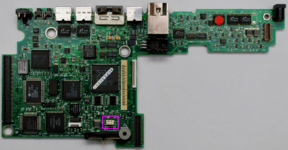 It may be an SMD version like shown here, but I've also seen removable versions. | |
Posted by: croissantking on 2022-06-07 10:07:24It may be an SMD version like shown here, but I've also seen removable versions.My PB520c has a removable fuse, but my PB145 has an SMD. I temporarily desoldered the battery contacts to get better access to it. | |
| Posted by: alk0v on 2022-12-04 04:30:57 Hello. I have similar problem and broken fuse. Is it influent to starting from power supply only without battery? As I see its placed in the battery circuit and shouldn influent to starting directly from power supply. Regards. | |
| Posted by: alk0v on 2022-12-04 04:56:07 I also found damaged D15 diode on the back side of the main PCB. Marked like KW. 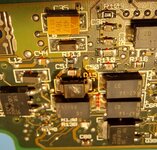 | |
Posted by: nacayosi on 2022-12-04 07:09:01I also found damaged D15 diode on the back side of the main PCB. Marked like KW.I have replaced it by dip-type Zener diode 13V 0.5W and recovered the PB180's mainboard. | |
Posted by: alk0v on 2022-12-04 08:15:23I have replaced it by dip-type Zener diode 13V 0.5W and recovered the PB180's mainboard.Is it DDZ13B SOD-123 Zener diode 13V±2.5%, Izt=10mA, 500mW? I found it by partnumber, but SOD-123 is smalled package. And I dont understand why they used 13v zener diode because power source is 7.5v. | |
Posted by: nacayosi on 2022-12-04 21:17:59Is it DDZ13B SOD-123 Zener diode 13V±2.5%, Izt=10mA, 500mW?I got the info from below link. It should be DDZ13B. I am not EE guy, no idea for the spec. of diode. 
SOLVED: Blown Capacitor at point D15 on Logic Board - PowerBook 180afischer15, just checked your images again. The "KM" you referred to is actually a "KW" That marking and the D15 identify your component as a DDZ13B SURFACE MOUNT PRECISION ZENER DIODE. The part is available at places like this. The datasheet containing all the specs for the diode is...
 www.ifixit.com
| |
| 1 |