68kMLA Classic Interface
This is a version of the 68kMLA forums for viewing on your favorite old mac. Visitors on modern platforms may prefer the main site.
| Click here to select a new forum. | |
| Do Not Have Enough Access Privileges Error - Mac OS 9.2.2 | |
| Posted by: Concorde1993 on 2022-06-05 18:57:25 After reviving my IIfx and ThinkPad 600E, it's now time to revive my B&W G3, which actually houses a 400MHz G4 board (w. PCI graphics). In the 10+ years that I've owned this computer, it's always had two problems - the Zip drive does nothing (it isn't even recognized by the system), and the system will not allow me access to certain control panels (Energy Saver, Memory, Startup Disk to name a few). When I attempt to open these control panels, I get the "Do not have enough access privileges" error. I've tried to counter this error by clicking "Get Info" for the HD and changing the privileges for all users to "Read/Write." When I do this, I'm greeted with a "Type -50" error message. I know I can always clear the drive and reinstall the OS, but since I have about 2GB worth of programs on it, I'd like to see if I can resolve this privileges error problem before completely starting fresh. The drive itself (a Quantum Fireball 4GB) is in good shape and the OS otherwise runs fine with 1GB of RAM. | |
| Posted by: MOS8_030 on 2022-06-05 19:48:11 Have you tried running something like Norton disk doctor? | |
| Posted by: Concorde1993 on 2022-06-05 23:23:59 How would Norton Disk Doctor remove an Access Privilege error? | |
| Posted by: MOS8_030 on 2022-06-06 08:25:53 There's probably some damage to the directory or the desktop file or some bad blocks. You can run the Apple Disk First Aid, it may fix it but Norton is a more comprehensive. The zip drive issue may be the extension is damaged or missing. | |
| Posted by: Concorde1993 on 2022-06-06 11:10:08 Disk First Aid found nothing wrong with the drive. I'll try Norton, but I doubt it'll do anything. | |
| Posted by: Concorde1993 on 2022-06-06 21:22:04 Unfortunately, I don't have a copy of Norton Disk Utilities that will run on OS 9 (Version 3.5 is slightly too old to run on 9.2.2). I do have Anti-Virus 8.0, and as expected, nothing was detected on the HD. I'll need to find either Version 5.0, 6.0 or 7.0, unless someone else has another suggestion on how to deal with this privileges error? | |
| Posted by: jeremywork on 2022-06-06 21:45:43 Alsoft DiskWarrior provides a similar function and works very well. DiskWarrior 3 - Macintosh GardenDiskWarrior 3 for OSX and DiskWarrior 2.1.1 for MacOS 9. Alsoft Disk Warrior has actually been around a long time and spoken of in inner circles amongst Mac engineers, but surprisingly it is nowhere near as popular as either Norton Utilities or Tech Tool Pro which is as much a shame as it is...
| |
| Posted by: Concorde1993 on 2022-06-10 15:21:39 Picked up a boxed OEM copy of Norton Utilities 8.0 locally today. Tried running Disk Doctor - it worked for a bit, then the following error message appeared: 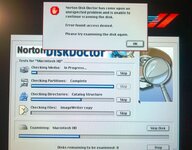 I'm guessing there's some type of admin lock on the HD. Is there a way to remove this in OS 9.2.2 without wiping the drive? The OS is not asking for any passwords other than the one I placed for my user file way back when. | |
| Posted by: beachycove on 2022-06-10 15:40:13 Have you tried a System re-installation with no wiping of the drive? You’d get an Old System Folder from which to copy necessary bits and pieces over. My first thought on reading this thread was that maybe something strange results from the primitive User facility introduced in OS9, but otherwise this is not behaviour I have seen, to my knowledge, in about 20 years of OS9 use. | |
Posted by: Concorde1993 on 2022-06-10 18:27:39Have you tried a System re-installation with no wiping of the drive?No, besides I think it might be better to start fresh. I have all of the original software discs for my OS 9 programs, and various other extensions I downloaded from the web on USB over the years, so nothing will be lost. I'll just need to find the software upgrade for 9.2.2 since my OEM discs only covers 9.0 But otherwise this is not behaviour I have seen, to my knowledge, in about 20 years of OS9 use.There's a first time for everything. 😎 | |
| Posted by: Concorde1993 on 2022-06-11 23:40:55 The saga continues with this oddball Quantum 4GB drive. Not only can I not access certain software features in OS 9.2.2, the drive will also not complete a full erase process using Disk Utility under Snow Leopard. Take a look at this error message: 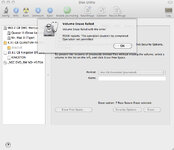 What in the actual fuck? I think I'm going to cut my losses with this drive and wait until another Quantum Fireball appears online. Or I might get an SSD. Who knows. All of my programs have been backed up to a USB key. | |
| Posted by: MOS8_030 on 2022-06-12 06:54:45 That is strange. If it's an IDE drive you might try reformatting (low level) it in a PC if you have access to one. After that, yeah, you might just let it go. | |
| Posted by: Concorde1993 on 2022-06-12 10:54:50 The drive successfully formatted the second time around under Snow Leopard. I'm going to do the reinstallation tonight and hopefully it goes without a hitch. | |
| Posted by: Concorde1993 on 2022-06-12 16:29:07 So I've hit a snag with the reinstallation process. My full OEM copy of Mac OS 9.1 worked perfectly - only thing I had to do was use the Drive Setup utility as the disc wouldn't recognize my Quantum 4GB drive without initialization. I currently have OS 9.1 running on my B&W and whatever restrictions I had under 9.2.2 are now history. Problems: When attempting to upgrade to OS 9.2.1, the installation stops halfway, and I get this error: 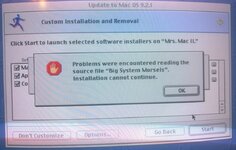 I attempted to resolve this by wiping off the disc (it was slightly dirty but nothing major), turn on virtual memory, remount the disc image using Disk Copy and installing from there, and changing extension manger settings to OS 9.1 ALL - no luck. I still get this blasted error. The disc itself is OK - I verified it with Disk First Aid - no corruption to any of the install files. The only thing I haven't done is run the disc on another CD drive. Problem #2 is my M8149 Apple ADC monitor stopped communicating with the B&W after the drive was wiped, so I had to revert back to my 13" Macintosh Color Display CRT to do the reinstall. Do these ADC monitors require a bootable OS to run? The other issue I have is under OS 9.1, the ADC monitor will get to the boot screen, then the color will go inverted, and the system will hang. The monitor worked fine with OS 9.2.2 | |
| Posted by: Concorde1993 on 2022-06-12 20:53:16 Got OS 9.2.1 to install - of course with a caveat. I copied the install file to the HD and ran the update from there. Installation was a success - no errors of any kind. The problem now is after OS 9.2.1 completes loading, the system hangs indefinitely. Doesn't matter which monitor I use, so it's not a display issue (and yes, my Apple ADC monitor works fine in 9.2.1 - strange that it can't do the same in 9.1). The only way I can get to the desktop is by disabling extensions (and I'll note that I just did the recommended install for both 9.1 and 9.2.1 - no custom job here). Thoughts? I've never had so many problems installing an OS. What's with OS 9 that makes it such a pain in the ass? | |
| Posted by: Concorde1993 on 2022-06-13 12:06:47 I guess I'm talking to myself at this point, but for those still interested in this thread, OS 9.2.1 is now working perfectly fine on the B&W and so is my Apple ADC monitor. The freezing problem was caused by some ATI extensions the installer included in the "recommended" install package. Those have been disabled for the time being. The only remaining problem I have after this entire ordeal is the programs I backed up on my USB all show up as generic PC files in OS 9.2.1 (they read perfectly fine in Snow Leopard - of course I can't open them since Classic is not supported in 10.6.8, but the programs are there nonetheless). I tried rebuilding the desktop on the USB key - that didn't fix anything. I can open picture files perfectly fine in 9.2.1, but that's about it. | |
Posted by: CC_333 on 2022-06-13 17:52:12I backed up on my USB all show up as generic PC files in OS 9.2.1Did you make sure the USB drive was formatted for HFS? It sounds like the resource forks got stripped possibly, or maybe file type and creator codes.... What do the program executables look like in ResEdit? c | |
| Posted by: Byrd on 2022-06-13 18:29:40 I'd suggest the Quantum 4GB is hosed no matter what Norton or other utilities say. I'd suggest plugging it into a PC/Mac and run a full SMART diagnostic but the drive would probably predate this feature. | |
Posted by: Concorde1993 on 2022-06-13 19:49:37Did you make sure the USB drive was formatted for HFS?The USB key was formatted in MS-DOS (FAT). Always has been. I've used it many times to transfer files from my various Macs and ThinkPads. Never had any significant problem with it until now. I guess I could reformat the drive into HFS and see what happens. What do the program executables look like in ResEdit?I don't have a copy of ResEdit for OS 9 so I don't know. I'd suggest the Quantum 4GB is hosed no matter what Norton or other utilities say.It probably is given its age. The other 4GB Quantum drive I have sounds absolutely horrendous when I first start it up. I'm slowly finishing off my remaining heard of SCSI and IDE drives. I was thinking about buying this when the time comes. | |
Posted by: Byrd on 2022-06-13 20:02:04It probably is given its age. The other 4GB Quantum drive I have sounds absolutely horrendous when I first start it up. I'm slowly finishing off my remaining heard of SCSI and IDE drives. I was thinking about buying this when the time comes. I'm still pulling IDE drives from P3, P4 systems to keep my G3-G4 Macs going, those 40 - 60- 80GB 7200RPM Seagates from these systems still run well. That OWC unit looks like a generic SATA drive with IDE adapter, you could DIY for less than half the price if keen! | |
| 1 > |