68kMLA Classic Interface
This is a version of the 68kMLA forums for viewing on your favorite old mac. Visitors on modern platforms may prefer the main site.
| Click here to select a new forum. | |
| GCC HyperDrive troubleshooting - drive doesn't spin | |
| Posted by: JC8080 on 2022-06-04 06:14:57 I recently picked up a 512ke with a 20mb internal GCC HyperDrive. Unfortunately it doesn't work, the drive doesn't spin up. I've checked and it does have power to the drive, and there is a light on the front of the drive (not on the front of the Mac, buried in the internal enclosure) that flashes a repeating pattern of 3 long and 4 or 5 short flashes. I assume the drive is stuck due to age. Has anyone had luck reviving an old drive like this? I know it's not a SCSI drive so it would be difficult to replace, I read they were IDE drives with unique connectors. Thanks. | |
| Posted by: MOS8_030 on 2022-06-04 09:24:07 The HD is a serial drive, at the least the one in my system is. Does the HD get power from the analog board? It may be that analog board needs to have the caps replaced. If it has a separate PS for the board and drive check out this thread. Fat Mac with HyperDrive revived!After the recent revival of my Lisa 2/5 I decided to drag out the Mac512K with the General Computer HyperDrive. I picked this up at Goodwill back in the '90's. (1996 if I can believe the file dates on the HD. That's all I have to go on.) I think I paid $120 for it maybe. (That may be what paid...
 68kmla.org
| |
Posted by: JC8080 on 2022-06-04 17:12:00The HD is a serial drive, at the least the one in my system is.Thanks for the link. I pulled the drive out today, it's a MiniScribe 8425. The HD gets power from a separate PS, I checked voltage at the drive and measured 13.2v and 5v, with the connector disconnected from the drive. | |
| Posted by: MOS8_030 on 2022-06-04 18:05:52 If you're lucky the drive is just stuck and can be freed up. | |
| Posted by: JC8080 on 2022-06-05 09:54:51 I did a bit more work on it this morning. I took the PCB off and was able to turn the spindle by hand, it did seem a little tight at first. I turned it by hand for a few minutes and put it back, no luck, the drive didn't spin up. I did it a couple more times, same result. There is a connector in one of the photos that I put a red rectangle around, that connector looks to run from the PCB down to the motor that turns the spindle. I checked voltage at that connector, the three pins on the left (brown, yellow, red) all had 13.2v, the other three didn't show anything, maybe grounds? This suggests to me there is power going to the motor, so I think it's not a good sign the drive won't spin. The other definitely-not-good thing I noticed is the two small components in the corner by the blue connecter seem to have catastrophically failed, as seen in the photos. I wouldn't think that would stop the motor from spinning though as long as it's getting power, which it seems to be. I'm not quite sure where to go with it from here. I imagine I could get a PCB from another drive, but if the drive itself won't spin up, that's an issue. I haven't yet looked into whether there is a utility out there that could low-level format a replacement drive so the HyperDrive would work with it. A really quick google search shows there are a couple devices that emulate MFM drives and use and SD card, though I have not looked into those, and maybe there would be formatting issues involved there as well. | |
| Posted by: MOS8_030 on 2022-06-05 10:17:41 Hmm, that's a shame, yeah fried components. No way to know why they fried or if replacing them would fix anything. I only fire up my system a couple of times a year and I'm always surprised that it still works because I know one day it won't. | |
| Posted by: JC8080 on 2022-06-05 12:17:20 I just ran across a different thread where a forum member installed an MFM emulator that uses an SD card, this might be the way to go. It's not inexpensive, but neither are used drives which may or may not work, and it would stand the test of time. SSD for a HyperDrive: A Mini GuideA while ago I picked up this Macintosh 128K (Original repair thread above), and it turned out to be a HyperDrive 20 equipped system with a 512Ke board. After repairs the board was functional, but mine was missing both the hard drive and the power supply, and trying to find an original compatible...
68kmla.org
| |
Posted by: mg.man on 2022-06-05 13:19:22I noticed is the two small components in the corner by the blue connecter seem to have catastrophically failedYou might be lucky, and it's just the larger one that failed, and the 2nd one is just covered with the first's innards. That looks very much like an old-school "bullet" tantalum capacitor - the same type you find near the PSU connector on an old Apple II motherboard. I can also make out "2" "7", so might that be 27uF (pF?). Dunno. Perhaps something like this - https://www.ebay.com/itm/164541694959 ? Since you have nothing to lose, you might try removing both and checking if the 2nd one is still OK - do you have a M-meter that will show capacitance? | |
| Posted by: mg.man on 2022-06-05 13:21:07 Could also be 2.7uF? Found this as well - https://www.ebay.com/itm/260894785468 🤔 | |
| Posted by: mg.man on 2022-06-05 13:26:09 Ahh... there is a decent pic here - https://www.ebay.com/itm/314018414725 - which indicates the 2nd component is just a resistor. You can probably enlarge and make out the value. The other component - the blown one in your case - is definitely a capacitor, but I can't see any markings. Purely on size... it does look about the size of the 2.7uF one above... Good luck! | |
Posted by: JC8080 on 2022-06-05 20:19:53Ahh... there is a decent pic here - https://www.ebay.com/itm/314018414725 - which indicates the 2nd component is just a resistor. You can probably enlarge and make out the value. The other component - the blown one in your case - is definitely a capacitor, but I can't see any markings. Purely on size... it does look about the size of the 2.7uF one above... Good luck!Thanks for doing that research, I'll do some more digging and see if I can confirm the specs for the capacitor and resistor. Like you said, nothing to lose! | |
Posted by: MOS8_030 on 2022-06-05 21:22:54I just ran across a different thread where a forum member installed an MFM emulator that uses an SD card, this might be the way to go. It's not inexpensive, but neither are used drives which may or may not work, and it would stand the test of time.Oh I hadn't seen that. Terrific info! If you need a better photo of the HD board let me know. I can take a picture, although my drive is only 10mb. | |
| Posted by: JC8080 on 2022-06-06 17:37:11 I don't have high hopes for fixing the board. These photos are front and back of the damaged area, I mirrored the back image so you can look at them side by side and see where things line up. The images from my microscope aren't great. I removed a transistor to get better access to the area, it is at the bottom of the frame, the three holes bottom-center. C12 is the capacitor that was damaged, and the resistor was above it, you can see the outline on the PCB but I can't read what it says. The via off to the right is badly burned. I think this board has more than two layers, if it was just one or two layers I could probably just follow the traces and run a couple bodge wires. Since it's a multi-layer board (I believe) and I don't have a schematic, I think this repair is beyond my somewhat limited skillset. If I had a spare drive around I'd swap PCBs and see if the drive works, it would be great to keep whatever software is on the drive, assuming the drive itself would work. It's hard to justify $50 for a parts drive off eBay though just to rob the PCB and hope my drive is physically good. The project is definitely not dead though, "worst case" I can do the MFM emulator, so this HyperDrive setup will definitely live again, even if it isn't with an actual HD. | |
Posted by: mg.man on 2022-06-07 04:45:13If I had a spare drive around I'd swap PCBs and see if the drive worksAnother option might be to locate a SCSI version. Looking at one of mine, it appears the connections to the drive mechanism are the same (at least physical placement, etc.)... 🤔 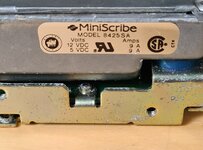 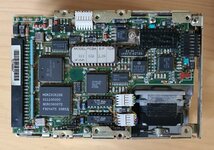 | |
| 1 |