68kMLA Classic Interface
This is a version of the 68kMLA forums for viewing on your favorite old mac. Visitors on modern platforms may prefer the main site.
| Click here to select a new forum. | |
| System 1-5 Patch for >2020 Date | |
| Posted by: loplop on 2022-05-18 13:19:59 For pre-System 6, does anyone have a patched Alarm Clock DA that allows the date to be set >2020? Would appreciate a copy if so. | |
| Posted by: loplop on 2022-05-19 18:34:15 I found a solution—Macintosh Garden had a piece of software called “PRAM-5.0” which allows setting of PRAM values, including the date/time: 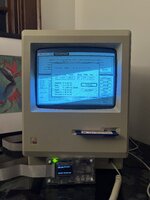 | |
| Posted by: 3lectr1cPPC on 2022-05-19 19:06:22 Someone remind me to check back on this thread in 18 years... | |
Posted by: dcr on 2022-05-21 17:03:24Someone remind me to check back on this thread in 18 years...I'll be curious how some of the patches work. Like if they "patch" it to read the base code as the new years, such that what the old Mac OS originally saw as 1904 would now be seen as 2041, what happens when you exchange a file with a newer computer? Will it see the file date as 2041 or 1904? | |
| Posted by: loplop on 2022-05-21 17:20:28 Why, oh why, did Apple choose 1904 to start counting up from 🙁 | |
| Posted by: LaPorta on 2022-05-21 18:24:32 2020 Patch won't work with any of these? | |
Posted by: MOS8_030 on 2022-05-21 20:21:25Why, oh why, did Apple choose 1904 to start counting up from 🙁https://lowendmac.com/lab/04/0115.html - it was convenient. | |
Posted by: loplop on 2022-05-22 04:19:08https://lowendmac.com/lab/04/0115.html - it was convenient.I have read that—but it still doesn’t answer: why did the Macintosh team feel an accurate calendar back to 1904 was important? Certainly there would never be files brought on to a Mac from 1904. Or even 1964… | |
| Posted by: Crutch on 2022-05-22 07:21:52 I think part of the idea was that Apple wanted applications that use the standard date/time routines to be able to work reasonably far into the “recent past”. It wasn’t about supporting retroactive file creation dates obviously. But someone using Multiplan in 1984 likely wanted to be able to enter quarterly sales data or whatever going back to 1981 or 1978 or …. So starting in 1980 was probably not a great idea. Then the question was just how far back should the date system go? Certainly Apple (rightly) suspected major system upgrades would arrive well before the 1904-based system ran out of years, so it seems like it wasn’t a bad call. I'll be curious how some of the patches work. Like if they "patch" it to read the base code as the new years, such that what the old Mac OS originally saw as 1904 would now be seen as 2041, what happens when you exchange a file with a newer computer? Will it see the file date as 2041 or 1904? I’ve played around with writing a patch for this. My approach was to patch _Secs2Date to reinterpret date-time records stored as seconds to return a different calendar year for display purposes (reinterpreting, for example, 1904-1964 as 2040-2100, but leaving dates in 1965+ alone). From Googling “Macintosh Secs2Date” it looks like multiple others have tried this same approach. It works, but the side effect would be that any (for example) 2040 dates would appear as 1904 on a system not running the patch (which I guess, too bad, run the patch!), and anyone sorting dates based on direct binary values will think that 2040 comes before (say) 2020, which might be a more serious shortcoming but is unavoidable without totally breaking backward compatibility by reinterpreting the full range of binary values. | |
| 1 |