68kMLA Classic Interface
This is a version of the 68kMLA forums for viewing on your favorite old mac. Visitors on modern platforms may prefer the main site.
| Click here to select a new forum. | |
| SE30, desk picture, decor etc | |
| Posted by: bcschmidt on 2022-05-02 16:30:03 Is there a trick to getting those backgrounder apps like color desk, desk picture, decor to work on compacts? So far I've tried my classic, se and se30 and can't seem to get any of them to work. Spoke with a few others that can't get them working either. The built in ones murder my retinas unless I use the fourth pattern, which is just boring dithered Grey. Gotta be a way to get these working. Systems 6.0.8-7.5.5 I've tried with no luck, lots of cool macpaint images I want to use as wallpaper . Color desk shows whatever image I've chosen while the extensions are loading, but goes back to the apple pattern as soon as the desktop loads up. It also causes the extensions to load all over on the bottom of the screen. | |
| Posted by: tommijazz91 on 2022-05-03 03:08:17 I have a Plus and SE/30 with working custom backgrounds (you can see it in my profile account). At the moment I cannot remember the apps but they were different for each compact Mac and didn't need particular tweaks. I'm away from home now, if I get back in a few days I'll write here the apps needed. | |
| Posted by: BacioiuC on 2022-05-03 04:17:35 None of the apps like Desk Picture and etc work on 7.5.5. 7.1 and 7.5.3 were the best to get them working properly. Desk Picture was the one that most consistently worked for me on my SE/30. You can also use the After Dark 2+ screensaver software to use background and displays. That's the only one that works for me on Color Classic II. Also, try removing all extensions before using Desk Picture, sometimes I found it clashing with a lost of extensions. | |
| Posted by: Crutch on 2022-05-03 04:46:11 ColorDesk works fine for me on my SE/30 running 7.5.5. I uploaded it to the Garden a few years ago. https://macintoshgarden.org/apps/colordesk I suspect you may have a conflict with another extension? Try turning off all non-standard extensions except ColorDesk and see if it works. | |
| Posted by: bcschmidt on 2022-05-03 08:18:45 Okay so I did try it with 7.1.1, desk picture again and it worked first try. But back to 7.5, no dice. Might keep it at 7.1.1 for a bit. Weird tho, I tried last week with 7.1.1 and could not get it to work. Only thing I did different this time, was install appearance manager. | |
| Posted by: Aeroform on 2022-05-03 11:10:09 Haha @bcschmidt I guess I was one of those others on FB. It’s been bugging me for a year+ now. Excited to give ColorDesk a try, I believe thats’s the only one I haven’t tried so far. The one built into After Dark did not work for me on 7.5.5 & SE/30. | |
| Posted by: bcschmidt on 2022-05-03 11:20:01 I ended up getting a sad mac last night after removing my 7.5 install. Got a 0000000F 00000021 code, guess I'm reformatting again tonight lol, just when I got it to where I wanted it. | |
| Posted by: just.in.time on 2022-05-03 22:21:12 On an SE FDHD running 7.1 I use Background. Works very well. However, that one doesn’t seem to work on an SE/30. It will load the picture during startup but once at the desktop any draws to the screen (menus, opening windows, etc) will cause distortion and artifacts to the image that don’t resolve until reboot. | |
| Posted by: BacioiuC on 2022-05-04 06:42:42 Right, the SE/30 is really weird when it comes to any background apps. I just checked a screen I took some time ago and I had Desk Picture running on a 7.5.5 SE but not on my 7.5.x SE/30. Weirdly enough my second se/30 with a Graphics Card works without issues on 7.5.x with Desk picture. One thing I haven't checked is what kind of install I have (universal, machine specific) etc. Will check hopefully later tonight. | |
| Posted by: glay78 on 2022-05-04 07:19:36 All My Macs works with ColorDesk. The trick is to get the correct .PICT file. I used online converter to convert JPEGs to PICT. 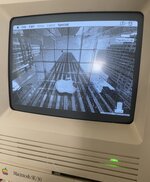 | |
| Posted by: bcschmidt on 2022-05-04 07:21:30 Didn't work for me no matter what .pict I tried, with 7.5.5. | |
Posted by: glay78 on 2022-05-04 16:02:17Didn't work for me no matter what .pict I tried, with 7.5.5.Did you copy ColorDesk into Control Panel folder? Then it should work | |
| Posted by: bcschmidt on 2022-05-04 16:03:57 Not a single one worked under 7.5.5. First one I tried under 7.1.1 was desk picture and it worked right away, I haven't tried the others yet on 7.1.1, and yeah I know where they go 😛 | |
| Posted by: glay78 on 2022-05-04 21:34:48 I tried on 7.5.3 and it works anyway. | |
| Posted by: BobDenford on 2023-05-20 13:23:57 Has anyone been able to get any of Decor, DeskPicture, ColorDesk, Backdrop, or any other desktop background software to work on System 7.5.5? If you have, can you upload the image file you used and any settings that might be relevant? I've tried all four on my SE/30 (both with and without other extensions/control panels enabled) and none of them have worked. ColorDesk and DeskPicture will make my desktop icons blink when I try to change the background, but nothing else changes. Backdrop displayed my picture during startup, but once the desktop loaded the background was replaced with a pattern I had set previously. | |
| Posted by: just.in.time on 2023-05-20 16:10:54 @BobDenford do you have 32 or 24 bit memory addressing turned on? Also, Virtual Memory? | |
| Posted by: BobDenford on 2023-05-20 20:47:48 Yes to both. I turned them off and re-tested them all, including DeskPicture with no other extensions, to no effect. | |
| Posted by: bibilit on 2023-05-21 00:42:17 Used mainly Decor at some point, never had any issue except that the boot to the background was a bit longer. IIRC, the way Decor worked changed other the time, so the installation process was not the same. | |
| Posted by: BobDenford on 2023-05-21 08:47:10 Were you using System 7.5.5? Do you have a working installation of Decor right now that you could take a look at? | |
| Posted by: bibilit on 2023-05-23 11:25:02 Probably somewhere but too many computers to remember which was using it. But Decor was available from system 7 to MacOS 9, so probably 7.5.5 is fine. | |
| 1 > |