68kMLA Classic Interface
This is a version of the 68kMLA forums for viewing on your favorite old mac. Visitors on modern platforms may prefer the main site.
| Click here to select a new forum. | |
| Mac Plus Sad Mac Error 03FFFF | |
| Posted by: Anonymous on 2022-05-01 19:13:15 Once again I find myself with a problem I can't seem to diagnose. Not only is my Mac Plus showing this pixelated line, but its giving an error I can't find anywhere online. Other than that, there's a buzzing noise coming from somewhere near the speaker of the Mac. Ignore it being upside down that's my mistake. Any suggestions?View attachment IMG_0542.MOV | |
| Posted by: rollmastr on 2022-05-02 00:47:45 I'm pretty sure 03 indicates bad RAM. | |
| Posted by: dochilli on 2022-05-02 05:40:49 Yes, 03 is bad RAM, but FFFF means that all chips are bad! Usually the subcode is used for the identification of the bad chip: | |
Posted by: cheesestraws on 2022-05-02 05:43:37but FFFF means that all chips are bad I can't see the video, any chance you could post a still image of what the pixellated line looks like? A quick thought: maybe one of the data lines to the RAM is bad? That could make it think that every RAM chip is dodgy. | |
Posted by: Anonymous on 2022-05-02 08:17:29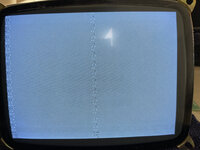 Here's the photo as you requested. As for the ram, where would I find those? Does any 30 pin 1mb dram chip work or would I have to scavenge another Mac for that? | |
| Posted by: bibilit on 2022-05-02 12:05:18 The Plus is giving you a good chime so probably a bad ram. Pretty easy to find, yes any 30 pin will do. Keep in mind that a Plus is by default a 1 Mb unit, so 4 sticks of 256 kb. Using 4 sticks will give you a 4 Mb unit, but a resistor should be removed or cut in the logic board. | |
| Posted by: cheesestraws on 2022-05-02 12:32:47 That doesn't look like I expected! I agree with @bibilit: easiest option here is to change SIMMs. Try that before assuming anything more complicated is wrong. | |
| Posted by: Anonymous on 2022-05-02 15:07:06 Thanks for the diagnosis! That's good news. As for the bad news I think my flyback capacitor crapped out, cause my Mac isn't turning on anymore. No chimes or anything. based on the model of mine, is there a place to get a 157-0042-C? or could I possibly use the many apple alternatives floating around Ebay? | |
| Posted by: bibilit on 2022-05-03 12:49:13 Why are you thinking is a flyback issue ? happened to me once out of maybe 50 units or so. The fact that you are not getting a chime is probably related to a power supply issue (still Analog side problem) You can check voltages at the floppy connector. | |
| Posted by: Anonymous on 2022-05-04 19:44:40 I suppose you're right. Its what the Dead Mac Scrolls told me (Page 21) and I blindly followed. Any suggestions as to possibly replacing the power supply? | |
| Posted by: desertrout on 2022-05-04 21:37:21 The power supply is integrated into the analog board, so it's more of a process of 'fixing' the power supply as opposed to replacing it. But you should verify the voltages first as an initial step of troubleshooting. Refer to page 38-39 of this PDF: https://vintageapple.org/macbooks/pdf/Macintosh_Repair_&_Upgrade_Secrets_1990.pdf Then Chapter 4 provides an overview of Power Supply problems. A flyback failure could indeed be a cause of your boot failure - did you measure CR5 as the Dead Mac Scrolls suggested? | |
| Posted by: Anonymous on 2022-05-05 06:24:44 Yep! the resistance of CR5 is between 11 and 12 as the Mac Scrolls says. Thanks for the book link btw that helps as well. | |
| Posted by: desertrout on 2022-05-05 07:27:46 Great - that should get you started. Keep us posted, and ask questions if you hit a road block! | |
| Posted by: Anonymous on 2022-05-08 12:29:19 Update! I finally got the replacement flyback and after installing it, still nothing happened, No chimes or anything. Any ideas? Here's what the soldering looks like in case I did something wrong  | |
| Posted by: desertrout on 2022-05-08 12:53:14 Let's get back to brass tacks... are you getting any voltages at the floppy port (page 38 in Pina) or on the analog board? If there's power, what is it reading and can you adjust it? If there's no power, you need go to back to the source and work forward: check your switch is good, check the fuse, check both sides of the transformer, check your analog-to-logic board connections are good, etc. Note: the primary side of the PSU (from the switch to the transformer) contains live mains voltages. BE CAREFUL (needs to be said - I don't know your familiarity / experience with working on power supplies). PS - your soldering looks good to me 🙂 | |
| Posted by: Anonymous on 2022-05-08 14:02:14 I haven't used multimeters much, so I'll tell you what I'm doing in case it's wrong. I'm following page 38, but I'm not sure what DCV position to set the multimeter at. It says 2.5, 5, 25, 125, 500,1000. Regardless, the needle isn't moving whatever I set it to (the multimeter is an analog one). That for the +12V Pin 8 on the disk drive connector. | |
| Posted by: dochilli on 2022-05-09 00:23:37 Use 25V position. Put the red cable to pin 8 and the black cable to one of the screw (ground). Then you should measure about 12 V. Do the same with pin 6 for 5 V. If you measure 0 V, your analog board has a problem. Did you check the solder joint of the power connector? | |
| Posted by: Anonymous on 2022-05-09 08:07:43 Thank you, and I haven't checked that, where would it be located? | |
| Posted by: desertrout on 2022-05-09 12:26:19 The joints circled in this image (https://forums.macrumors.com/attachments/128k-analog-comon-cracked-solder-video-pin-jpg.763018/) tend to crack over time... the set with ten pins (marked as J4 on the component side) connects the analog board to the logic board, so a bad joint there could be an issue. I think that's what @dochilli is referring to? It's always a good idea to reflow (remove the solder, then resolder) these joints anyway. | |
| Posted by: Anonymous on 2022-05-09 20:53:58 Welp, I resoldered all 10 joints and still no dice. Would sending a photo of the motherboard be beneficial? At this point I'm out of ideas so... | |
| 1 > |