68kMLA Classic Interface
This is a version of the 68kMLA forums for viewing on your favorite old mac. Visitors on modern platforms may prefer the main site.
| Click here to select a new forum. | |
| All about Apple PC 5.25" Drive (A9M0110) | |
| Posted by: slomacuser on 2022-04-19 03:28:06 The Apple PC 5.25 Drive may be used with a Macintosh® SE or Macintosh II to transfer data between 5.25-inch MS-DOS®-formatted disks and 3.5-inch Macintosh-formatted disks. 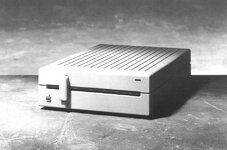 What you need to use it: • A file transfer program such as Apple File Exchange. 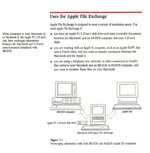 • One of the following expansion cards: - Macintosh SE-Bus PC Card, the MS-DOS disk drive controller for the Macintosh SE. 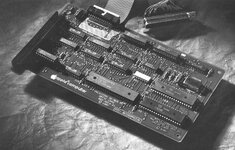 - Macintosh II PC Card, the MS-DOS disk drive controller for the Macintosh II. 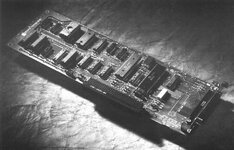 - A third-party expansion card that is designed to operate with the Apple PC 5.25 Drive. According to Apple, the drive and controller cards are not compatible with Macs with FDHD ROMs. source Available Documents: - Apple service manual - Technical procedures - PC 5.25 drive Product info - Macintosh II PC drive card product info - Macintosh SE-bus PC drive card product info - Macworld February 1988 - Review Missing: - Apple PC Drive 5.25 Owners manual pic Testing the card: The MacTest™ SE and MacTest™ II programs test an Apple PC 5.25 Drive and an Apple disk drive controller card at the same time. If the system you are testing uses a non-Apple disk drive controller card, replace it with an Apple card before testing. CAUTION: Do not install more than one Macintosh II PC Card in the Macintosh II. The power supply was not designed for two of these cards and could be damaged. | |
| Posted by: slomacuser on 2022-04-19 03:30:05 My own testing. Macintosh SE, 4 MB, 20 HD, System 6.0.5, PC card, PC disk drive - Apple File Exchange - WORKS - Utilities disk #2 - DOS Mounter 4.1 - WORKS - DOS Mounter Plus 4.0 - system errors - PC Soft 2.5 - does not recognise the drives Macintosh SE, 4 MB, 20 HD, System 7.0.1, PC card, PC disk drive - DOS Mounter 4.1 - WORKS - DOS Mounter 4.0 - system errors Macintosh IIci, 16 MB, 500 HD, System 6.0.5, PC card, PC disk drive - Apple File Exchange - WORKS - PC Soft 1.3 - WORKS - DOS Mounter 4.1 - system errors - DOS Mounter Plus 4.0 - system errors - DOS Mounter 1.2 - needs personalization (needs original disk) - DOS Mounter 3.0 - needs personalization (needs original disk) - AccessPC 2.0 - does not recognise the drive 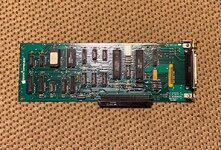 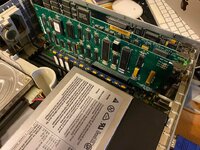 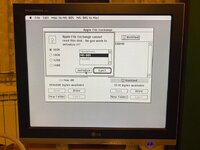 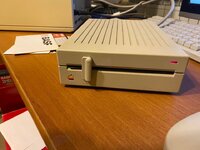 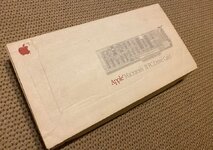 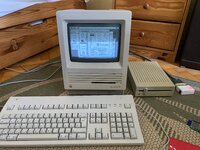 | |
| Posted by: cheesestraws on 2022-04-19 03:41:32 I believe these can also be used with some of the PC compatibility cards (as in, the x86 copro cards). @jeremywork would know more—he now has the one of these I used to have. | |
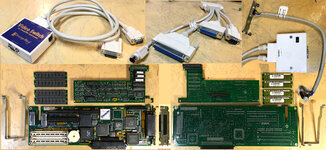
| Posted by: jeremywork on 2022-04-20 00:46:34 Thank you for contributing this excellent write-up! I still have the one @cheesestraws sent me, though I haven't tried to use it with the Macintosh II PC Card (identified electronically as Emerald City) yet. Theoretically, it should work anywhere a DC-37 port PC floppy drive is expected, including AST/Orange Mac286 and Orange386 with optional diskette controller populated and breakout cable installed. However, the documentation supplied with my boxed (presumably late model; 25MHz despite the printed manual only mentioning 16 or 20MHz configs) Orange386 contradicts itself regarding compatibility with the A9M0110. On page 5 of the Orange386 User's Manual: PC Floppy Disk (Drive A)and on page 82: Connecting a PC Floppy Drive The manual is dated January 1992 on the inner cover, however there are quite a few places Mac286 appears where even adjacent pictures show Orange386, so I suspect this manual was a (perhaps hastily) revised version of the Mac286 manual. Sandwiched in the middle of it along with the warranty and quick troubleshooting guide is a nicely printed document labeled IMPORTANT Orange®386 Compatibility Chart. REV 5/92 Among the floppy drives in the "Compatible" section there is only one IBM model, 3.5" 720K, 3964. In the "Incompatible" section there is only one floppy drive: Apple, 5.25" PC Drive My Orange386/IIci continues to have this issue where keyboard inputs are ignored moments after POST completes. It allows me to get into setup but not do anything after entering, or if I don't enter setup I'm blocked out by the time 'Press F1 Key to Continue or CTRL-ALT ESC for Setup...' appears (CMOS RAM error; keyboard error. Both expected, though as it sits a bit of an impasse.) When I plug in the A9M0110 I get a flash of the red LED and normal drive probe noises after the RAM test and before the PC speaker beep, so... ¯\_(ツ)_/¯ I will work on scanning all of the documentation included with the Orange386 and post it over on the x86 card revival thread, as it seems to make more sense to look for it there. | |
| Posted by: mg.man on 2022-04-20 02:27:01 I have one of the "AST" DOS cards(pair) waiting for me to collect from my folks' in CO - as soon as I can get across (hopefully in the next few months), and am keen to see if a) it's working and (if so) b) I can get an external 5 1/4 drive working.🤞 Will report back here when I have it. I don't think it's related to your issue, but I found this comment in an old thread... SE 5.25 Floppy DriveAnyone have one of these or use it? I don't ever recall it. http://docs.info.apple.com/article.html?artnum=2179 http://docs.info.apple.com/article.html?artnum=10314 Did the card come with the floppy drive A9M0110? Thanks!
 68kmla.org
| |
| Posted by: slomacuser on 2022-04-20 06:17:10 On "other" forum @RetroTheory posted this Did a little disassembly on the Apple 5.25" PC Drive and it turns out its a near standard Panasonic JU-455-5 360K floppy drive. 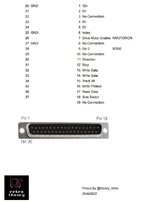 | |
Posted by: jeremywork on 2022-04-20 07:04:05On "other" forum @RetroTheory posted thisThis is very useful. Orange386 drive pinout is included in the manual (along with the other ports split from the big DD-78 connector on the card.) Looks nearly correct already, so an adapter cable would take only a little effort to fabricate from one of these: 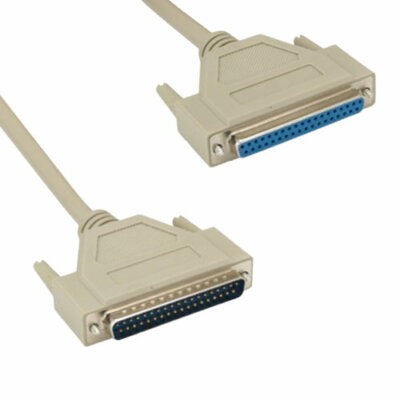
3 feet DB37 Serial Extension Cable 37 Pin Male to Female RS-449 Shielded 28 AWG | eBayThis DB37 37 pin male to female extension cable is an cost effective way to connect/extend RS-449 serial device using DB37 connection. Double shielded for maximum EMI/RFI protection. Wired Straight Through pinout.
www.ebay.com
I don't know enough about 0V vs GND, or the implications of FNPRES touching GND, but I doubt I killed anything by trying the A9M0110 on the Orange card. | |
| Posted by: RetroTheryboy on 2022-04-20 07:24:20 Hi ,I wrote 0V to denote supply ground as opposed to signal ground. The 12V, 0V, 5V 0V are on the supply side, the rest are signal ground. | |
| Posted by: NJRoadfan on 2022-04-20 11:14:01 The IBM and Apple DC-37 pinouts are compatible. There are likely minor differences with pins 7-10 which set drive 0 or 1, but this is solved with a twist in the cable if needed or with the DS0 and DS1 jumpers on the drive itself. The biggest difference is that Apple added supply voltages to pins 1-5 to allow their drive to be powered by the host computer while IBM drives require external power. Don't think those pins are not passed onto the 34-pin floppy cable and shouldn't pose a problem. | |
Posted by: jeremywork on 2022-04-20 13:32:00Hi ,I wrote 0V to denote supply ground as opposed to signal ground. The 12V, 0V, 5V 0V are on the supply side, the rest are signal ground.Thanks for clarifying! The biggest difference is that Apple added supply voltages to pins 1-5 to allow their drive to be powered by the host computer while IBM drives require external power.Ah, so IBM drive on Apple card would be a problem, but Apple drive on IBM interface should be harmless, though probably ineffective. Orange Micro anticipated this power requirement since they were trying for A9M0110 compatibility, and what caused them to add it to the incompatible list in the months following the User's Manual is still TBD. | |
| Posted by: NJRoadfan on 2022-04-20 18:15:37 What a meant to say, the power pins likely aren't even connected to the IDC-34 cable the drive connects to. An Apple PC drive will not work on an IBM card because they don't provide power to the drive. | |
Posted by: Concorde1993 on 2022-08-04 22:22:13When I plug in the A9M0110 I get a flash of the red LED and normal drive probe noises after the RAM test and before the PC speaker beep, so...Did you plug in the 5.25" directly to the back of the OrangePC card? | |
Posted by: jeremywork on 2022-08-31 16:27:54Did you plug in the 5.25" directly to the back of the OrangePC card?Sorry I forgot to respond to this. My card is the earlier Orange386 which only has the massive DB-78 connector. The drive is attached through the accessory kit breakout cable. | |
| Posted by: Fred1212 on 2024-12-11 22:10:15 Thanks for the resources folks | |
| Posted by: Fred1212 on 2024-12-22 15:49:23 Found these rough copies of manual | |
| Posted by: zefrenchtoon on 2024-12-25 19:22:58 Here is a full scan of my manual 😉 | |
| Posted by: alectrona6400 on 2024-12-25 20:31:11 i had no idea these even existed... now i wanna get one considering my S/O bought me a 5.25 drive (that is kinda dicey, needs a full recap soon) and a bunch of 1.2MB floppies... lmao. she's such an angel. but i take it, these are only 360k? | |
| Posted by: Fred1212 on 2024-12-26 13:05:32 Thanks for the Manual Scan. Yes PC drive is 360k only | |
| Posted by: CuriosTiger on 2025-02-07 10:22:02 I got my combo working with the following: "Emerald City" NuBus card installed in a Mac IIci System 7.5.5 Apple File Exchange 7.0 (copied from the old System 7 Golden Master CD that I have.) The drive also mounts in the Finder when I launch AFE, but any attempts to copy files to or fro in the Finder fail. I have to use Apple File Exchange for that. There appears to be a rudimentary file system driver hiding in Apple File Exchange 7.0 in a DRVR resource. I did try Apple File Exchange 1.1 in both System 6.0.5 and System 6.0.8. Neither saw the drive. At some point, I may attempt to install the System 7.0 Golden Master on a separate partition. It's possible the issues I had in the Finder are just because the driver has not been updated to be compatible with System 7.5.x. | |
| 1 |