68kMLA Classic Interface
This is a version of the 68kMLA forums for viewing on your favorite old mac. Visitors on modern platforms may prefer the main site.
| Click here to select a new forum. | |
| Preserve an SE (M5011) for the future | |
| Posted by: Berenod on 2022-04-11 06:13:48 Just picked op an SE for 55€. Absolute steal, bloke advertised as an attic cleanup, working condition, if not gone by the weekend it went to the junkyard... Got in the car and drove out straight away. So, it is indeed working, I guess a 20MB harddrive and 800k floppy. Boots, programs work (word 4.0, excel, ...). Bloody noisy thing it is as well 🤣 Even came with a style writer II, not yet tested. So, obviously want to preserve it, what to look out for? Obviously urgently a new battery before it turns explosive, recap,... The screen is a bit unstable, it's sharp, but the image wiggles a bit, like the size varies all the time. Maybe new (hopefully quite) fan. As it has 4mb ram, maybe install 7.0 or 7.1, just don't want it to get too sluggish. Might use a blueSCSI, but then I guess the external DB25, I kind of like to boot occasionally from the noisy spinner for the sake of authenticity! And a good cleanup 🤣 Are those keyboards easy to find? On mine the esc key sort of broke, still works but is loose.... 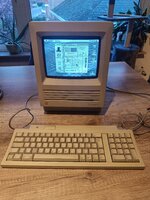 | |
| Posted by: dochilli on 2022-04-11 06:33:58 The unstable screen can be caused by leaking caps on the analog board or the PSU. I would recap them first. The keyboard is easy to find and not so expensive like the Mac plus keyboards. | |
| Posted by: Johnnya101 on 2022-04-11 06:57:19 To "future proof" it, replace all caps on analog board and in PSU, may as well get the logic board recapped too (even though they don't leak) just so they are all done at the same time. You can replace the fan with something modern. The HDD can be replaced with an SCSI2SD or similar. Also make sure the floppy drive is taken apart, cleaned, and may as well replace the eject gear. To really prepare yourself/future proof/plan ahead, pick up a new flyback as a backup (Note: They are NOT cheap). Note that these are the steps I would take to preserve it, as you say in your title. You don't NEED to recap the logic board, or do some of those things, but they would definitely prepare it for the future. | |
Posted by: Skate323k137 on 2022-04-11 14:15:48To "future proof" it, replace all caps on analog board and in PSU, may as well get the logic board recapped too (even though they don't leak) just so they are all done at the same time. You can replace the fan with something modern. The HDD can be replaced with an SCSI2SD or similar.This is exactly what I did when I got my SE; the logic board is the easiest thing to recap anyway so you may as well. My SE came with the exact same specs, the recap of the analog board cleared up the same video issue. | |
| 1 |