68kMLA Classic Interface
This is a version of the 68kMLA forums for viewing on your favorite old mac. Visitors on modern platforms may prefer the main site.
| Click here to select a new forum. | |
| Help for a nubus Radius PrecisionColor Pro 24X ROM/firmware upgrade | |
| Posted by: Classicman on 2022-03-25 09:32:09 Hi friends! I want to upgrade my nubus Radius video card to a newer rom version (now 1.50). I need compatibility with Mac OS 9.1. I remember in the nineties, Radius distributed these kinds of updates... Anybody of you have an application utility that can help me for the upgrade? Thank you all in advance! | |
| Posted by: ajacocks on 2022-03-25 17:07:12 What format is the ROM chip on the board? I assume surface mount. Can you locate the part number? - Alex | |
| Posted by: Byrd on 2022-03-25 19:59:43 If you can find the updated ROM, you’ll need a friend with a TL866 programmer to flash a new chip. I don’t think I’ve come across software flashing for ROMs until later hardware. | |
| Posted by: Trash80toHP_Mini on 2022-03-26 08:56:17 This one? https://www.applefritter.com/files/images//mac_display_card_24ac_front-2148_0.jpg Radius/Apple same, same AFIK. ROM's a socketed PLCC: http://www.interfacebus.com/ic-package-plcc-dimension-outline-drawing.html It's likely no big deal to read/program new 2.0 version you need. I'll see what I can do, for that I have a spare. A member sent me a setup to read out an unobtanium DIP ROM I have, but I've been way to much of a fraidy cat to take that one on. 😞 @balrog is starting a ROM repository, maybe he already has that image? | |
| Posted by: Classicman on 2022-03-28 09:41:34 Thank you a lot friends and sorry for the delay of my response. Yes, Trash80toHP_Mini! the card is like mine! But I'm not a computer expert at your level. I haven't knowledge / equipment suitable for doing this type of update. This is why I was asking you experts if there was a software update of the ROM for this card. | |
| Posted by: Trash80toHP_Mini on 2022-03-28 09:56:05 Frst off, it's jt outsid of active linkage and I'm NOT an expert on computers. Maybe pass for that on peripherals and expansion cards from the 68k era though. Yep, yours is just like mine with the PLCC socketed ROM v.2.0. Gotta get that dumped sometime . . . soonish? | |
| Posted by: beachycove on 2022-03-28 10:13:55 Can’t you just flash the card using the standard Radiusware utility? here: https://vintageapple.org/macdrivers/video/knighttech/index.html | |
| Posted by: Trash80toHP_Mini on 2022-03-28 10:16:25 EPROM on board, not EEPROM that can be flashed I think? Is that a Radius utility for the PCI era? | |
| Posted by: Bolle on 2022-03-28 11:38:06 The only Nubus Radius card that has a flash ROM is the Thunder IV as far as I know. All others I have seen are not programmable in system. | |
| Posted by: Phipli on 2023-05-22 04:54:48 Here is a collection of PrecisionColor ROMs - some from the internet, the 8XJ and 24XK are from my cards. If anyone has more v2.0 ROMs, it would be great to compare the differences! I suspect some of the big block of difference between @Bolle's v2 ROM and mine is the splash image? | |
| Posted by: pizzigri on 2023-05-23 13:16:41 Ahhh I wish I had eproms and gear to program it! im also looking for a 2.0 rom.... This is my card | |
Posted by: Phipli on 2023-05-23 14:38:25Ahhh I wish I had eproms and gear to program it!Weird thing... I think someone has swapped the ROM in your card at some point in its life. So the sticker on the back shows it is an Apple sold version, but the ROM looks like the Radius ROM, not the Apple version. 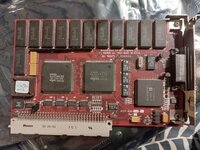 My 24XK is almost identical, except it has a slower speed RAMDAC (80ns instead of 110ns). This is why your card can do higher resolutions than mine. Putting the AC ROM in mine would be effectively an overclock (if I picked a resolution and refresh rate that needed it). | |
Posted by: mg.man on 2023-05-23 16:15:56except it has a slower speed RAMDAC (80ns instead of 110ns).Am I missing something, wouldn't 80ns be faster than 110ns? BTW, just posted this over in the other thread: What's the difference between the various Radius 24 cards?I got through just over half the testing last weekend. I'll hopefully get through the rest this weekend.
 68kmla.org
| |
Posted by: Phipli on 2023-05-23 16:18:45Am I missing something, wouldn't 80ns be faster than 110ns?Yeah, I'm just being dumb. But just in my units, it's MHz, not ns. Sorry! | |
Posted by: mg.man on 2023-05-23 16:21:55it's MHz, not ns.Ahhhh... 😀 | |
Posted by: mg.man on 2023-05-24 00:22:24What's the difference between the various Radius 24 cards?I got through just over half the testing last weekend. I'll hopefully get through the rest this weekend.
68kmla.org
I'll try to get the ROM dumped this w/e. @Phipli - I'd rather not pull the labels, do you know what "type" EEPROM these use? Looks like PLCC32 footprint. | |
Posted by: Phipli on 2023-05-24 00:43:34They are 27c256 chips. Brand varies, if you pick a random 27c256, then click ID, it will tell you the chip ID and you can Google the ID to find the manufacturer and product if you're interested. | |
Posted by: mg.man on 2023-05-24 01:00:15They are 27c256 chipsSpot on! I noticed in the pic that the label was lifting a little on the 24X, so, I gently gave it some assistance... 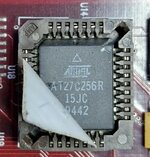 So... 27xxx - does that mean these are EPROM, and therefore, one-shot, NOT erasable? 🤔 | |
Posted by: Phipli on 2023-05-24 01:02:25Spot on!Mine are both one shot, but I have some rewritable ones on the way for experiments. Make sure you get 5V chips. | |
Posted by: Phipli on 2023-05-24 01:06:37Spot on!Oh, BTW, I checked the circuit and they're compatible with 512 byte chips. In fact, with a small mod you could use the jumper near the chip to bank between two ROM versions. All you need to do is add a 10k ohm pull down resistor to the middle pin, then removing the jumper selects bank 0, fitting it as per my cards selects bank 1. Ignore the other position. The green board is my 256 colour card, which has a different PCB design. | |
| 1 > |