68kMLA Classic Interface
This is a version of the 68kMLA forums for viewing on your favorite old mac. Visitors on modern platforms may prefer the main site.
| Click here to select a new forum. | |
| Performa 6360, "Input signal out of range" using switchless DB15 adapter | |
| Posted by: alectrona6400 on 2022-03-24 08:07:55 I was recently given a Performa 6360 (might I add, with a G3 card!), and when I turn it on, the computer chimes as normal yet the monitor shows nothing but "Input signal out of range, change to 1024x768 at 60Hz" I'm fairly certain that these do output some nonstandard resolutions, and I even tried it on a Compaq MV700, which just showed nothing. I'd also like to add the PRAM battery is missing if that's of any good information. I do have a DIP switch DB15 adapter on the way, but I'm not sure if that's my only problem. | |
| Posted by: Cory5412 on 2022-03-25 20:43:58 The system may be set to something newer and lower-end monitors don't like, such as like 832x624@75Hz. If you have an OS install CD (any version this machine supports should work) you can boot it and see what that does (if it works, go to the system preferences folder on the HDD and see if you can delete the monitors or displays preferences), you can also (if there's a PRAM battery) see what zapping the PRAM once does. (No real reason to zap it a bunch.) if you have any other monitors, Dell UltraSharps in particular, giving one of those a go may also be worth some time. | |
| Posted by: mogs on 2022-03-25 22:45:12 I get the same issue on my Q605 with some switchless DB15-DE15 cables I have. This is to a Samsung SyncMaster which seems to display pretty much anything the 605 can (with the exception of 512x384, which it does display, just not correctly). It's a shame since it would be nice not to need the adapter (plus they are the correct colour). | |
| Posted by: alectrona6400 on 2022-03-26 11:55:11 The computer seems to be outputting something at 35Hz. I ordered a DIP switch adapter so that should be here soon. While I was at it, I also recapped the system... | |
| Posted by: alectrona6400 on 2022-04-08 16:12:23 So I have got back around to setting up my 6360, but I have a DIP switch adapter now, and even a PRAM battery just to be safe. I have a Compaq MV700 hooked up, and it does seem to get a signal, just can't display it. Whenever I turn the computer on while the monitor says "NO SIGNAL", it does show a very distorted picture. 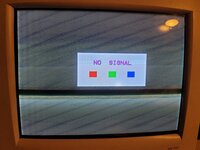 And here are the settings on my DIP switchable adapter: 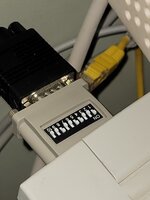 I believe this corresponds to an Apple Multiple Scan display. And if it's of ANY help, my Presario monitor has all 15 pins populated on its male connector. Any ideas of what could be going on here? | |
| Posted by: alectrona6400 on 2022-04-08 17:01:12 Set it to separate sync. Now we're in business! 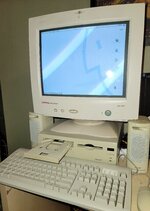 | |
| Posted by: Cory5412 on 2022-04-08 17:35:25 There we go, great to see it! Honestly I forgot those adapters did different sync modes, but it looks like there are and I bet most PC monitors want separate sync. If anyone else needs it, the reference for this type of adapter is here: https://68kmla.org/bb/index.php?threads/video-adapter-docs-scan-dump.24012/post-288613 | |
Posted by: alectrona6400 on 2022-04-09 11:08:25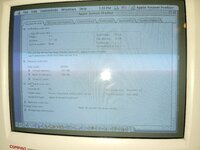 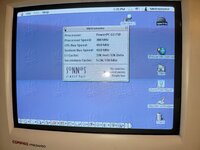 | |
| Posted by: Skate323k137 on 2022-04-11 07:43:33 Very nice! The first photo you showed is a very typical pattern to see on a monitor receiving an improper or out of range sync signal. Short horizontal lines separated incorrectly (As opposed to being the width of the screen) usually indicates a scan rate higher than the monitor supports in my experience. Sometimes if you send 480P to a 240P/NTSC tube, it splits into 2 perfect squished pictures on either side of the screen 🤣 | |
| 1 |