68kMLA Classic Interface
This is a version of the 68kMLA forums for viewing on your favorite old mac. Visitors on modern platforms may prefer the main site.
| Click here to select a new forum. | |
| Dead CRT on my Classic? Aw jeez... | |
| Posted by: System6+Vista on 2022-03-18 16:22:17 This was the first vintage Mac I bought, in 2009, worked very reliably for a while. About a year ago couldn't boot from the hard disk, just showed the ? screen, but booted into the OS just fine from ROM (Apple+X+O). So I figured the internal HD was dead, OK. Now, however, I see nothing on the screen save for a faint white line. I have a floppy jammed in there that I can't get out (I've tried the pinhole for manual eject plenty) and I figured that was the root of my issue until a) I plugged in headphones (the speaker has never worked) and can hear the startup chime and b) remembered that a Mac that starts will show something on the screen if it can, even with no OS, right? Thanks! Dave Daves 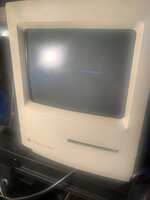 | |
| Posted by: LaPorta on 2022-03-18 16:33:41 Multiple questions: 1. Has this been recapped (I would assume not since you didnt say, and the sound is so low)? 2. How is it that the floppy is jammed in? Will it just not eject automatically? Is it jammed in even with the paperclip trying to eject it? 3. How did the floppy become jammed? The collapsed white line is usually due to a component failure on the analog board. Which one specifically someone should be able to answer, and it should be in reference manuals out there. | |
| Posted by: System6+Vista on 2022-03-18 16:41:37 Thx for the reply! You assume correctly, I should've mentioned, no I cannot imagine that anyone has re-capped or refurbished this machine given the source and somehow in 2009 my young self didn't realize the importance of this (so what if my clock is wrong?). I cannot remember how the floppy became jammed. Yes, even with the paperclip trying to eject it, it's really worked in there somehow as if something is holding it from the back, I don't know. Seeing as the machine is starting, I can tell because it chimes over & over, unless I hold Apple+X+O, then it is quiet unless I release the keys.... is there any key command I can do to have it auto-eject? But it must not be able to do so because iirc, if it can't boot from a floppy present when booting, it spits it out... I have the FloppyEmu so I really don't care so much about the floppy drive if it's not causing me trouble because I've realized they're all gonna fail eventually, even my recent-era USB-floppy drive for my modern Mac has died on me so I'm done w floppies no matter how fun the little sound & ejecting is. I have an external 800k floppy drive as well, though that's about as useless to me as anything could be. | |
Posted by: rjkucia on 2022-03-19 05:38:10is there any key command I can do to have it auto-eject?If you hold the mouse button down, it'll try to eject the drive. But, if it's truly jammed in there this might not help. | |
| Posted by: System6+Vista on 2022-03-28 14:00:34 Thanks for mentioning this, rjkucia, I did not know about that! But yeah, it's so incredibly jammed I doubt it'll work. I'll still try. | |
| Posted by: Johnnya101 on 2022-03-28 14:03:35 Blown component on the AB would do this. Whatever you do, make sure you do NOT leave it on this screen for longer than a minute or two! The screen will get burned in. | |
| Posted by: System6+Vista on 2022-03-28 14:09:15 Now the monitor doesn't show ANYTHING, the screen is only dark (still I can hear the machine starting via the headphone port). And I can hear its internal hard drive going. How hard might it be to fix said 'blown component on the analog board'? I guess I should open it up, take & post pics. | |
Posted by: Byrd on 2022-03-28 17:34:21How hard might it be to fix said 'blown component on the analog board'? I guess I should open it up, take & post pics.Sadly, it's not easy. The Classic and Classic II was built to a super low price point with many cheap components and a quick search on the forums will reveal a multitude of electrical issues that can occur. In your instance, expect to see significant cap leakage on the analog board (it usually looks like honey leaking out the bottom of the board), and I'd also be looking at TDA4605, zener diodes and the optocoupler. Your Classic motherboard will also need a clean up of leaking goo and capacitor replacement. | |
| Posted by: bibilit on 2022-03-29 02:38:47 Analog issue for sure, can be as simple as weak solder joint on the upper connector (the first picture is showing lost vertical deflection) another possible issue is the TEA2037 chip being bad. | |
| 1 |