68kMLA Classic Interface
This is a version of the 68kMLA forums for viewing on your favorite old mac. Visitors on modern platforms may prefer the main site.
| Click here to select a new forum. | |
| Sonnet Encore ZIF G4 CPU Upgrade - G3 B&W jumper setting | |
| Posted by: macintosh2002 on 2022-02-14 00:10:22 Hello, could someone let me know how to set the jumper for a Sonnet Encore ZIF G4 1Ghz CPU in a G3 B&W? I pulled the jumper and these little metal brackets fall out of the jumper block. Unfortunately there is no reference in the Sonnet documentation, it is only mentioned that a jumper is included. Thank you, Patrick | |
| Posted by: Byrd on 2022-02-14 01:53:54 You don’t set any jumpers - keep what’s in place on the B&W G3 motherboard and the Sonnet G4 will work out of the box. You will need to install a patched G4 aware firmware to the Mac before plugging in the G4 CPU, however | |
| Posted by: Bolle on 2022-02-14 02:14:04 The B/W G3 does indeed need a different jumper block for the 1GHz upgrade to clock the bus down to 66MHz. It will only work with the stock jumper block in the Beige G3. The slower (up to 500MHz) Sonnet G4 upgrades didn’t need jumpers on either the Beige and B/W. | |
| Posted by: macintosh2002 on 2022-02-14 03:56:41 Thank you for your reply. Which setting has the different jumper block for the G4 1GHz model to use it in a B&W or Yikes? The Sonnet instructions are not helpful in this point... | |
| Posted by: Byrd on 2022-02-14 23:17:41 Apologies for the misinformation 🙂 Found the manual here, which says pull the jumper block completely in the B&W: 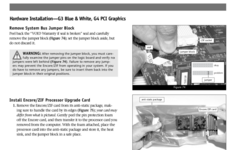 | |
| Posted by: macintosh2002 on 2022-02-15 00:30:16 But in that manual they also mention a replacement jumper block. I made a request, hope that Sonnet will reply. | |
| Posted by: jeremywork on 2022-02-15 01:14:17 I think that warning refers to the plastic block as the jumper block, and the internal metal contacts as the jumpers. It warns that should it become separated it should be put back together (but not reinstalled on the motherboard.) | |
| Posted by: macuserman on 2022-02-15 05:29:11 I had this same problem it took me awhile to figure it out but I have the correct information saved. I believe this is what you want. | |
| Posted by: macuserman on 2022-02-15 05:30:50 I had this same problem it took me awhile to figure it out but I have the correct information saved at home. If you don't get an answer I had this same problem it took me awhile to figure it out but I have the correct information saved.At least that's the picture I have saved on my phone labeled correct jumper settings if that isn't right let me know and I'll check my computer at home which currently has the jumpers set correctly. I saved this because as you found the actual correct jumper setting is hard to find as they just intended you to use the included jumper block. | |
| Posted by: macintosh2002 on 2022-02-17 08:54:51 I got an answer from Sonnet, but they makes it very easy for itself - they refer to the support page with the reference material 😒 @macuserman That´s nice, could you please also check your computer at home please to be sure? Your picture shows the following setting for the Sonnet ZIF G4 with 1000MHz CPU: 00010110100 | |
Posted by: macuserman on 2022-02-17 09:58:55I got an answer from Sonnet, but they makes it very easy for itself - they refer to the support page with the reference material 😒Yes I can do that, might take me a minute to get to it, but if your patient I can for sure. In the meantime as far as I'm aware there isn't really any risk in just trying it, goodness knows I've set the wrong jumper settings I don't even know how many times or forgotten to even put the block back all together and sat there scratching my head about why it wouldn't work like an idiot. If it was me I'd give those settings I have there a try, I bet you'll have success. | |
Posted by: macuserman on 2022-02-17 10:02:01Yes I can do that, might take me a minute to get to it, but if your patient I can for sure. In the meantime as far as I'm aware there isn't really any risk in just trying it, goodness knows I've set the wrong jumper settings I don't even know how many times or forgotten to even put the block back all together and sat there scratching my head about why it wouldn't work like an idiot. If it was me I'd give those settings I have there a try, I bet you'll have successAlso one more note about this just so it's recorded in some form online, I purchased a 1.1Ghz Powerlogix G3 which is quite rare and I had a very difficult time finding any sort of documentation on which jumper settings to use with it and ultimately I just ended up trying the same jumper settings as the block that comes from Sonnet with the 1Ghz G4 processor and it works great. I am using that now in fact. Not that it's likely someone else will run into that as I'm the only one I know with one of those currently, but still I just wanted to throw it out there in case someone ever needs that bit of info. | |
| Posted by: herd on 2022-02-28 13:30:47 Nice find on that powerlogix CPU. I think there are some people here who would be interested in details on it, to try and make more of them: 68kmla.org/bb/index.php?threads/ppc750gx-vs-ppc750gl.39043/ | |
Posted by: macuserman on 2022-02-28 14:17:23Nice find on that powerlogix CPU. I think there are some people here who would be interested in details on it, to try and make more of them:I may have joined every mac forum and searched for mentions of that particular processor and messaged every single person who ever said they had one via the various forums and asked if they still had it and would be willing to sell it. Only one person even responded not surprising since all the posts were super old years back in fact. I bought the one from the only person who actually got back to me. There was a guy on FB who had an 800mhz one that was badly damaged CPU burn marks and wanted crazy money for it even though it was non functional. I passed on that plus it wasn't what I really wanted. Thanks for that thread link I think I'll join that convo I would love to see more of these. | |
| Posted by: DarthNvader on 2024-08-21 07:10:11 Does anyone have any specifics on what issue caused Sonnet to limit these to 66MHz bus operation? Has anyone ever tried 70Mhz-100Mhz to see if the bus can be clocked higher? | |
Posted by: Powerbase on 2024-08-21 08:41:09Does anyone have any specifics on what issue caused Sonnet to limit these to 66MHz bus operation?This thread mentions something about it: "This is probably because those cards use PLDs/FPGAs to interface the processor to the older bus, and they apparently can't operate at 100MHz." Someone more knowledgable might have to chime in with what the reasoning was. | |
Posted by: DarthNvader on 2024-08-21 16:23:01This thread mentions something about it: "This is probably because those cards use PLDs/FPGAs to interface the processor to the older bus, and they apparently can't operate at 100MHz." Someone more knowledgable might have to chime in with what the reasoning was.Did you forget the link? | |
| Posted by: Powerbase on 2024-08-21 19:17:32 Yes, yes I did. It was from this board too. But I found this one too https://68kmla.org/bb/index.php?threads/do-any-g4-zif-upgrades-run-100mhz-bus.39573/ Did they have some extra logic on the boards, or an fpga? | |
| Posted by: jeremywork on 2024-08-21 21:44:40 I think the purpose and subsequent speed limitation of the FPGA is to allow the pins to be remapped, since the accelerator needs to be installed at two different 90° rotations on the socket to accommodate the different physical constraints on beige vs blue/white models. | |
| Posted by: DarthNvader on 2024-08-24 05:43:11 So they added the FPGA so it could be used in the Beige and the B&W/Yikes, it was not a technical limit of the machines themselves, but rather Sonnet didn't want to design two upgrades. Piss poor reasoning in my view, slowing the bus and memory down by 1/3 was a bone head move on systems already starved for bandwidth. I wonder if it matters if the FPGA is not remapping pins, what system has the correct orientation? It would be nice if someday someone designed a proper upgrade for these systems that was able to use the bus at whatever speed it would rub at. The B&W and Yikes system can be overclocked to 133MHz bus without too much trouble. Just not sure the XPC106 can take it. | |
| 1 > |