68kMLA Classic Interface
This is a version of the 68kMLA forums for viewing on your favorite old mac. Visitors on modern platforms may prefer the main site.
| Click here to select a new forum. | |
| Crackling/Static Noises from Apple Multiple Scan 17" | |
| Posted by: Concorde1993 on 2016-04-17 00:08:09 For the past hour, I've heard small crackling noises emanate from the back of my Multiple Scan. It happens every 45 seconds or so. I'm thinking it is just dust that has built up on the flyback transformer after so many years (I've never personally opened up the monitor or done any service to it besides a dusting of the exterior). I currently have it set to 1024 x 768 @ 60 Hz. The monitor appears to be working fine despite the noise. There are no abnormal display problems or any burning electrical smells. Thoughts? | |
| Posted by: Floofies on 2016-04-17 08:59:12 The flyback is likely arcing, it should be replaced. | |
| Posted by: CelGen on 2016-04-17 09:34:34 If he's never opened it the odds are that it's dust buildup. Not the kind of stuff that you can easily blow off either. You gotta go in there with a brush and clean the high voltage areas. Flyback arcing can usually be dealt with with a more in-depth cleaning followed by an application of silicon on the problem areas. | |
| Posted by: techknight on 2016-04-21 15:16:45 depends on how much moisture and conductive crap concentration there is in the dust. Dust by itself wont unless its really really really bad. I have literally seen dust-trees hanging of high voltage parts and wires of old TV sets, and still work fine. the slight popping and arching is either a bad ground on the aquadag coating of the CRT itself, or the bad telltale sign of the flyback getting ready to go. Also if the high voltage is too high, it will do that as well. Only way to know, is grab a high voltage probe and check it. should be 21 to 23KV. If the ground is bad on the aquadag/CRT, it cant properly form a return path to ground, so it tries to do one itself occasionally = pop. The flyback going bad can do it as well, and easy way to know the difference is if the arcing/popping is coming from the spark-gaps on the rear neck PCB board. thats from the focus or G2 voltages exceeding maximum specs. Too high of high voltage can do the same thing so it can become a red-herring fast if your not careful. | |
| Posted by: Concorde1993 on 2016-10-30 20:37:57 I believe I've partially figured out the source of that crackling noise. Just look at all that brittle plastic on the top rear housing! 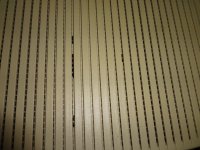 So if anyone would like to donate a rear case for this monitor, I'll try to keep it running for a little while longer. Otherwise, she's scrap. | |
| Posted by: Carboy7 on 2016-10-31 07:06:26 Ouch... :-/ | |
| Posted by: Concorde1993 on 2016-11-26 13:22:06 Picked this up on Thursday - a 2004 LaCie 19" Electron Blue IV. 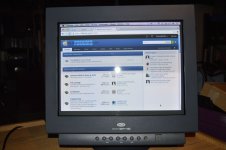 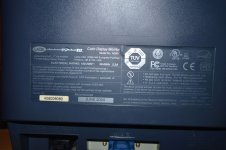 It came with the Blue Eye Calibration tool, original manuals, and cover. Although the monitor works perfectly and saw very light use over its lifetime, the seller was a heavy smoker. I've managed to remove most of the smell, but there are a couple of crevices on the case that still have some nicotine residue. As for the Multiple Scan, there's a local e-waste recycler that's currently offering 10 cents a pound for CRTs and LCDs. Unless, of course, somebody wants to rescue this guy for $10. | |
| Posted by: CC_333 on 2016-11-26 16:00:01 Hmm, I'd come and get it if I weren't more than 2,600 miles away :-/ c | |
Posted by: CelGen on 2016-11-27 12:12:23I believe I've partially figured out the source of that crackling noise. Just look at all that brittle plastic on the top rear housing!That isn't your problem. Again, you likely need to clean inside the monitor. The plastic is only brittle because it's seen hundreds of thermal sycles which is always hard on monitor plastics. I have a number of monitors that are the same way. The heat is just hard on some plastics. But if you want to write the monitor off for that then sure, be the defeatist type. | |
Posted by: Concorde1993 on 2016-11-27 13:44:20That isn't your problem. Again, you likely need to clean inside the monitor.Well I didn't say the breaking plastics was the official problem, but I don't like the fact that these shards are falling into high voltage areas. I wouldn't doubt that there is something else causing the noise, but for a monitor that I received for free over a decade ago, I don't really want to invest anymore time into it. Besides, the colour reproduction on the LaCie is far better than the old Trinitron, and I like having another inch of viewing space. Oh, and one less adaptor to bridge to the Mac Pro. Be the defeatist type.I've asked the community for another case nearly a month ago, no response as of yet. CC is too far away to pick it up. So don't chastise me for killing off a 20-year-old CRT that nobody wanted in 2006. | |
| Posted by: Carboy7 on 2016-11-27 18:17:45 I wouldn't doubt that the damaged plastic is causing it. Maybe, the holes in the top probably let more dust in, settling on the high-voltage areas and making it pop. But, as Techknight said, that probably isn't it. Also, possibly the flyback is bad, as Floofies said. Sorry for the fact that you have to let that 50lb monstrosity go. | |
| Posted by: CelGen on 2016-11-28 17:40:59 Just open the damn thing and clean it. The sheer amount of "it sounds bad so I'll just replace it instead of investigating for myself" hurts. | |
| Posted by: Concorde1993 on 2016-11-28 21:49:33 Behold, the damn thing in all its EOL glory! 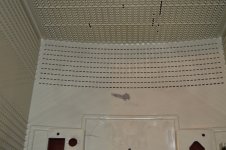 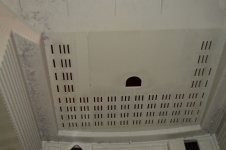 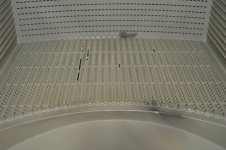 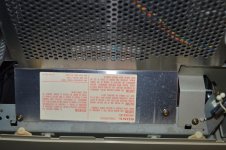 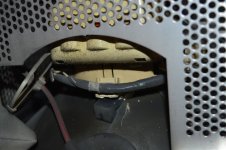 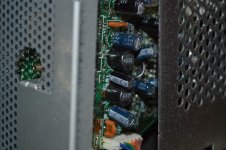  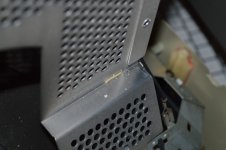 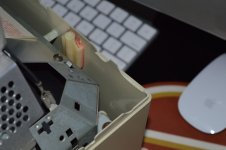 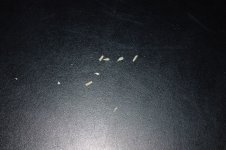 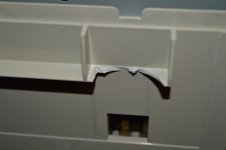 | |
| Posted by: wthww on 2016-11-29 00:35:12 Whoa, please take a chill pill guys. Thanks, //wthww | |
| 1 |