68kMLA Classic Interface
This is a version of the 68kMLA forums for viewing on your favorite old mac. Visitors on modern platforms may prefer the main site.
| Click here to select a new forum. | |
| Dream setup - RaSCSI PowerBook formfactor for internal WiFi! | |
| Posted by: avadondragon on 2022-02-05 11:51:18 I recently acquired both a BlueSCSI PowerBook version and a Pi ZERO version of the RaSCSI. I noticed the RaSCSI was even smaller than my PowerBook BlueSCSI board and I got to thinking - how cool would it be if I could put my RaSCSI INSIDE my PowerBook for internal WiFi? Just a thought for possible future development. | |
Posted by: Nixontheknight on 2022-02-05 11:52:25I recently acquired both a BlueSCSI PowerBook version and a Pi ZERO version of the RaSCSI. I noticed the RaSCSI was even smaller than my PowerBook BlueSCSI board and I got to thinking - how cool would it be if I could put my RaSCSI INSIDE my PowerBook for internal WiFi?I think it would work if you use a Pi Zero 1/2 W | |
| Posted by: landoGriffin on 2022-02-05 20:05:19 No future development needed. Its ready to go 🙂 The Version 2.4a board can support this use case. I have a STL file for the bracket available here: RASCSI/hw/pb_bracket at develop · akuker/RASCSIFork of the original RaSCSI project by GIMONS. RaSCSI allows a Raspberry Pi to function as emulated SCSI devices (hard disk, CD-ROM, and others) for vintage SCSI-based computers and devices. - RASC...
 github.com

PiSCSI - Full Size - Assembled by LandoGriffin on TindiePiSCSI 2.7 Fully Assembled and Tested (Previously RaSCSI Reloaded)
 www.tindie.com
You could configure the RaSCSI to emulate a DaynaPort SCSI/Link and a SCSI drive to boot from. I've been using a RaSCSI inside my PowerBook 520c for a while and seems to work fine. (Just takes a while to boot up, since the Raspberry Pi needs to boot before MacOS can boot.) Also - if you do this, make sure you disable the hard drive spin-down functionality. Whenever the Powerbook "spins down" the drive, it cuts power to the drive. 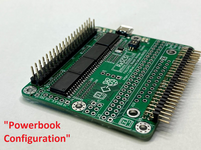 | |
| Posted by: avadondragon on 2022-02-06 12:57:33 Oh cool! I didn't realize the full size RaSCSI had the header for the PowerBook. | |
Posted by: Nixontheknight on 2022-02-06 16:37:23Oh cool! I didn't realize the full size RaSCSI had the header for the PowerBook.It is hidden under the DB25 external SCSI header so it probably isn't obvious at first glace | |
| 1 |