68kMLA Classic Interface
This is a version of the 68kMLA forums for viewing on your favorite old mac. Visitors on modern platforms may prefer the main site.
| Click here to select a new forum. | |
| Laserwriter II Paper Jam Light | |
| Posted by: Johnnya101 on 2022-01-27 05:10:34 Recently got a Laserwriter IIntx. It turns on, the green light all the way to the left flashes, then stays solid, and then CLICK, paper jam light comes on. Doesn't an AC block failure display two red lights? I do not have the top paper tray cover installed because it is being retrobrited, if that would cause this issue. | |
| Posted by: ScutBoy on 2022-01-27 06:44:36 A/C block failure is usually two flashing red lights. | |
Posted by: Johnnya101 on 2022-01-27 12:13:39A/C block failure is usually two flashing red lights.Must have jinxed it. Started it today, got the paperjam light, turned it off, turned it on, flashing two lights. Does it just need new caps or should I just get one of the HP style ones off ebay for $50? | |
Posted by: ScutBoy on 2022-01-27 12:48:47Must have jinxed it. Started it today, got the paperjam light, turned it off, turned it on, flashing two lights. Does it just need new caps or should I just get one of the HP style ones off ebay for $50? I think you can recap it if you want to pull it apart, but I was lazy and just bought replacements for the LWIIs I refurbished. Here's a couple of part numbers you can search for: RG9-0205 HP SX-ACPM-B Once you get past that, then you start finding out which rollers need to be replaced 🙂 | |
Posted by: Johnnya101 on 2022-01-27 13:42:54I think you can recap it if you want to pull it apart, but I was lazy and just bought replacements for the LWIIs I refurbished.Do you happen to remember if you got the whole unit or just a board? When I look on ebay I have two options: 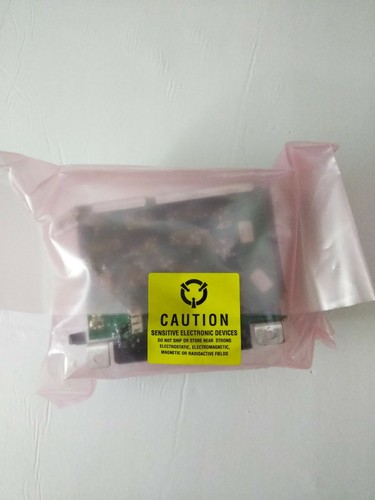
HP RG9-0205-R AC Power Module Assembly | eBayFind many great new & used options and get the best deals for HP RG9-0205-R AC Power Module Assembly at the best online prices at eBay! Free shipping for many products!
www.ebay.com
Or 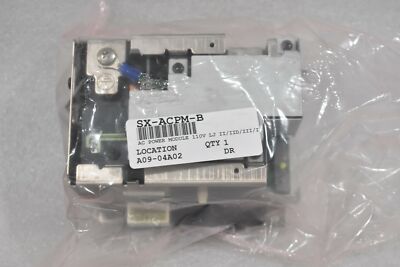
HEWLETT PACKARD SX-ACPM-B AC POWER SUPPLY MODULE FOR LASERJET II/IID/III | eBayFind many great new & used options and get the best deals for HEWLETT PACKARD SX-ACPM-B AC POWER SUPPLY MODULE FOR LASERJET II/IID/III at the best online prices at eBay! Free shipping for many products!
www.ebay.com
| |
| Posted by: ScutBoy on 2022-01-27 15:38:28 It was the whole big brick like the second one you show. the first one might be the whole thing as well (bad camera angle) but the other is the whole assembly | |
| Posted by: volvo242gt on 2022-01-28 01:22:24 Looks like both are. You can kinda see the metal frame that holds the board in place in the first auction's pic. | |
| Posted by: Johnnya101 on 2022-01-29 07:14:40 Just documenting this for anyone in the future. Took it apart to see if there was anything obvious with the power supply. You can see the one green cap that failed and has leaked all over, corroding everything. It is a 22uf 25v rated for 105 degrees Celsius. There is also a thinner but taller 10uf 50v one that's black, it too is leaking and corroding it's surroundings. I would think if these were to be replaced, that should fix the issue. I did end up buying a new HP unit. I'll probably end up getting this board recapped as a spare. 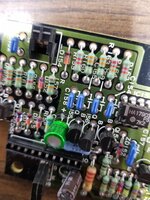 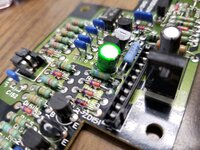 | |
Posted by: Johnnya101 on 2022-02-10 08:22:46I think you can recap it if you want to pull it apart, but I was lazy and just bought replacements for the LWIIs I refurbished.Ok, the new AC block fixed that one issue. Now back to the original: paper jam. If I remove the tray, reinsert, open and close the lid, the error goes away. Once I try printing, it either A., successfully grips the paper and prints, B., grips and moves it an inch forward then light comes on, or C., paper doesn't move. I cleaned the rollers while I had it apart. They seemed fine. There is an imprint left after it tries gripping paper in the middle of the top of a page, so I guess needs new pickup rollers? Once the paper is past that it pulls the paper through alright. | |
| Posted by: Johnnya101 on 2022-02-10 09:16:24 Also, when it DOES feel like printing, this is what page it prints, no matter what I choose to print. | |
| Posted by: Johnnya101 on 2022-02-16 14:16:14 Just received my replacement rubber roller tune up kit today (laserprinterkits.com had a kit). WOW, I thought the rollers were in decent shape... Nope, new ones look and feel totally different. The paper feed one that has little teeth was worn flat, new one looks great. Waiting on the new toner blade before I try it out, but I suspect old rollers caused this issue. | |
Posted by: TimHD on 2022-02-16 15:45:36Just received my replacement rubber roller tune up kit today (laserprinterkits.com had a kit). WOW, I thought the rollers were in decent shape... Nope, new ones look and feel totally different. The paper feed one that has little teeth was worn flat, new one looks great. Waiting on the new toner blade before I try it out, but I suspect old rollers caused this issue.Which kit did you get at that site? - seems that the options include more items in each ,eg Deluxe, Ultimate etc (and am wondering if I just get the "ultimate" pack to be best placed in future!) | |
| Posted by: Johnnya101 on 2022-02-16 15:50:23 Actually, I got it off eBay, figured linking the site would be better because nobody likes eBay's fees. I got the deluxe kit, I don't see a supreme kit? The eBay listing seems to be cheaper if you want the CD. Otherwise, get it from their site. 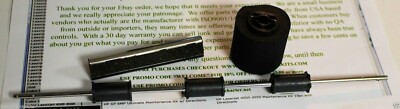
HP LASERJET 2 3 III III D MAINTENANCE REPAIR KIT + INSTALLATION DIRECTIONS USA | eBayHP LASERJET 600 M601 M602 M603 PREVENTIVE MAINTENANCE ROLLER REPAIR JAM KIT USA. The included video is for the Laserjet 3. If you have a Laserjet 2, 2D or 3D the parts will work but the cover removal is not on the cd, but the service manual shows you how to remove the covers.
www.ebay.com
Can also get individual parts. Definitely stock up on parts, who knows how long we will be able to get them for. | |
| 1 |