68kMLA Classic Interface
This is a version of the 68kMLA forums for viewing on your favorite old mac. Visitors on modern platforms may prefer the main site.
| Click here to select a new forum. | |
| Help re FloppyEMU HD20 emulation | |
Posted by: Andeddu39 on 2022-01-25 14:23:11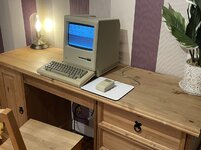 Hello all. I have the above Macintosh Plus which I use to BBS on occasion. I destroyed my ONLY System 6 floppy disk by accident when using it on another system with a damaged drive. I have since installed System 6.0.8 UK onto my FloppyEMU as my keyboard does not play ball with the standard US or international layouts which are installed on the SD card. Is there a way to customise HD20 on the FloppyEMU to load THAT particular operating system rather than the US one which is currently pre-installed? I have to virtual disk swap at the moment between System 6 UK and the terminal I use called Red Ryder which is annoying. Any help would be appreciated! | |
| Posted by: mg.man on 2022-01-26 02:20:00 I have a System 6.0.8 image I use on my FloppyEMU, I'll need to check if it's "British", but I think so... shoot me a PM. | |
Posted by: Andeddu39 on 2022-01-26 10:41:45I have a System 6.0.8 image I use on my FloppyEMU, I'll need to check if it's "British", but I think so... shoot me a PM. Thanks for the response. I do have a UK System 6.0.8 which I am presently using. Do you use the HD20 function? If so, do you know how to make the FloppyEMU mount a specific disk image rather than the one that’s included in the bundle? | |
Posted by: mg.man on 2022-01-26 16:47:36Do you use the HD20 function?Yes, all the time. 😀 do you know how to make the FloppyEMU mount a specific disk image rather than the one that’s included in the bundle?Just like floppy images, you can have multiple "HD20" images on the microSD - IIRC, they all need to be in the root directory tho. I don't have mine set up atm, and the documentation on the BMOW site is not that clear, but if you scroll down in the comments section of the FloppyEMU page [https://www.bigmessowires.com/floppy-emu/] Steve mentions the following: 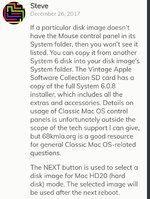 I'll try to set mine up in the next couple days, but basically, it is possible to choose which HD image you want loaded when the FloppyEMU is powered-on. You can't change it dynamically, you need to power off then restart when you change the image. It's pretty easy once you get the hang of it. | |
| Posted by: cheesestraws on 2022-01-27 03:11:21 That was it! I'm away from my Floppy Emu at the moment and I couldn't remember what button it was you had to press to select an image. That was unreasonably annoying me. Thanks :-D. | |
Posted by: cheesestraws on 2022-01-27 03:12:47Hello all. I have the above Macintosh Plus which I use to BBS on occasion Excuse the double post, hit post before I meant to. Just wanted to say that's a really nice-looking setup you've got there. Very classy 🙂 | |
Posted by: Andeddu39 on 2022-01-27 04:13:18Just like floppy images, you can have multiple "HD20" images on the microSD - IIRC, they all need to be in the root directory tho. I don't have mine set up atm, and the documentation on the BMOW site is not that clear, but if you scroll down in the comments section of the FloppyEMU page [https://www.bigmessowires.com/floppy-emu/] Steve mentions the following: I'll try to set mine up in the next couple days, but basically, it is possible to choose which HD image you want loaded when the FloppyEMU is powered-on. You can't change it dynamically, you need to power off then restart when you change the image. It's pretty easy once you get the hang of it. Thanks for locating those comments, they’re very helpful! There appears to be a treasure trove of troubleshooting information on the page you’ve provided. The official FloppyEMU guide is minimal and fails to explain a lot of what the device is capable of doing. Using a FloppyEMU emulated HD20 with my Macintosh Plus The above link is a helpful guide on how to create a custom HD20 image. Appreciate the assistance! | |
Posted by: Andeddu39 on 2022-01-27 04:19:32Excuse the double post, hit post before I meant to. Just wanted to say that's a really nice-looking setup you've got there. Very classy 🙂 Thanks! That computer is my first vintage machine which I picked up fully refurbished and recapped back in mid-2020. I placed it into the official Macintosh carry case for storage for around 6 months last year before missing the BBS world. I have an SE also which I used to BBS on for a few hours per week however the ADB keyboard just doesn’t feel as satisfying as the original M0001 keyboard. | |
Posted by: joshc on 2022-01-27 04:54:47however the ADB keyboard just doesn’t feel as satisfying as the original M0001 keyboard.Interesting, I'm the other way around. Much prefer typing on the ADB keyboards to the originals. | |
Posted by: Andeddu39 on 2022-01-27 05:06:23Interesting, I'm the other way around. Much prefer typing on the ADB keyboards to the originals.It’s still a good keyboard but the softness makes it feel a lot less tactile to me than the original. Each to their own, I guess! | |
| 1 |