68kMLA Classic Interface
This is a version of the 68kMLA forums for viewing on your favorite old mac. Visitors on modern platforms may prefer the main site.
| Click here to select a new forum. | |
| MacIPpi - Surf the Internet on your old Macintosh with TCP/IP over LocalTalk | |
| Posted by: mactjaap on 2016-04-11 12:28:11 A new product of the guys,... uhhh guy... from www.MacIP.net! 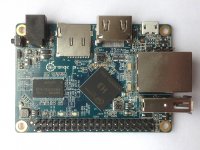 The MacIPpi. This is a dead cheap Orange Pi One ($9.99 and $13.64 with shipping) will act as a macipgw (MacIP gateway) and a Netatalk afpd file server. It will allow you to surf the Internet with your old Macintosh without any problems. Just connect your old Macintosh with a normal LocalTalk bridge, like an Asante AsanteTalk or a Dayna Etherprint to you LAN and startup you MacIPpi. You can also use an old networking Mac with the LocalTalk Bridge control panel to do the work. You set your Mac with MacTCP on f.i. 172.16.2.2 (anything between 172.16.2.2 and 254, subnet mask 255.255.255.0), as gateway 172.16.2.1 and DNS 8.8.8.8. Or do the same with a TCP/IP control panle, but then choose Connect via: AppleTalk (MacIP) and configure: Using MacIP manually. Same IP information. Start a TCP/IP kind of program like, Fetch, Telnet or a browser and of you go to the Internet! So, what do you you have to do to get this up and running: - Order a Orange Pi One - A good Power adapter (5V 2A), or buy it together with your Orange Pi One. - Take care for a 8GB SD card and maybe a case or buy everything together as a set. Shipping will take 8 to 14 days. Download my image from www.macip.net. Use 7zip to unzip. http://cdn.macip.net/Armbian_5.07_Orangepih3_Debian_jessie_4.6.0-rc1.7z Use dd on Linux systems (and MacOSX) to put the image on the SD disk. This will be a command like this: dd if=Armbian_5.07_Orangepih3_Debian_jessie_4.6.0-rc1.raw|pv|dd of=/dev/sdc bs=16M On a Windows system you can use a tool like Win32DiskImager Connect you Orange Pi One to the network with a cable. It will get an IP address from your home router if you power it on. After a few minutes it will be ready. Take this time because the appletalk daemon needs some time to settle. Even no need to connect a screen. If you want you can login from your Macintosh with Telnet or SSH. You can use IP address 172.16.2.1 to connect. If you want to connect from a Mac OSX, Windows or Linux machine you have to find out the IP address or use a serial console. If you want to login username is: orangepi and password: orangepi You can become root by entering sudo -iand password orangepi The system is running Debian strech/sid and kernel 4.6.0 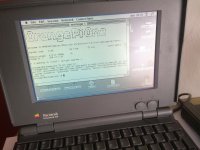 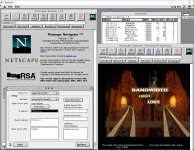 | |
| Posted by: Elfen on 2016-04-11 18:08:12 One of the few things about the Orange Pi that is known is that it is 100% software compatible to the Raspberry Pi; thus you can take a SD made for the Raspberry Pi and put it into the Orange Pi and it will run without modification like one would for the Banana Pi or Beagle Bone Black/Green or others Pis. Thus I can guess that the reverse should be true - running this MacIPpi software should work on a Raspberry Pi without modification. Of course, I'm saying this without testing it. Thus I am going to have to research this. But one should be able to do this through Raspbian like one can with Ubuntu as both Raspbian and Ubuntu are Debian based Linuxes. https://68kmla.org/forums/index.php?/topic/21958-netatalk-on-ubuntu-more-distros-soon/ | |
| Posted by: mactjaap on 2016-04-11 23:37:45 @Elfen If you have a Raspberry Pi or other similair device...please test! It would be very nice if this works right out of the box. If not I could make a "receipt" how I did it. It is no rocket science, but involves kernel and software compilation. I can imagine that not every Mac lover is able to do that. That why I always try to get a simple solution that people with less knowledge of such devices and UNIX/Linux also can use. | |
| Posted by: Bunsen on 2016-04-12 03:39:36 Great stuff, mactjaap 🙂 | |
| Posted by: NJRoadfan on 2016-04-12 15:01:15 macipgw was surprisingly tricky to get working on Linux. First off the kernel needed to have an option turned off, than one had to NAT the MacIP segment of the network to avoid router re-configuration. I still wish it was possible to configure the whole thing to use the same IP subnet like the Fastpath and Gatorbox can both do, but that likely requires some more hacking. | |
| Posted by: mactjaap on 2016-04-12 22:20:24 Yes. It is complicated. That's why I like to offer a simple solution like the MacIPpi or a virtual machine. I will make an update of the MacIPgw virtual machine too. | |
| Posted by: mactjaap on 2016-04-12 22:24:14 Many thanks to Jason King who made the Linux version of MacIPgw available! https://github.com/zero2sixd/macipgw/blob/master/README.md | |
| Posted by: PowerPup on 2016-06-07 15:14:39 Awesome work mactjaap. This is the perfect excuse to buy a 2nd OrangePi. 😎 | |
| Posted by: Bunsen on 2016-06-08 21:51:13 I'm thinking ... I have heard vague rumours (which I will hunt down if there is interest) of people bitbanging a serial port out of the Pi's GPIO pins (presumably through an RS232 level translator). mactjaap, if I can confirm that and find source, would you be willing to roll it into your image, along with a PPP daemon? | |
| Posted by: PowerPup on 2016-06-08 22:00:54 Yup, both the Raspberry Pi and the Orange Pi can use the GPIO pins for a serial port. Here's info on setting it up on the Orange Pi: http://www.orangepi.org/orangepibbsen/forum.php?mod=viewthread&tid=921&highlight=gpio | |
| Posted by: mactjaap on 2016-06-08 22:06:25 Absolutely willing to work on this! The work which has been done on the LocalTalk adapter could be vital. PPP daemon is no problem. | |
Posted by: Bunsen on 2016-06-09 17:52:59The work which has been done on the LocalTalk adapter could be vital.How come? The Localtalk port will happily connect to an RS-232 port. | |
| Posted by: mactjaap on 2016-06-09 21:33:33 For a ppp connection. SURE! But I'm still dreaming of a one in all device. Replacing the LocalTalk adapters as we have them now for a 21 century one with LocalTalk and IP capacities! | |
Posted by: flecom on 2016-11-15 07:57:51For a ppp connection. SURE! But I'm still dreaming of a one in all device. Replacing the LocalTalk adapters as we have them now for a 21 century one with LocalTalk and IP capacities!anything ever come of this? would love to just use an Opi connected directly to the serial port as a bridge without having to have a separate localtalk > ethernet adapter too | |
| Posted by: Bunsen on 2016-12-04 10:00:17 Mac <--> Serial PPP <--> *Pi running Linux + Netatalk <--> Ethernet or Wifi <--> LAN. | |
Posted by: Bunsen on 2016-12-04 10:02:26Beagle Bone Black/Green or others Pis.The Beagle boards are completely different to Pis. | |
| Posted by: mactjaap on 2016-12-04 10:17:36 Interesting. But hoe to get this working with a Macintosh Plus? That what is so cool about a hardware LocalTalk Bridge and a Opi with my MacIPgw on it. | |
| Posted by: Bunsen on 2016-12-04 11:28:21 .... by using the serial port. | |
| Posted by: mactjaap on 2016-12-04 11:49:34 Ok. Would be nice to read a "how to". Connect a Mac to a Pi by PPP and then surf the Internet. An other question is: will there be anyone capable building a LocalTalk adapter to replace the old generation. | |
| 1 > |