68kMLA Classic Interface
This is a version of the 68kMLA forums for viewing on your favorite old mac. Visitors on modern platforms may prefer the main site.
| Click here to select a new forum. | |
| Screen Oddities: 1400c | |
| Posted by: LaPorta on 2021-12-18 08:57:51 Hi everyone, I am currently at the tail end of a recap of @Rick Dangerous PB1400c. Recap has gone well, but there is a persistent issue: before he sent me the machine, he told me that the screen had video glitches that appeared after he did a PRAM reset. His original post is located here: PowerBook 1400c CL FindGot my 1400c printing! Had to do the same thing i did with the 3400; adjust the appletalk port in control center, extensions, etc. Nice to have it working.
 68kmla.org
The machine continues to have these video glitches. I realized it was not actually a PRAM error: if you fiddle with the contrast settings, you can make the red area go away, but resetting the PRAM returns the contrast value to baseline, revealing the red. This is likely what happened to him. I have ran through a rule-out procedure. I recapped the logic board, as well as the inverter and LDC boards. This did nothing to change the issue. Here are the other stpes I took: 1: Connected the entire screen assmebly to another 1400 of mine. Problem still exists (it is not the logic board/video circuitry). 2: Used a known-good inverter board with the LCD assembly. Problem still exists. 3: Used a known-good LCD video board to logic board cable bundle. Problem still exists. 4: Used a known-good LCD board (I don't know the proper name for the large board on the rear of the LCD that plugs into the LCD ribbons) with the LCD. Problem still exists. This leads me to suspect that the issue is within the LCD itself. However..... The weird thing is that certain graphics display over the distortion properly. When the machine is fully started, fiddling witht he contrast makes different lines appear in the picture, etc. For a great example of a graphic over the distortion, check out this photo of 8.6 starting up: 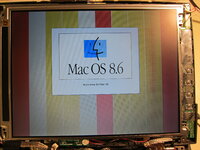 Here is what it looks like when on and working. The only distortion visible are a few vertical lines in the picture: 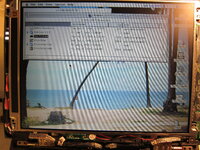 Here are photos of the LCD cabling and the board attached to the LCD itself. I can't see anything visually wrong: perhaps a component failed on this board? It is directly connected to the LCD, so I have no way or femoving it to test. 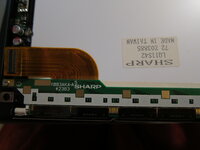 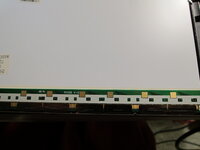 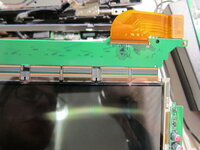  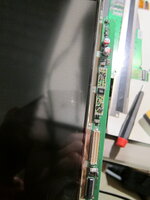 At this point, I am just recommending he find another panel, as this is getting to the extent of my knowledge. Any suggestions? | |
| Posted by: Johnnya101 on 2021-12-18 09:31:17 Have you tried connecting it to an external display to see if the problem follows? I dont know if it is easy to do that on those though... | |
| Posted by: LaPorta on 2021-12-18 09:36:00 Connecting what specifically? The machine itself? I can, but the graphics issue happens even when I connect this screen internally to a working 1400 in place of its own internal screen. | |
| Posted by: Johnnya101 on 2021-12-18 10:04:55 Oh, okay, sorry, kind of skimmed that part in the first post. Worse case it is the LCD, I think they make new ones: https://www.os-store.com/11-3-sharp-lq11s42-lcd-led-dispaly-screen-panel.html | |
| Posted by: LaPorta on 2021-12-18 10:49:21 Wow, that is crazy!! I assume those come with at bare minimum the top and bottom circuit boards attached, since there appears to be no other way to work that? | |
| Posted by: Johnnya101 on 2021-12-18 10:56:38 I think so, the white back cover, PCB, and LCD with metal frame. Not sure about the cable though. | |
| Posted by: tsun on 2022-12-08 09:46:07 Hi, I'm having this exact same issue on a 1400c/133. Has anyone else ever discovered the cause? Seems to be limited to the C models. | |
| 1 |