68kMLA Classic Interface
This is a version of the 68kMLA forums for viewing on your favorite old mac. Visitors on modern platforms may prefer the main site.
| Click here to select a new forum. | |
| Can I use this Hard Drive in my Macintosh Classic II? | |
| Posted by: EmNem543 on 2021-12-07 08:43:33 I'd like to use this hard drive in my Macintosh Classic II. Is there anything I need to look out for? what adapter do I need for the SCSI connector? Do I need to use patched software? is the Capacity Too large? (9GB) Any help is appreciated.  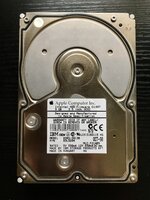 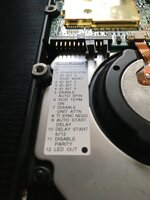 | |
| Posted by: Nixontheknight on 2021-12-07 08:51:25 The capacity is a problem because HFS can only address up to 2GB per drive until OS 8 (or probably 7.5.3 (7.5.2 for PPC)) | |
| Posted by: Crutch on 2021-12-07 08:57:40 Yeah but you can solve that with partitioning right? | |
Posted by: Nixontheknight on 2021-12-07 09:08:08Yeah but you can solve that with partitioning right?Yes you can | |
| Posted by: Cory5412 on 2021-12-07 09:08:18 Here's the volume size limits: https://68kmla.org/bb/index.php?threads/volume-size-limits-under-hfs-and-hfs.3872/ On a Classic II: 7.1: 2GB/partition 7.5: 4GB/partition 7.6: 4GB/partition (can run up to 2TB partitions on '040s and PPC Macs) You should be able to partition the disk three ways. | |
| Posted by: EmNem543 on 2021-12-07 09:13:39 Aside from Partitioning, is there anything else I need to look out for? | |
| Posted by: beachycove on 2021-12-07 09:38:56 In no particular order, beyond what has been said: SCSI number doesn't really matter in a CII (jumperless should be 0), but set it by jumper if you wish to 1 or 2; set it to auto-spin and with termination on; be prepared for needing Silverlining or the like to partition, though standard System 7 tools may work on the drive; the power requirements of a fast drive like this may press the electrics of an ageing CII hard, so a recap of the analog/ power board is advisable; and obviously you will need a 68-pin to 50-pin converter. Say a prayer, shove it in, and give it a whirl. I wouldn't install anything beyond 7.1 on a CII, by the way. | |
| Posted by: Cory5412 on 2021-12-07 10:43:43 So, here's what to check for:
A SCSI replacer (any, disk performance literally doesn't matter for almost any use case you can put to a Classic II) may be a better option -- not because of the partition or overall disk size, but because of the other physical concerns putting a much later and higher end disk in can present. w/re 7.1 - IME 7.6.1 runs "fine" on a CII. It's poky, but a CII is gonna be a little bit poky at literally everything. It was a cheap computer sold for under $1500 to people who wanted to replace typewriters with something that could do slightly more. (Mine's running 7.6.1 because the eventual vtools ASIP6 -> OSX10.4 migration will mean I need to use IP locally, instead of AppleTalk, for file access.) I should put 7.1 on my CII. I'm still on ASIP6 now, although as soon as I start moving I'll need to add OpenTransport and updated AppleShare back in and then it'll probably feel the same and use the same amount of memory so at that point I may as well just run the newer software. Use whatever you like and/or whatever OS gets you the functionality you need. | |
| 1 |